Showing posts with label BMW ICOM A2. Show all posts

Wednesday, November 10, 2021

How to Fix BMW ICOM NEXT not work

Do update Emergency Firmware on BMW ICOM Next for fix troubles when it not find IP address or all LEDs show Red Color
ICOM NEXT Error:

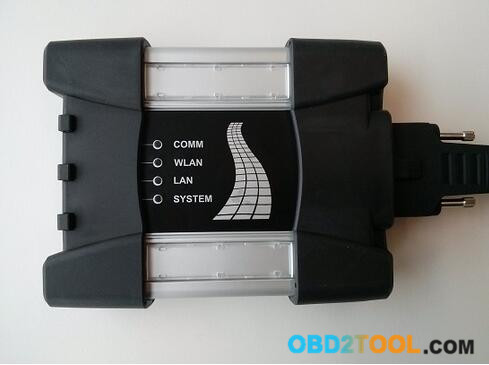
I have one BMW ICOM Next bought from China have been use 2 years great ,but sundenly it stop work .It will not connection any Vehicles and Programmer says Etherenet can’t find IP address . the ICOM NEXT mux all LEDS going Red and the System LED blinking Red-Yellow .
BMW ICOM NEXT not work Soultion :

1.Go to check BMW ICOM programmer Directory :C\ProgramData\BMW\ISP\data\TRIC\ICOMNEXT\ICOM-Image-XX-YY-ZZ( Show hidden files if you not find it ),if there have more than one ICOM-Image-XX-YY-ZZ file ,then choose the most recent one for last updates .

2.Copy the file ICOM_Next_app_yyyyyy.tar.gz and ICOM_Next_rootfs_xxxxxx.tar.gz to Your USB Disk ROOT Directory(Important) .

3.Disconnect ICOM NEXT Mux from Power adapter or Vehicle,And pull the USB Disk to ICOM’S USB port

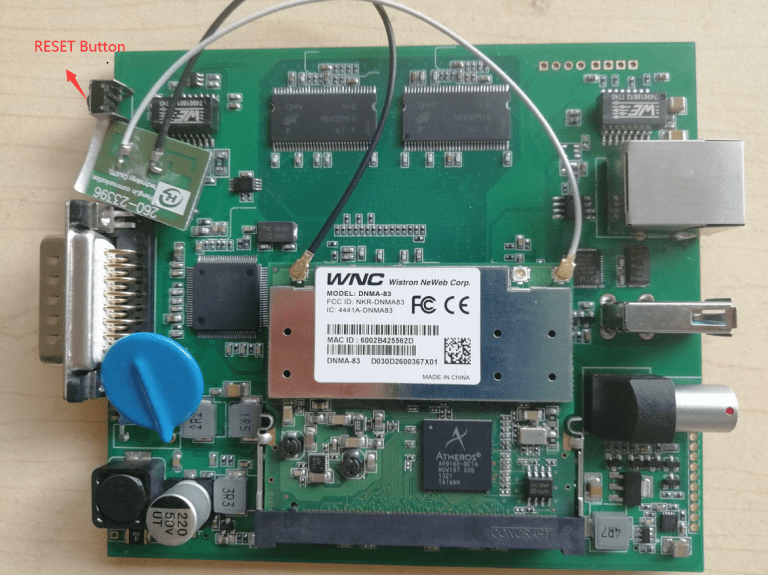
4.Press the Reset Button and keep Hold,another Hand held the OBDII Cable with vehicles diagnotic socket(Start Engineer for supply power ),the whole LEDS will glow red.

How-to-Fix-BMW-ICOM-NEXT-not-work

5.Now release the reset button ,Press again 3 times within 4 seconds. After there will be going do firmware update

6.Wait several minutes until all LEDS stop glowing(Do not disconnect ICOM mux as long as any LED glows red)

7.The emergency firmware update is finised !now you can pull out USB Disk and try Connect LAN Cable to vehicle for Test .all setting will need be reconfigured since it have been lost .

If you want to know more about bmw diagnositc tools, please click bmw trouble repair.

Sunday, June 13, 2021

Free Download BMW ICOM Next Firmware 1.44

Available with BMW ICOM firmware update with latest ISTA, I’m posting here the images for both ICOM A2 and original Next firmware.
Upload via x.x.x.x:60080 url.

https://mega.nz/folder/qy5EmZwK#-cqyZ6fFpS-EyUvDzOVP_Q

including ICOM A2 and ICOM Next

ICOM applicationImage 01.44.00

ICOM BootImage 01.28.00

icom-firmware-update-1

ICOM Next app 010108

ICOM Next rootfs 010106

icom-firmware-update-2

How to update BMW ICOM firmware V1.44?

1.  Download BMW ICOM V1.44 firmware update file
*   Please connect BMW ICOM A2 with computer using internet cable, power ICOM by 12V power adapter or from 1x DLC
*   Unzip ICOM FW v1.44 upgrade files.
*   Open IE Internet Explorer, enter address http://169.254.33.45:60080/ if you update Perfect version BMW ICOM, log in with

username: root

password: NZY1150263
PS: to upgrade common version ICOM A2 A1, browse http://169.254.92.38:60080/  and the next steps are the same.

2.   Click “Update Firmware”, you will see ICOM firmware version information.

3.   Click “Browse” to select file “ICOM-BootImage-01-28-00.bin”, set image type as “SYSTEM”, click “Send the file”.
4.   When it pops up “Write the image file to the flash?”, click “Yes”, then ICOM indicator light will turn red.
5.   When it pops up “The SYSTEM IMAGE update was successful”, click “Update Firmware”.
6.   Choose “ICOM-ApplicationImage-01-44-00.bin”, set image type as “APPLICATION”, click “Send the file”, it will spend several minutes since the file is a little bit large.
7.   When it pops up “Write the image file to the flash?” click “Yes”, then the ICOM indicator light will turn red for the second times.
8.   When it finish upgrading, click “reboot”.
9.   Click “Home” – “Update Firmware”, you will find ICOM A2 firmware update to the newest version:
10.   Current SYSTEM IMAGE version: 01.28.00
11.   Current APPLICATION IMAGE version: 01.44.00

Additional Note:
Please be sure your computer is to obtain IP address automatically.

Have fun!

Sunday, March 14, 2021

BMW ICOM A2 NEXT WiFi Connection method

     1. Set the router to

      User name: ISAP

     Password: 12345678

  1. Connect your computer to the router
  2. The device is powered on and can be used after long WLAN light


If you want to set your device’s WIFI account password, please follow the following steps:

  1. Connect the BMW ICOM to the car and connect the computer through the network cable
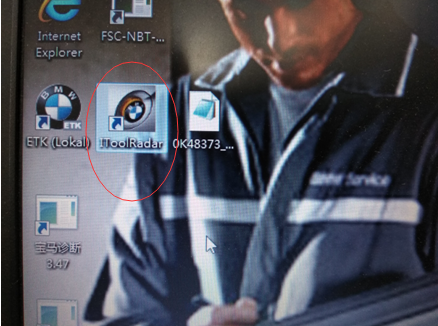
  2. running “IToolRadar”

1

  1. Record the current IP address

2

  1. Open Internet explorer and enter the IP address just recorded (ip+ :58000)

3

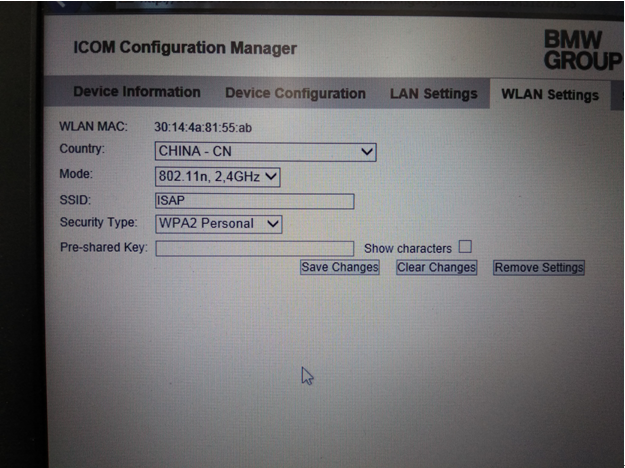
  1. Go to WLAN Settings

Enter account in SSID and password in pre-shared Key

BMW ICOM

  1. Click Save Changes
  2. Then restart the device and it can be used normally.

Tuesday, March 2, 2021

How to remove CAS MC9S12 module for BMW 2 Series 2004-2012 with BMW ICOM A2 NEXT A3+B+C?

Newest BMW ICOM NEXT A2 A3+B+C V2020 08 Software Released


BMW ICOM A2 Software Version : V2020.08

ISTA – D: 4.24.13,with SDP Programming Database 4.24.12

ISTA – P: 3.67.1.000 with Engineer Programming,supports the programming of BMW motorcycles and electric vehicles can program F/G/I/K chassis for car (through the ICOM, not other cable )


Vin: V2020.6.08


BMW ETK: 2019.12

BMW KSD: 2019.12  Multilanguage

BMW FSC Navigation Code Generator

BMWAiCoder for BMW Coding


BMW ICOM NEXT V2020.08, With free Software:

  1. Get engineer version, INPA 5.00,winkfp 5.2.3,NCS 3.5.1, e-sys 3.30,data V67.0
  2. get Chinese software DR.GINI B020
  3. get count code navigation tool software FSC operator code
  4. get one-clik hidden brush tool BMWAi V4.6
  5. Add DIS Software for Old cars, DISV57 and DISV44,diagnosis and programming for BMW virtual machines
  6. Support Vehicles: For BMW Cars,For BMW Motorcycle,For Rolls-Royce, For Mini Cooper

Procedures:

Remove the CAS

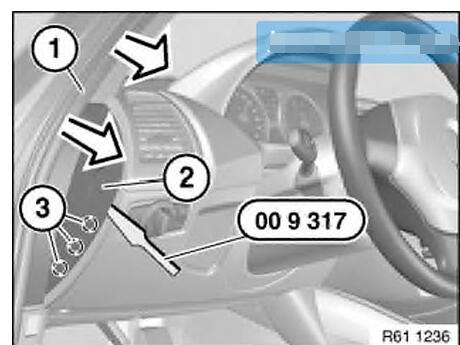
Disconnect protective edging (1) in the region of the left pad (2), the dashboard in the direction indicated by the arrow.

Unclip the left cover (2) instrument panel at the points(3) and remove it.

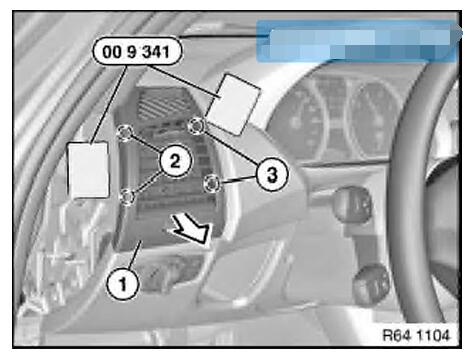
Release the left ventilation gritle(1) of the clips at (2).

Unlock the clips(3)

Remove the left ventilation grille (1) in the direction indicated by the arrow.

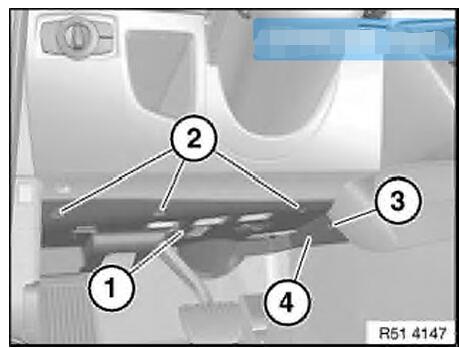
Release screws(1) and(2).

Remove the expanding rivet(3).

Pull the trim(4) ago.

Disconnect the appropriate connectors and remove the trim(4).

https://www.obd2tool.com/blog/2020/08/08/how-to-remove-cas-mc9s12-module-for-bmw-2-series-2004-2012-with-bmw-icom-a2-next-a3bc/

Sunday, February 28, 2021

How to solve EMF Control Module Trouble on BMW E70 X5 2011 with BMW ICOM A2 A3 NEXT A+B+C?


BMW ICOM Software Version : V2020.05

ISTA – D: 4.22.32,with SDP Programming Database 4.22.32

ISTA – P: 3.67.1.006 with Engineer Programming,supports the programming of BMW motorcycles and electric vehicles

can program F/G/I/K chassis for car (through the ICOM, not other cable )

Vin: V2020.2.15


BMW ETK: 2020.1

BMW KSD: 2020.01  Multilanguage

BMW FSC Navigation Code Generator

BMWAiCoder for BMW Coding


BMW ICOM A2 +B+C NEXT V2020.05, With free Software:

  1. Get engineer version, INPA 5.00,winkfp 5.2.3,NCS 3.5.1, e-sys 3.30,data V67.0. get Chinese software DR.GINI B020
  2. get count code navigation tool software FSC operator code
  3. get one-clik hidden brush tool BMWAi V4.6
  4. Add DIS Software for Old cars, DISV57 and DISV44,diagnosis and programming for BMW virtual machines.


A BMW E70 X5 2011 with 4300km,the owner described that when starting after parking,the EMF warning light on,and parking brake function can not work correctly.


Mechanic staff released the parking brake mechanically,and then use ISID to diagnosed,got the below fault code:

5F12 DSC: Brake-pad wear, front axle, brake pads

5F10 DSC: Brake-pad wear, front axle, sensor

6DDC DSC: EMF: interface

600E EMF: Control module: internal fault (engine circuit)

6011 EMF: Control module: internal fault (engine circuit)

6031 EMF: Emergency release detected


The E70 is equipped with electro-mechanical parking brakes (EMF) in batches, which are used to prevent stationary vehicles from moving on their own.The parking brake is operated by the parking brake button in the center console. The parking brake button is located in the center console, behind the gear selection button (GWS).


The parking brake button is simulated in the hand brake operating logic:

Pull up the parking brake button: the parking brake is activated

Press the parking brake button downward: the parking brake will quit working


The dynamic stability control system (DSC) is the main control unit of the electro-mechanical parking brake (EMF).When the engine running or the vehicle on road: The parking brake hydraulically acts on the disc brakes on the front and rear axles via DSC.When the engine is off and the vehicle is stationary: The parking brake is applied to the drum brake of the rear axle by means of an electro-mechanical servo unit.The release action can be triggered by pressing the parking brake button,and the correspondingly activated brake system opens.When stationary, the parking brake can only be released by manipulating the foot brake, whether the engine is running or off.


EMF powered by rear distributor (2 bus terminals KI.30),it can be adjusted electromechanically through the transmission mechanism connected to the motor and flange.At this time, the pull wires act on an expansion lock that locks the rear drum brake. The force sensor provides an adjustment force signal to the EMF control unit. In order to ensure the required braking force, the adjustment force must be checked. A spring is integrated in the force sensor at the end of the wiring.The force sensor performs a displacement measurement when the spring is compressed, and this displacement measurement is based on the Hall effect.


When the EMF fails or is faulty, the EMF warning lamp and indicator light are on. When the EMF fails (for example, the fault code storage record) or when the power supply voltage is not high enough, a mechanical emergency unlock is provided,this emergency unlock makes it possible to manually release the servo unit.


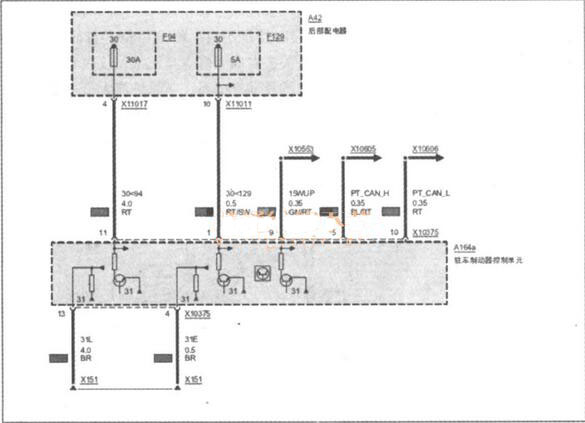
Select the fault code “600E-EMF control unit: internal fault (engine circuit)” to execute the test plan. The system analyzes the fault frequency for 4 times. It is recommended to visually inspect the plug connection on the EMF control unit (curved leg, corrosion, and firm fixation) The circuit diagram checks whether the ground fault (pin 4, pin 13) and power supply (pin 1, pin 11) have the above-mentioned faults. As shown

Check the cable connector of EMF,all work well without bent,corroded.Measure the power supply terminals X10375 pin11 and pin1,the voltage is 12V,it is normal,and measured the X10375 pin 13 and pin 4,both work well,it means the EMF control circuit is fine.Next, perform EMF function detection. No matter whether you press or release the EMF switch button, the function lighting flashes continuously.The EMF warning light on and gave the EMF error massage,When you press or release the EMF switch button, you can’t hear the sound of the EMF actuator action, indicating that the EMF has no action, so it is determined that the EMF itself is faulty.


In order to find out the reason of EMF trouble,mechanic disassemble the EMF and found the negative terminal of the EMF actuator has been burned out.


Replace the EMF assembly, delete the fault storage, and troubleshoot.

Friday, September 7, 2018

Bmw Icom A2 interface

Topic:
I have recently bought the new BMW Diagnostic Tool Icom A2 interface with Isid 3.1, Ista/d 2.36 and Ista/p 2.49.2 software and i would like to ask if anyone knows if it’s possible to connect wireless to the car’s obd without the LAN cable since it support’s WLAN option or what else needed to make it possible? The Icom A2 interface is a clone.
Replied by shawnsheridan
I don’t think any of the A1 ICOM Clones had WLAN card inside, and I would be surprised if A2 ICOM Clone did. If it does, I am pretty sure you need a special Access Point connected to ISIS Server to use WLAN mode.
Replied by TroyE60
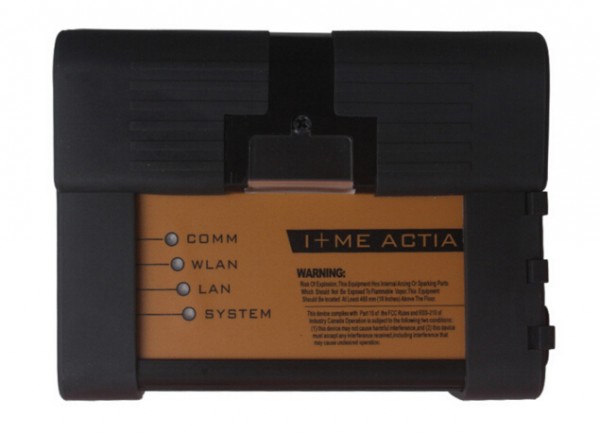
Thanks mate for your answer. Actually the ICOM A2 supports Wireless lan. As you can see from the below pic which I have already uploaded (Icom A2 connected in my car’s obd slot) with the system light green (turn on – operational) it has 4 lights. One for communication, one for wireless lan, on for LAN (RJ 45) and one for the operation named system. I was wondering if there is some kind of emulator or something to “trick” the interface so it thinks it is connected on an ISIS server even running from VMware.

Friday, March 23, 2018

ICOM A1 A2 Wireless User Manual

Lan Connect Operation Details
1. Connect the LAN cable to ICOM A1/BMW ICOM A2, another side to laptop LAN port
2. Connect OBDII cable to car OBDII Port; sometimes you might need the external OBDII cable.
3. Insert the USB KEY to laptop USB Port and power on the laptop
4. Input the password: BMW ICOM (all Capital letters) and press “Enter” to continue.
5. Wait the software well loaded (The red letters disappear and the offline day appears)
42-1 42-2
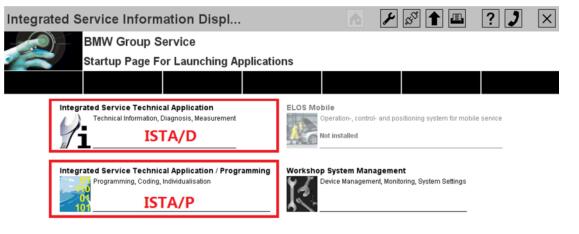
6. Choose ISTA/D or ISTA/P to enter the diagnostic or programming software.
7. For ISTA/D Choose [Vehicle identification] and choose read out vehicle data or start vehicle test to diagnostic with cars.
42-3
8. For ISTA/P choose [Create new session], then choose the free icom, it will read out all the vehicle’s information and modules one by one.
Wireless Connection Details
1. Power on the router firstly, till the green LED is flashing on the router. (Important)
2. Connect the ICOM A1/ A2 to car OBDII port via the OBDII cable and make the ignition on.
3. Wait till the ICOM A1/ A2 WLAN LED is light up and flashing (around 10 seconds or so)
4. Insert the USB KEY to laptop USB Port and power on the laptop
5. Input the password: BMWICOM (all Capital letters) and press “Enter” to continue.
6. Wait the software well loaded (The red letters disappear and the offline day appears)
7. Choose ISTA/D or ISTA/P to enter the diagnostic or programming software.
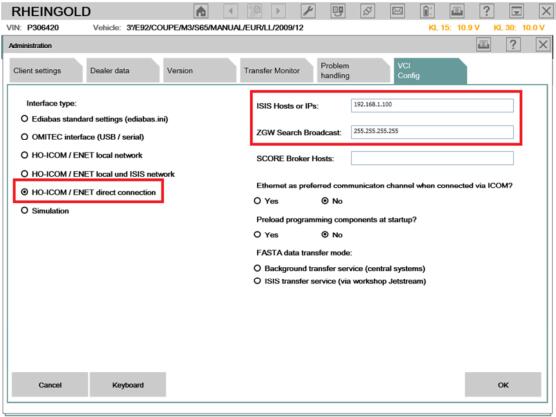
8. For ISTA/D Choose  firstly, then choose [VCI Config], check the IP address like this: 192.168.1.100 / 255.255.255.255
9. The interface type must choose [HO-ICOM/ENET direct connection], click save and close the window.
42-4
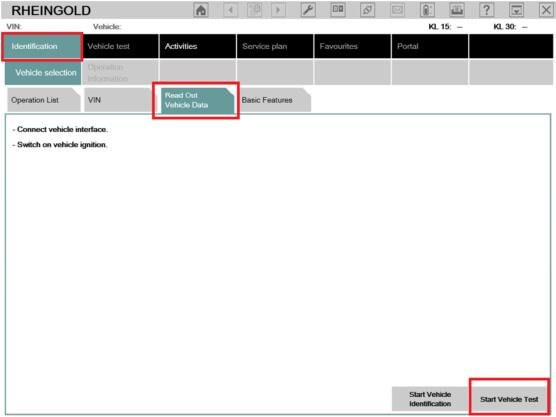
10. Choose [Identification] then choose [Read Out Vehicle data], then choose [Start Vehicle Test].
42-5
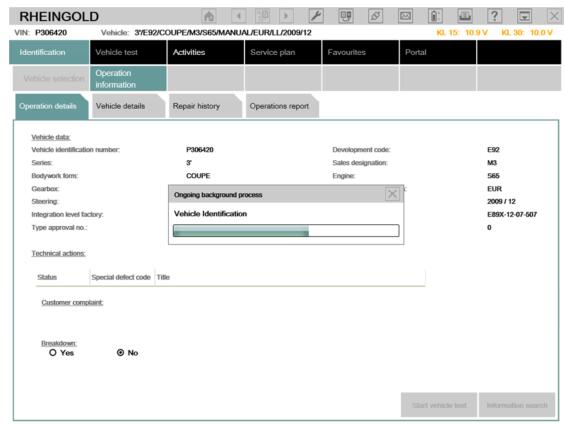
11. At the popup screen, please confirm the IP address is [192.168.1.100] and choose [ICOM], and then system will read out all the car information and modules one by one.
42-6
42-7
42-8
NOTICE:
1. All the internal settings are well configured, please DO NOT change settings, this might lead the software not working.
2. Switch between LAN and WLAN, you need plug off the OBDII cable from car and re-plug in (Make the ICOM A1/A2 multiplexer restart)
3. Please keep your laptop/ Routers with stable power when using.
4. If you cannot diagnostic with cars by WLAN, please make sure the router is powered on and restart the laptop to try.
5. All operations must base on the software well loaded! (red letter disappear and offline day appear)

Wednesday, February 28, 2018

What is used for BMW G30 ECU flash

22-1
Purpose: Need to flash a BWM G series G30

Puzzle: Is the ICOM Next mandatory or is the up to date ICOM 1st generation BMW ICOM Next from 2012 ok?
Can I flash NBT EVO with old ICOM?

Advice & Options:

1.

ENET cable would probably be better for you.

2.

I flashed NBT EVOs with old ICOM without problems.

3.

Flashed all Cars with Icom Next and Online Aos with DHCP over Router. Since that i have Never any Problems with NBT or other. Flash E/F/G with this Setup.

Note that Online Aos is the online version of the BMW software for Diagnostic, Programming any many other things.

4.

To answer your question
1st : you doesn’t need iCOM NEXT to flash the G series…but It actually Lot better & save up your times because iCOM NEXT has build in Gigabit connection.
2nd : old iCOM working find. It just take a lot longer.

5.

Icom best any type , router I noticed w my setup I use desktop w 2 lan port and on a few f cars it actually faster then oem it programs up to 8 module same time w gigabit switch , and handle data lots faster than etnet cable and for certain modules the router is a must will crash hu high in kombi in a few others

6.

Any icom will work , but to be safe with f,g,i series vehicles , use a dedicated router as kafas huh and a few other modules will crash if you do not use a router it handles the switches for Ethernet as those modules use more than 1 path way , in short it uses all 4 two pair wires and without router not good , this has worked for me for some time now good luck. note my router does not connect to wan

Conclusion:

ICOM Next is the best option for G series, working better and faster than old BMW Diagnostic Tool BMW ICOM cables. It handles multiprogramming and coding quite nicely. Gets the job done much faster if flashing the complete vehicle. Also, another benefit to Next will be compatibility for future cars.

BMW ICOM A3 or BMW ICOM NEXT

Hello mates. I do not know what to choose between BMW ICOM A3 HW 1.38 and BMW ICOM NEXT A + B + C HW 1.40
please help me with some advice
18-1
18-2
BMW ICOM A3 HW 1.38: http://www.obd2tool.com/goods-5216-201609+New+BMW+ICOM+A3BCD+Professional+Diagnostic+Tool+with+Free+Wifi+Function.html
BMW ICOM NEXT A + B + C HW 1.40: http://www.obd2tool.com/goods-6940-BMW+ICOM+NEXT+ABC+New+Generation+OF+ICOM+A2+With+201707V+Engineers+software+Plus+Lenovo+T410+Laptop+Ready+to+Use.html
Reply 1: Both of these have the same hardware. None of them are clones of anything also. A3 is fully china version of ICOM, there is no original version looking like this crap. NEXT is just looking as genuine NEXT, but with old A1/A2 hardware inside, like A3.
Reply 2: I recommend buying an original Icom next. It is priced roughly at 500 euro. Take in consideration that you will probably work on cars that are worth 30-40k euro or maybe more and if your chinese icom fails you even once, you will be spending a lot of money on a bricked ecu.
Reply 3: You can have a Icom Next HQ clone if you don’t have much budget of it. This tool handles multiprogramming and coding quite nicely, much faster in BMW F and G series and if flashing the complete vehicle. It supports gigabit Ethernet too to be future proof, there currently is not gigabit Ethernet protocol defined yet for autos. will be compatibility for future cars. Also, it has a better wifi card and USB3.0 instead of USB2.0 (USB 3.0 is theoretically more than ten times faster than USB 2.0. We need usb 2.0 or usb 3.0 flash drive formatted with FAT32.)
No comments on China knockoff quality, I mean an ICOM Next interface.
Reply 4: Buy a icom next original or HQ clone, these are for a decent price now

BMW E-Series Programming with ICOM ISTAP, not ISTA+

There are different systems for vehicle diagnosis (ISTA) and programming (ISTA/P) used. This means it was necessary to change systems several times when repairing a vehicle using software.
ISTA+ has been expanded so that all the required programming functions for the series F, G and I are integrated.
E-series vehicles still have to be programmed using BMW ICOM ISTA/P!
The functions relevant for programming can be accessed via the following menus:
17-1
Vehicle treatment
1.Software update o Comfort – as per the suggested measures plan
o Advanced – with broadened scope
o Additional software (range of functions is not active yet)
2. Control unit replacement o Before exchange (preparation) – control unit read-out for the exchange
o After exchange (subsequent evaluation) – control unit configuration after exchange
3.Vehicle modification o Retrofit
o Conversion
o Conversion (only coding)
o Backfitting
o Immediate measures
17-2
So, what for E series coding/programming?
For Exx- Series:
Interface = K+DCAN Cable (OBDII to USB) or ICOM
ECU Data Files = SP-Daten
NCS Expert = Coding Software
WinKFP = Programming (Flashing) Software
EDIABAS = Low-Level ECU Communication Software used by NCS Expert & WinKFP
For Coding, you need NCS Expert / SP-Daten for E-Series
All Diagnosis and Coding can be done with a cheap K+Dcan cable
For Programming (Flashing ECU’s with new Firmware), then you need ISTA/P for for E-Series, or you can use WinKFP for it. And you will need a BMW ICOM cable (ICOM A2/ICOM A3 or ICOM Next)
YOU HAVE TO KNOW before you buy ICOM A2 or ICOM A3 or ICOM Next:
ICOM Next vs the old ICOM
-> much faster in BMW F and G series ..
-> supports gigabit Ethernet too to be future proof, there currently is not gigabit Ethernet protocol defined yet for autos. Also it has USB3.0 instead of USB2.0 and a better wifi card.
So, Icom next a works much better.
BMW ICOM A+B+C vs ICOM A2
-> more stable during programming
-> be necessary for the future Gbit cars
-> faster start-up times and high throughput
-> through high-performance,low-power ARM SoC
-> improved handling
-> more flexible OBD cable
-> lighted button for logs

In sum, Icom next wins!
ICOM A3 vs ICOM NEXT
Both of these have the same hardware. None of them are clones of anything also. A3 is fully china version of ICOM, there is no original version looking like this crap. NEXT is just looking as genuine NEXT, but with old A1/A2 hardware inside, like A3.
I recommend buying an Icom next. It is priced roughly at 500 euro. Take in consideration that you will probably work on cars that are worth 30-40k euro or maybe more and if your chinese icom fails you even once, you will be spending a lot of money on a bricked ecu.
ICOM A vs ICOM A2 vs ICOM A3
Modified ICOM A2 for vehicles with OBD access receives a significantly more powerful processor and more storage capacity. And robust aluminium case will help to avoid damage when using in harsh environments. It works better in cooling, runs faster and works more stable, not easier broken than older ICOM A.
ICOM A3 can program all units for all BMW series expect media system, and work more stable and has stronger compatibility than ICOM A2, A1.
In short, ICOM NEXT A+B+C works perfect; it’s the best option.

Thursday, December 21, 2017

BMW ICOM A2 With V2017.12 Engineers software Plus EVG7 Tablet PC Ready to Use

BMW ICOM A2 With V2017.12 Engineers software Plus EVG7 Tablet PC Ready to Use


This is the package offer for BMW ICOM A2+B+C for with 2017.12V Software Plus EVG7 Diagnostic Controller Tablet PC, buy them together, save you a lot.Our engineer can install and test ok for you to use.


Compatible with BMW ICOM, ICOM A2, ICOM A3.ICOM PRO+A3


Software Version : V2017.12


ISTA - D: V4.08.12,with SDP data V4.08.11
ISTA - P: V3.63.0.400 can program F/G/I/K chassis for car (through the ICOM, not other cable )
Vin: V2017.10.10

Not connected 9000 days remaining
BMW ETK: 2017.09
BMW KSD: 09.2017Multilanguage
BMW FSC Navigation Code Generator
BMWAiCoder for BMW Coding
With free BMW Engineer Software (INPA, NCS, WinKFP, E-Sys 3.27.1, Psdzdata 59.0), BMW FSC code generator and BMW AiCoder 

1. Support Multi-language: American English, British English, German, Spanish, French, Italian, Polish, Portuguese, Turkish, Czech, Swedish, Dutch, Indian, Greek, Russian, Japanese, Korean, Thai, Simplified Chinese and Traditional Chinese
2. Software Version: Newest V2017.12
3. Support Vehicles: For BMW Cars,  For  BMW Motorcycle,  For  Rolls-Royce, For  Mini Cooper
4. Support for BMW All Series Diagnose and Programming


Support Model:
It is recommended to use Lenovo ThinkPad: T61, T400, T410, T420, T430, X61, X200, X201, X220 X230 and other laptop with Intel chipset, such as I3 I5 / I7 series.

EVG7 DL46 Specification:
Mark : EVG7
Model : DL46
Processor : Intel Celeron 1037(Dual - 1.8Ghz/L3 2M) 
DDR : The biggest support memory : 4GB
HDD : 500 GB SATA HDD.
LCD : 10.4 Inch The resolution of the 1024x768
Graphics : touchscreen widescreen LED backlight, the core graphics Intel HD Graphics
Speakers : Built-in Speakers
Wireless : 802.11b/g/n 
LAN : The built-in 10-100M card
Bluetooth : BT2.0 , 4.0
USB : USB3.0 / Mini USB / 2 x USB2.0
Card Reader : TF Card Reader
Other Interface : VGA Voice Input / The Sound Output / DC Power Jack / Parallel LPT Port I/O VGA Output
Battery Type : 9 The core of lithium batteries 10.08V 6600 mAh
Power Adapter : 110V-240V The adaptive communication power supply
Battery Life : The specific time depending on the use environment
Specifications : 270x180x60 mm
weight : 1911g (with battery)
Certificates : CE / FCC /  RoH


Notice:
If your
BMW Diagnostic Tool BMW ICOM got error "database version mismach, the found database version are not compatible", just need to set the ISTA/D language as American English

Top 5 Reasons to Get BMW ICOM A2 with Latest Software
1.BMW ICOM A2 Hardware Version: V2017.12
2.Support Vehicles: 
BMW Cars, BMW Motorcycle, Rolls-Royce, Mini Cooper
3.Support BMW All Series Diagnose and Programming
4.With Bonus Engineer Programming Software
5. NEW EVG7 DL46/HDD500GB/DDR4GB Diagnostic Controller Tablet PC Ready to Use


Attention: No Network And Also No Connection With The Original Server When You Use The  ICOM Software HDD, Ortherwise It Is Will Be Damaged,And Need You Send Back For Repair
Notice: If your  ICOM HDD got error "database version mismach, the found database version are not compatible", just need to set the ISTA/D language as American English

BMW ICOM A2+B+C Connection:


BMW ICOM A2+B+C Function:
1.Interface A2 - OBD diagnostic supporting MOST, D-CAN and K-CAN protocols.
2.Interface B - diagnostic via MOST bus, and have connection to A-interface via USB connection.
3.Interface C - 20-pin cable for old models.

BMW ICOM A2+B+C Special Features Compared with ICOM :
1.The modified ICOM A2 for vehicles with OBD access receives a significantly more powerful processor and more storage capacity.Robust aluminium case will help to avoid damage when using in harsh environments.
2.To protect the MOST connector, the ICOM B for vehicles with optical MOST access will be equipped with a soft cover made of rubber instead of the former plastic cap.
3.The ICOM C for old series with a diagnostics socket will be additionally equipped with an approx. 20 cm long cable, which facilitates the connection of the ICOM A2 and makes storage in the engine compartment easier.

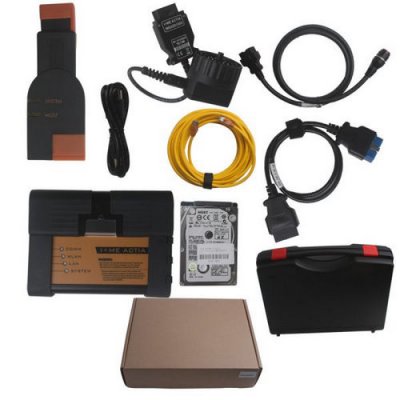
BMW ICOM A2+B+C Packing List:
1pc x BMW ICOM A2 Interface
1pc x BMW ICOM B Most 
1pc x BMW 20pin Cable
1pc x USB Cable
1pc x OBD2 Cable
1pc x LAN Cable
1pc x NEW EVG7 DL46/HDD500GB/DDR4GB Diagnostic Controller Tablet PC


Saturday, November 11, 2017

Solution of BMW Diagnostic Tool BMW ICOM BMW Ista Cannot Read BMW F-series

BMW Scanner BMW ICOM A2 BMW Ista from www.obd2tool.com is the best diagnostic and programming tool for BMW Vehicles. BMW Diagnostic Tool ICOm A2 software have come to latest version BMW Ista v2017.9. ICOM Rheigold ISTA software for BMW diagnotic tools, BMW ISTA D software for BMW Diagnostic Tool, BMW ISTA P for BMW ICOM programming. Some customers may get the problem that cannot read BMW F-series when they use BMW Scan Tool BMW Ista ,OBD2tool.com share you the solutions.
BMW Diagnostic Tool BMW ICOM with V2017.9 BMW Ista Software
6-1
Problem:
Need help setting up BMW ICOM Rheingold, does not read F series
There is a diagnostic interface BMW ICOM A2BC, a Chinese clone.
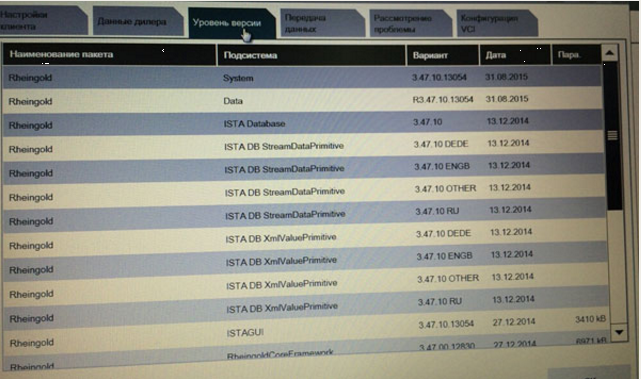
Installed simply by installation, works fine reads scans, diagnoses, Version 3.47.10.13054
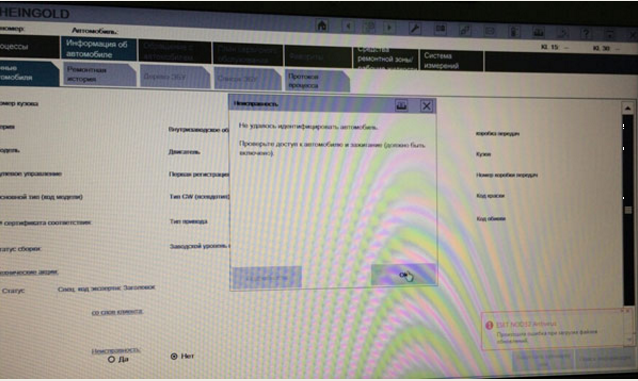
THERE IS A PROBLEM! Do not read the BMW F-series
Says it was not possible to identify the car.
What to do?
Pls help!
bmw icom A2
bmw icom A2
6-2 6-3 6-4
BMW Scan Tool BMW Ista Working solution:
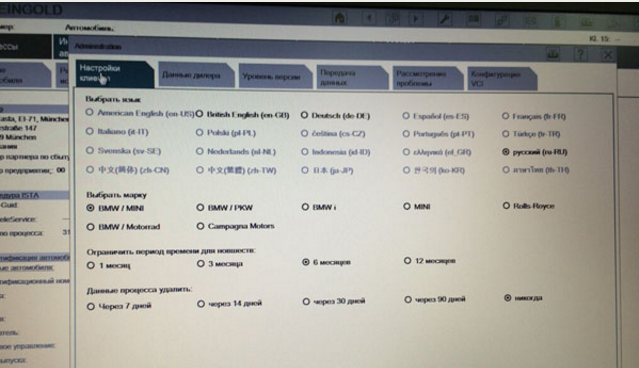
Put in the VCI Configuration check box is not for the item “Prefer Ethernet as the preferred communication channel for ICOM.”
Test Result:
It works, thanks.

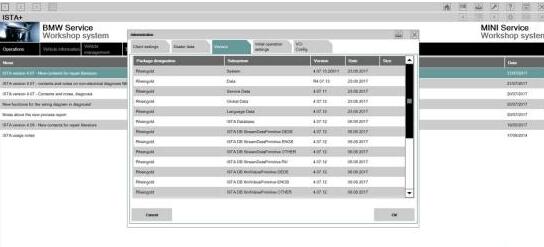
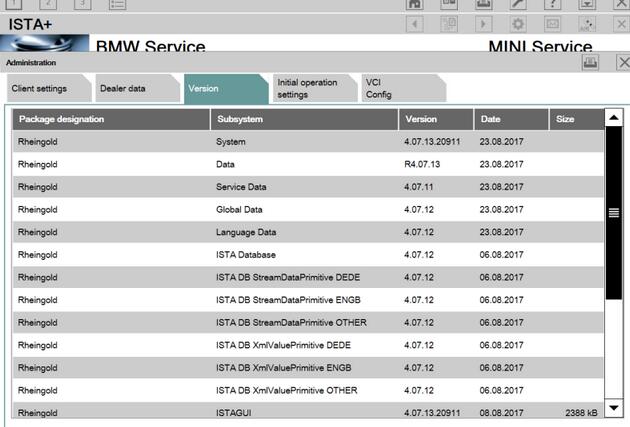
BMW ICOM ISTA-D 4.07.13 Download Free: No Issues!

Free download BMW ICOM ISTA-D 4.07.13 Standalone with ISTA data, for BMW diagnostics, coding, programming.
ISTA-D 4.07.13 Standalone download free:
https://mega.nz/#F!LNAWyI6a!fFLns3nUa-snYcu49Jxfjg
unknown security!!
Without SQLiteDBs, FASTA & HW check disabled.
License & regfiles included.
BMW_ISPI_ISTA-APP_4.07.13.20911 & ISTA-DATA_4.07.12 download:
https://mega.nz/#F!FlYAFK7L!qlgv72WeROL2OwFR2gP77w
unknown security!!
BMW_ISPI_ISTA-META_4.07.13.xml
BMW_ISPI_ISTA-APP_4.07.13.20911.msi
BMW_ISPI_ISTA-DATA_GLOBAL_4.07.12.istapackage
BMW_ISPI_ISTA-DATA_en-GB_4.07.12.istapackage
BMW_ISPI_ISTA-DATA_de-DE_4.07.12.istapackage
BMW_ISPI_ICOM-FW_03-15-02.msi
BMW_ISPI_ICOM-Next-FW_03-15-00.msi
5-1
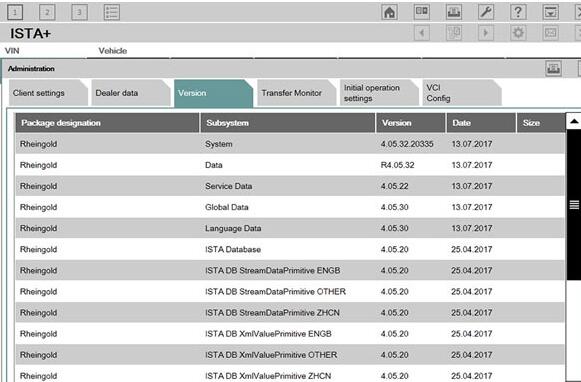
ISTA-D 4.05.32 ISTA-P 3.61.5 Windows 7 download:
Tested & Safe to use! Works great!!
5-2 5-3
BMW ISTA-D 4.07.13 Review:
16gb ram, Core I5, 1tb disk (win7 64 bit)
Ista-d has always been running like a charm
i have also check the new ista
all is running and no problems with delete mistakes
i5 4GB RAM
Standalone version would be great!
There is 2 firmware for ICOM A1-A3, for ICOM NEXT not.
Updated. No issues.
5-4
BMW ICOM ISTA-D 4.07.13 FAQs:
Q: I tried it out, and it works fine. But after deleting some error codes, it froze, but after I restarted the program, the codes were erased, is there any specific reason why that happened?
A: If you are using a INPA k+Dcan interface, you might need a Voltage Control tool in order to properly close the operation.
If not, you might have some issues with your local installation and/or software environment and/or prerequisites needed for ISTA D.
Q: my question was: is fw-03-15-02 an officially update for icom? Or is here something modded, like “03-15-00-unprotected” or so? Because there is only one file different to 03-15-00. In the past there was always two different files.
A: Official.
Q: Does anyone have License for ISPI Admin Client 5.1.6.181?
A: Check here:
https://mega.nz/#!NNZEhSAZ!EL142xuK8Hnaq_QFXuXbVleGt5Is-QO4mMUQELXUaMc
New Firmware for Icom Next
https://mega.nz/#!vopC3IAI!MfacbUE8DR-q192YpyahvlrThH5FFLsjqpzHSJFT-Bk
For people who want to use the web interface instead.
Q: I just wanna ask about the difference between the ISTA\D or P , ISTA+ and ISPI_ISTA ?? because I have a BMW E60 535XI 2008 and I wanna choose the best option for my car to diagnose or program , and also can I use that program with a K-DCAN OBD II cable which is the same I use for coding or I need to use another one ?
A: ISTA/D is for diagnostics of all BMW’s, Mini, and RR. It can only program Fxx/Ixx/Gxx-series BMW.
For E-series, you can use K+DCAN USB cable with ISTA+ for diagnostics, but you need BMW ICOM A+B+C and ISTA-P or Winkfp for programming.
Q: can’t I for examle update my ECU with sp-daten files using K+DCAN cable using Winkfp ? since it can be done using the same method but with another adapter like “iCarly’ ? I mean why acn’t I program using K+DCAN cable with ISTA P since ICOM is more expensive
A: Carly is a bluetooth device. K+DCAN cable will not work for two reasons; it cannot communicate over “most” interface (multimedia ECU’s) and would potentially take days to program with higher rate of likely failure. An BMW ICOM A2 emulator is less expensive than replacing an ECU.
Q: Now can you please guide me on what and where to buy a good quality of ICOM as I read that ICOM A+B+C from Obd2tool.com is good but I really don’t know how much does it cost and from where to buy it since I saw some on AliExpress but I don’t trust Chinese quality.
A:
ICOM A: main interface
ICOM B: adapter for programming multimedia in E series
ICOM C: adapter for old BMW with round 20 pin diagnostic plug
ICOM D: adapter for motorcycles
You can purchase directly from dealerships; though not sure they are still selling A2’s. If you read the ISTA-P release notes, you will see that next does not always work for E-series. Or, have a try ICOM here:
Q: I’m trying to update SDP but from all files only German language was updated.
I’m doing that all the time but now I have problem and I can solve myself.
What I’m doing wrong?
A: It does not look like anything is updated. You must have xml’s and istapackage for it to work.
Q: I have now installed and changed old ISTA with new 4.07 but now ISTA says that data are incompatible?
A: It is normal, you only update databases, you have not updated ISTA APP
Current ISTA version should be the same as thread title after you apply Reg fix included with standalone.
just install new ISTA and solved

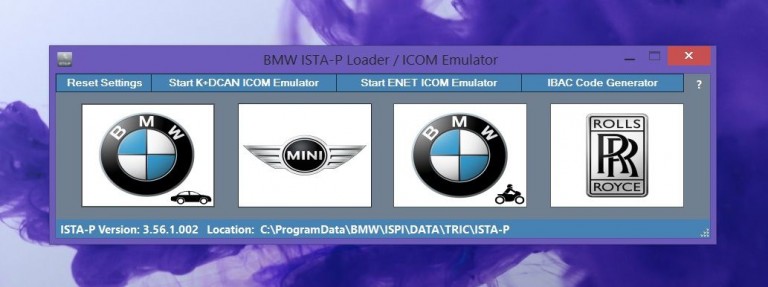
How to setup BMW ISTA/P Loader for ICOM A2 ENET cable K+DCAN adapter

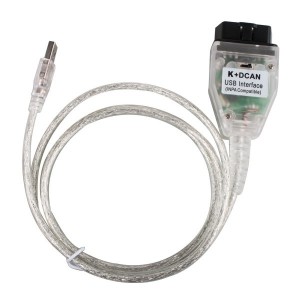
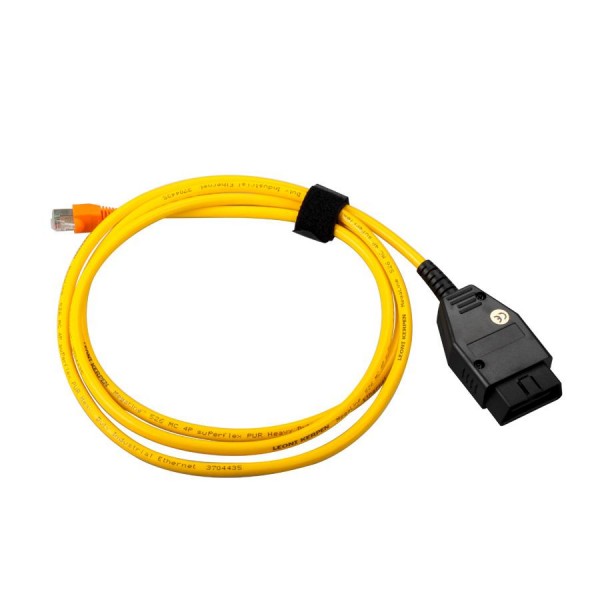
The text here, as a user manual of BMW ISTA/P Loader / ICOM Emulator,  is aimed to help those puzzled with ISTA/P Loader setup for ICOM A2, ENET cable, K+DCAN  USB interface.
Note: all info here not original, shared by a forum member
So try at your own risk!
Main content:
Part 1 – Compatible device
Part 2 – Latest ISTA/P Loader update information
Part 3 – How to install ISTA/P Loader v4.x
Part 4 – How to use  ISTA/P loader with ICOM A2, K+DCAN cable, ENET cable
Part 5 – How to shut down ISTA/P
3-1
Part 1 – Compatible device:
ISTA/P Loader compatible with ICOM A2 (OEM or clone), K+DCAN USB and ENET
3-2 3-3 3-4
 
Part 2 – Latest ISTA/P Loader update information:
NEWEST – ISTA/P Loader V4.8  update info:
Free download BMW ISTA-P Loader V4.8.7 to get all new info yourself
……
ISTA/P Loader V4.2 update info:
Custom resolution option added
Improved detection of bmw scan tool ISTA-P install location.
Improved compatibility with windows 10
Code improvements & minor bug fixes.
ISTA/P Loader V4.1 update info:
Code improvements/bug fixes. Main improvement – ISTA/P update fix (installing updates no longer fail/rollback after using loader). Note: if you have used old loader a clean install of ISTA/P will be needed (or restore backed up files). Any updates after that should install ok.
ISTA/P Loader V4 update info:
IBAC activation code generator added (also accessible from the notification icon menu).
ISTA/P user manual integrated.
Some code improvements.
Part 3 – How to install ISTA/P Loader v4.x:
Windows XP
Framework 2 – install using dotnetfx.exe
Framework 4 – install 4.0 using dotNetFx40_Full_x86_x64.exe (higher versions are not supported by XP)
Windows 7
Framework 2 – Built into the OS
Framework 4 – Install 4.52
Windows 8
Framework 2 – Built into the OS BUT needs enabling:
Framework 4 – Update to 4.52
Windows 10
Framework 2 – Built into the OS BUT needs enabling:
Framework 4 – Built into the OS
Step-by-step ISTA-P instructions
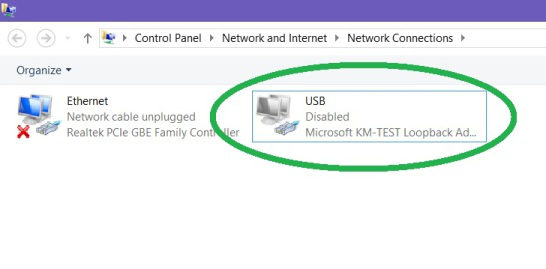
1. Disable your anti virus & firewall & run the network configuration tool “NetworkTool.exe”
note: may take a few seconds for tool to appear & up to 30 seconds to complete.
Then check in network connections that the USB network connection has appeared.
3-5
2. Install .net framework 2 & 4 (do not skip this step– loader will crash if these are not installed).
3. Install Java runtime (do not skip this step– loader will crash if this is not installed).
4. Install patched Ediabas 7.3.
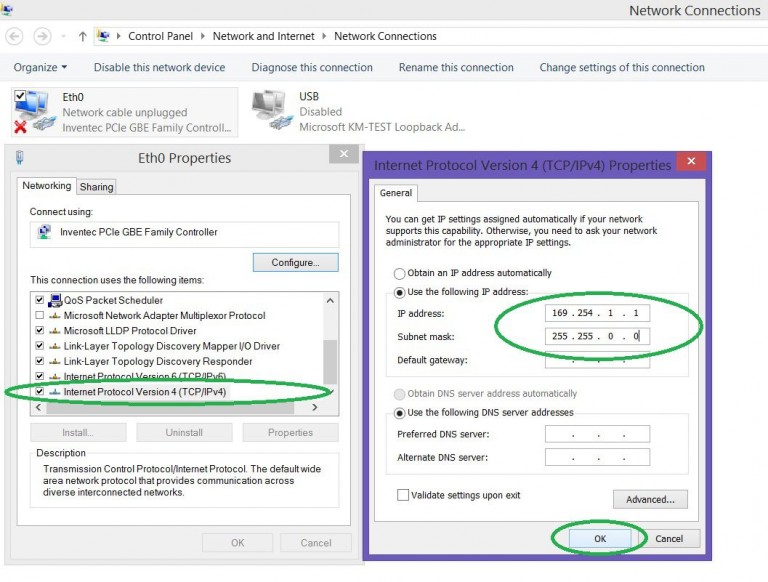
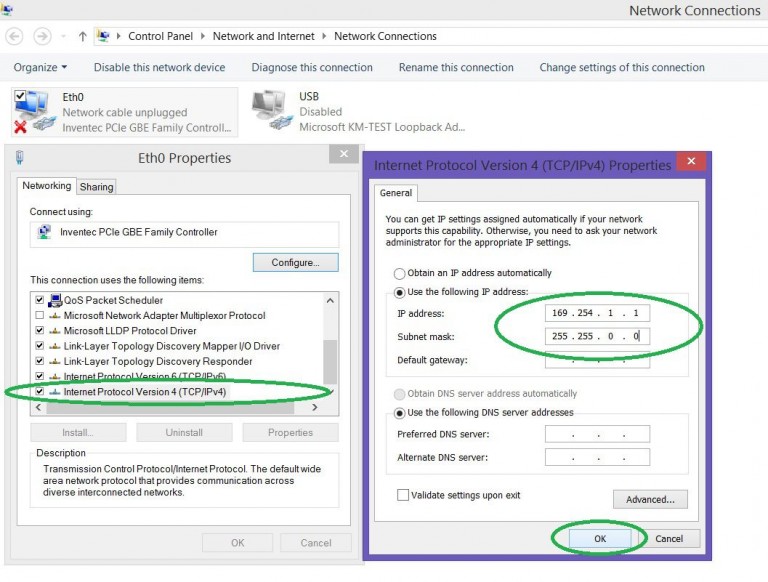
5.  Set up your Ethernet adaptor as shown in screenshot below (applies to ENET only. If you only intend using K+DCAN then you can skip this step).
3-6
Copy loader to desktop.7. Start the loader and choose your required settings and enter some dealerdata.note: ensure ISTA/P is installed on your system. If no ISTA/P installation is found, the loader will not start up.
Part 4 – How to use  ISTA/P loader with ICOM A2, K+DCAN cable, ENET cable
How to use with ICOM A2
1. Disable firewall & turn off WIFI.
2. Connect ICOM to car and PC.
3. Click BMW, Mini, or Rolls Royce brand. ISTA/P will now launch.
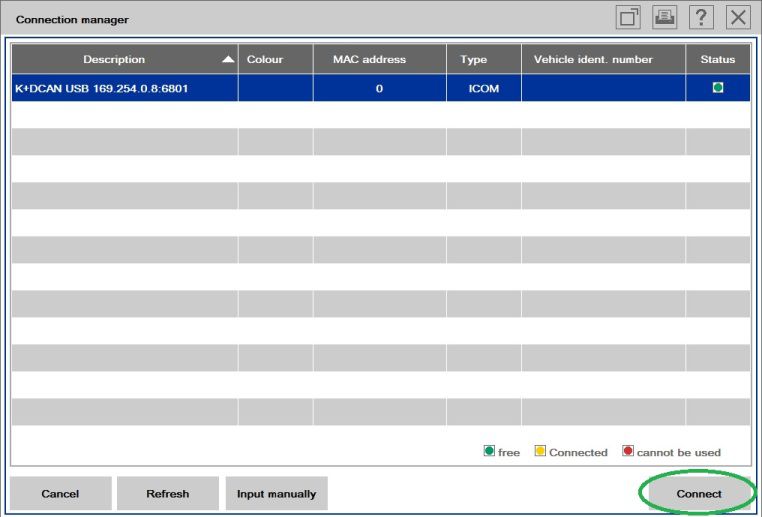
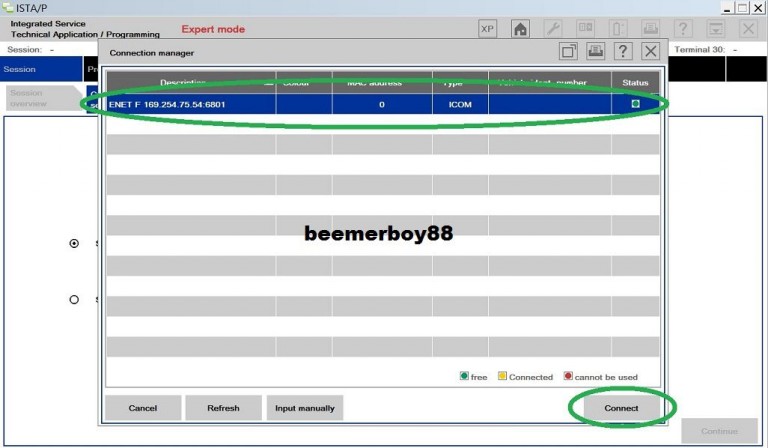
4. Select your ICOM in connection manager.
How to use with K+DCAN USB cable
First install your k+dcan cable and set up com port etc. (default port number for patched ediabas is com9).
1. Disable your anti virus, firewall & turn off WIFI.
2. Plug in K+DCAN cable and connect cable to car.
3. Start the loader
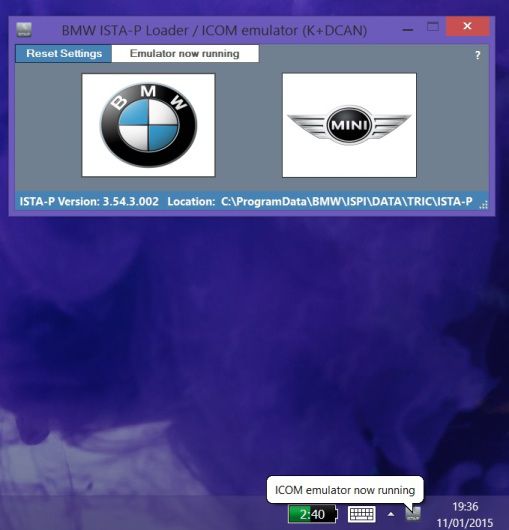
4. Click the “start K+DCAN ICOM emulator button” once. Then wait for emulator running notifications to appear.
3-7
Click BMW, Mini, or Rolls Royce brand. ISTA/P will now launch.6. Select K+DCAN in connection manager.
3-8
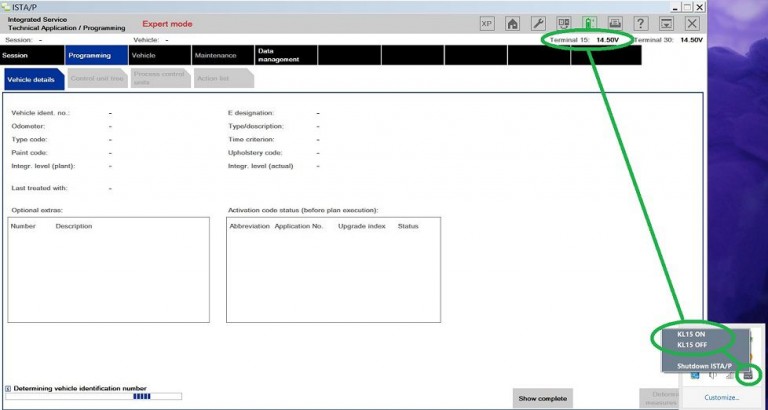
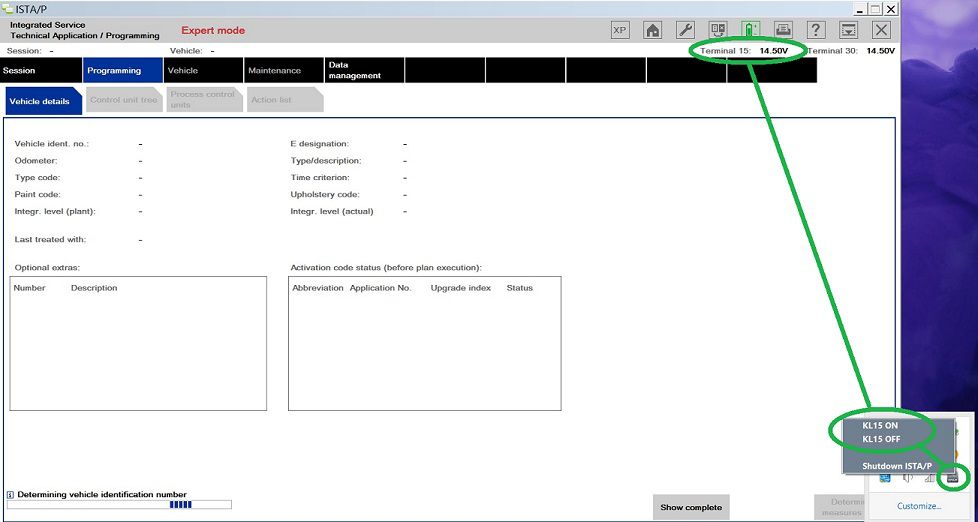
Note: when ISTA/P asks for ignition ON/OFF during programming use the KL15 controls located in the notification area of the taskbar (right click on ISTA/P notification icon). Default setting is “ON”. Obviously actual car ignition will need to be turned ON/OFF also.
3-9
How to use with ENET cable (BMW F-series)
1. Ensure your Ethernet adaptor is set up as shown in the screenshot below.
3-10
2. Disable anti virus, firewall & turn off WIFI.
3. Connect ENET cable to car and PC. Turn on ignition and wait for a minute or two.
4. Start the loader.
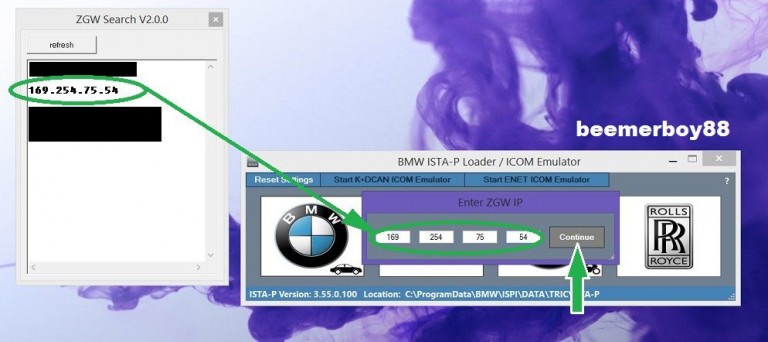
5. Click the “start ENET ICOM emulator button” once. ZGW search will now open.
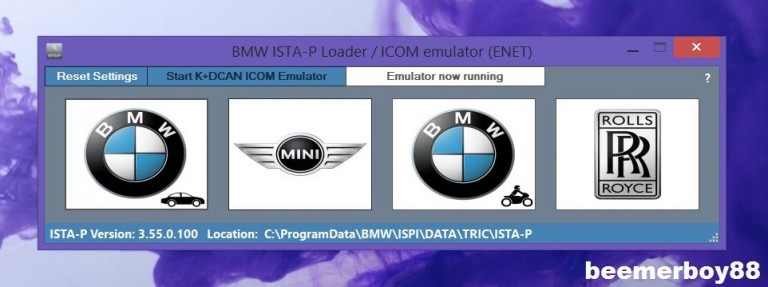
6. Enter your cars ZGW IP and click “continue”. Then wait for emulator running notifications to appear.
3-11 3-12
Click BMW, Mini, or Rolls Royce brand. ISTA/P will now launch.8. Select ENET in connection manager.
3-13
Note: when ISTA/P asks for ignition ON/OFF during programming use the KL15 controls located in the notification area of the taskbar (right click on ISTA/P notification icon). Default setting is “ON”. Obviously actual car ignition will need to be turned ON/OFF also.
3-14
Part 5 – How to shut down ISTA/P
Ensure session has ended and cleared from the session overview list. Then close down the Car Scanner ISTA/P window. The loader will then shutdown everything safely. Alternatively use the shutdown button on the ISTA/P notification icon.