Topic: How to do BMW G Series Coding with BMW ICOM cable
I’ve collect all useful tips of BMW G series coding on the web and make a write-up here. Hope it helps.
Q: Is it possible to code BMW G-series and wich software? E-sys is not possible?
A:
Coding G series is with ESYS. I think you need pro launcher from
Tokenmaster. It was written somewhere on the forum but maybee you can
ask Tokenmaster.
Q: Have any good success if G series coding?
A: I have successfully coded G-series. You need Pro Launcher.
Q: Do we know if it’s possible at all to code the G-series?
A:
Coding is possible with E-SYS, but problem is the mapping/trimmed
CAFD’s on new ECU’s. But for excisting ECU’s not a problem (BDC_BODY,
NBT2, ACSM etc.)
Q: Can I code G11 with Esys?
A: Tried to code G11 today.
My I-level is S15A-16-07-506, used data 5.94.
I found S15A target in Esys.
S15A psdzdata covers F090/G001/G002/G011/G012/G030/G031/G032/RR11/RR12/RR31
Q: Could you share with me your launcher pro’s token and activation code ?
A:
This is not possible. Token and activation code are valid for 1 PC
only. This is how it works: you ask Token Master, he sends token, you
install Launcher Pro with the token, Launcher generates request code,
you send it to Token Master, he sends you activation code in response.
Q: Which E-sys can be used for G series coding?
A: E-Sys:
S15A psdzdata covers G001/G002/G011/G012/G013/G030/G031/G032
S15C psdzdata covers G008/G038
Q: Which tool for G series?
A: I’m perfectly aware what ICOM Next from OBD2TOOL is and I have it.
Icom
next runs a gigabyte lan port. So if router and laptop also running
gigabyte ports you increase speed, that’s only if the car and software
allow it.
Also the Icom next is faster for G series cars which I suspect also have gigabyte Ethernet bus.
Also it has USB3.0 instead of USB2.0 and a better wifi card.
Ps. It’s a copy, from http://www.obd2tool.com/search-BMW+ICOM.html
Q: Which BMW ICOM can i use for G30?
A:
Any icom will work , but to be safe with f,g,i series vehicles , use a
dedicated router as kafas huh and a few other modules will crash if you
do not use a router it handles the switches for Ethernet as those
modules use more than 1 path way , in short it uses all 4 two pair wires
and without router not good , this has worked for me for some time now
good luck. note my router does not connect to wan
Q: What tool is used for G30 flash or coding?
A: Flashed all Cars with BMW ICOM Next and Online Aos with DHCP over Router. Since that i have Never any Problems with NBT or other. Flash E/F/G with this Setup.
Note that Online Aos is the online version of the BMW software for Diagnostic, Programming any many other things.
Q: How to do G30 coding?
A: BMW G30 has a quite a lot of differences in ECU, so wanted to share my findings here.
Note:
– This is Not a comprehensive list of options But options that are unique from options standard across the recent models.
– Read SVT does Not work, use Read ECU instead.
– Ensure vehicle engine is running before you press Read ECU button otherwise you won’t get the full list of ECUs.
ECU: SAS [Driver Assistance Systems]
ACC Default Distance: C_Abstandsstufe_init -> Set to 2
Blind
Spot Detection: Note that G30 has a multiple Blind Spot Detection
Modules, and you need to set Speed setting for each. For each radar
module there is a separate KMH and MPH Setting so 6 in all.
E.g.
C_LCA_SWW_Vmin_KMH – set to 55km/h
C_LCA_SWW_Vmin_MPH – set to Option 0 (Werte 22)
ECU: HU_NBT [Head Unit]
G30
has a hardware limitation and max Video-In-Motion you can get via E-sys
is 63 km/h (around 39 mph). After following standard VIM coding, Ensure
that
SPEEDLOCK_SPEEDVALUE_MIN: Werte=1F
SPEEDLOCK_SPEEDVALUE_MAX: Werte=3F
ECU: DKOMBI [Instrument Cluster]
Remove Speed Limit Sign from HUD: HUD_SPEED_LIMIT_ENABLE DKOMBI
ECU: IHKA [Climate Control] – Not Tested
This
encoding value determines whether the previous settings (Last Function)
should be used when switching from the Auto mode to Manual mode, in
manual mode, or whether the settings from “Auto” should be used when
changing from the car to the manual mode.
LAST_FCT_AUTO_MAN
Default: AKTIV (Active) = 01
HO
coding in order to be able to manipulate front-end adjustment of the
ventilation (if necessary, in the case of special large-scale customer
requests)
3003 -> VERTRIMMUNG_BEL_FRONT (Front Face)
keine = 00
3003 -> VERTRIMMUNG_FUSS_FRONT (Front Feet)
keine = 00
OPTIONS
keine = 00 (No)
kaelter = 01 (Colder)
waermer = 02 (Warmer)
ECU: BDC_Body -> 1DF7 – Comfort Access Settings
3514 PMaster Has Comfort Access Related Settings
ECU: ACSM – Safety Related Settings
Settings for SeatBelt Reminders and such
Showing posts with label BMW Engineer Software. Show all posts
Showing posts with label BMW Engineer Software. Show all posts
Wednesday, February 28, 2018

Step to install BMW ISTA+ with all programming data
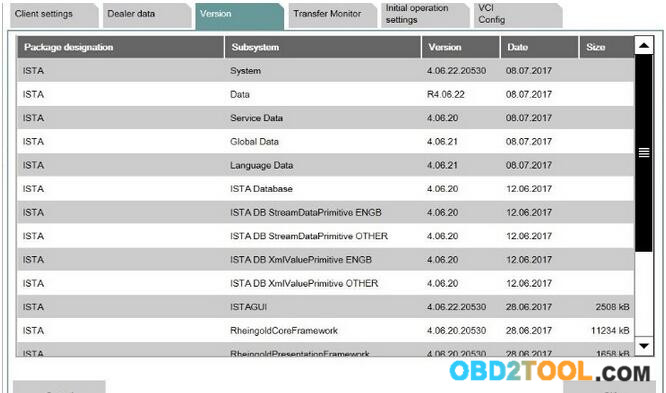
I have read that BMW will stop support F and G series from Ista P.
Is there somewhere a good tutorial how to install the new ISTA+ with all programming data included.
There are a lot of different software SPD delta, etc etc. How to install and which files to use
Here you go…
First you need ICOM to get ISTA+ programming to work. Yes, you can have tested ISTA+ download from cardiagtool.co.uk or use the psdzdata FULL from @Shawn which is an easier route for *you* than using the sdp deltas and ISTA Launcher Console.
Instructions:
1- rename C:\Rheingold\PSdZ\data\psdzdata to psdzdata.orig
2- extract psdzdata FULL in C:\Rheingold\PSdZ\data, browse to C:\Rheingold\PSdZ\data\psdzdata\swe\swfl and check that there is lots of files…
3- you need to enter those two registry entries for x64 OS:
Code:
[HKEY_LOCAL_MACHINE\SOFTWARE\Wow6432Node\BMWGroup\ISPI\ISTA]
“InstallLocation”=”C:\\Rheingold”
[HKEY_LOCAL_MACHINE\SOFTWARE\Wow6432Node\BMWGroup\ISPI\Rheingold]
“BMW.Rheingold.Programming.Enabled”=”True”
“BMW.Rheingold.Programming.PsdzDataPath”=”C:\\Rheingold\\PSdZ\\data”
PS: if you can’t read faults with ISTA, your installations has some issues.
Note:
I don’t use ISTA programming as I don’t have BMW ICOM.
I only use Esys/ENET for flashing/programming. Pretty powerful and lets you do stuff that ISTA will never do (like flash GTS DCT software for non GTS M4)
Here are two different entries to point to psdz.
1) BMW.Rheingold.Programming.PsdzDataPath”=”C:\\Rheingold\\PSdZ\\data
is all that is included in Diagnosis-only ISTA+
2) BMW.Rheingold.Programming.PsdzDataPath”=”C:\\Rheingold\\PSdZ\\data_swi
is what is needed for programming Fxx/Ixx/Gxx-series with BMW ICOM A2(ie SDP). But, you could change to whatever you want in registry.
BMW ICOM A3 or BMW ICOM NEXT
Hello mates. I do not know what to choose between BMW ICOM A3 HW 1.38 and BMW ICOM NEXT A + B + C HW 1.40
please help me with some advice


BMW ICOM A3 HW 1.38: http://www.obd2tool.com/goods-5216-201609+New+BMW+ICOM+A3BCD+Professional+Diagnostic+Tool+with+Free+Wifi+Function.html
BMW ICOM NEXT A + B + C HW 1.40: http://www.obd2tool.com/goods-6940-BMW+ICOM+NEXT+ABC+New+Generation+OF+ICOM+A2+With+201707V+Engineers+software+Plus+Lenovo+T410+Laptop+Ready+to+Use.html
Reply 1: Both of these have the same hardware. None of them are clones of anything also. A3 is fully china version of ICOM, there is no original version looking like this crap. NEXT is just looking as genuine NEXT, but with old A1/A2 hardware inside, like A3.
Reply 2: I recommend buying an original Icom next. It is priced roughly at 500 euro. Take in consideration that you will probably work on cars that are worth 30-40k euro or maybe more and if your chinese icom fails you even once, you will be spending a lot of money on a bricked ecu.
Reply 3: You can have a Icom Next HQ clone if you don’t have much budget of it. This tool handles multiprogramming and coding quite nicely, much faster in BMW F and G series and if flashing the complete vehicle. It supports gigabit Ethernet too to be future proof, there currently is not gigabit Ethernet protocol defined yet for autos. will be compatibility for future cars. Also, it has a better wifi card and USB3.0 instead of USB2.0 (USB 3.0 is theoretically more than ten times faster than USB 2.0. We need usb 2.0 or usb 3.0 flash drive formatted with FAT32.)
No comments on China knockoff quality, I mean an ICOM Next interface.
Reply 4: Buy a icom next original or HQ clone, these are for a decent price now
please help me with some advice
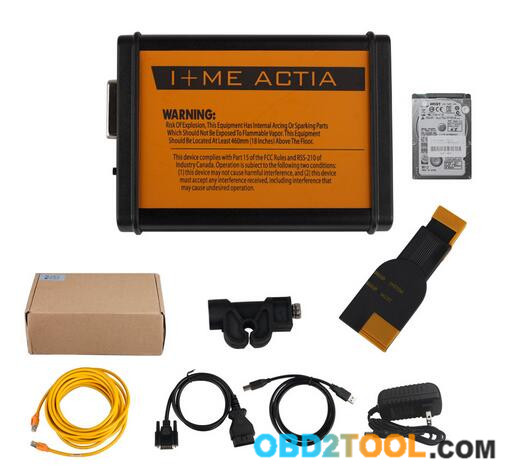
BMW ICOM A3 HW 1.38: http://www.obd2tool.com/goods-5216-201609+New+BMW+ICOM+A3BCD+Professional+Diagnostic+Tool+with+Free+Wifi+Function.html
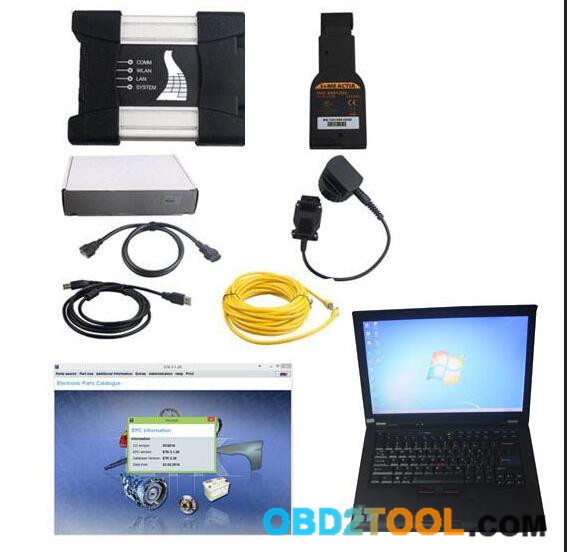
BMW ICOM NEXT A + B + C HW 1.40: http://www.obd2tool.com/goods-6940-BMW+ICOM+NEXT+ABC+New+Generation+OF+ICOM+A2+With+201707V+Engineers+software+Plus+Lenovo+T410+Laptop+Ready+to+Use.html
Reply 1: Both of these have the same hardware. None of them are clones of anything also. A3 is fully china version of ICOM, there is no original version looking like this crap. NEXT is just looking as genuine NEXT, but with old A1/A2 hardware inside, like A3.
Reply 2: I recommend buying an original Icom next. It is priced roughly at 500 euro. Take in consideration that you will probably work on cars that are worth 30-40k euro or maybe more and if your chinese icom fails you even once, you will be spending a lot of money on a bricked ecu.
Reply 3: You can have a Icom Next HQ clone if you don’t have much budget of it. This tool handles multiprogramming and coding quite nicely, much faster in BMW F and G series and if flashing the complete vehicle. It supports gigabit Ethernet too to be future proof, there currently is not gigabit Ethernet protocol defined yet for autos. will be compatibility for future cars. Also, it has a better wifi card and USB3.0 instead of USB2.0 (USB 3.0 is theoretically more than ten times faster than USB 2.0. We need usb 2.0 or usb 3.0 flash drive formatted with FAT32.)
No comments on China knockoff quality, I mean an ICOM Next interface.
Reply 4: Buy a icom next original or HQ clone, these are for a decent price now
BMW E-Series Programming with ICOM ISTAP, not ISTA+
There are different systems for vehicle diagnosis (ISTA) and
programming (ISTA/P) used. This means it was necessary to change systems
several times when repairing a vehicle using software.
ISTA+ has been expanded so that all the required programming functions for the series F, G and I are integrated.
E-series vehicles still have to be programmed using BMW ICOM ISTA/P!
The functions relevant for programming can be accessed via the following menus:

Vehicle treatment
1.Software update o Comfort – as per the suggested measures plan
o Advanced – with broadened scope
o Additional software (range of functions is not active yet)
2. Control unit replacement o Before exchange (preparation) – control unit read-out for the exchange
o After exchange (subsequent evaluation) – control unit configuration after exchange
3.Vehicle modification o Retrofit
o Conversion
o Conversion (only coding)
o Backfitting
o Immediate measures

So, what for E series coding/programming?
For Exx- Series:
Interface = K+DCAN Cable (OBDII to USB) or ICOM
ECU Data Files = SP-Daten
NCS Expert = Coding Software
WinKFP = Programming (Flashing) Software
EDIABAS = Low-Level ECU Communication Software used by NCS Expert & WinKFP
For Coding, you need NCS Expert / SP-Daten for E-Series
All Diagnosis and Coding can be done with a cheap K+Dcan cable
For Programming (Flashing ECU’s with new Firmware), then you need ISTA/P for for E-Series, or you can use WinKFP for it. And you will need a BMW ICOM cable (ICOM A2/ICOM A3 or ICOM Next)
YOU HAVE TO KNOW before you buy ICOM A2 or ICOM A3 or ICOM Next:
ICOM Next vs the old ICOM
-> much faster in BMW F and G series ..
-> supports gigabit Ethernet too to be future proof, there currently is not gigabit Ethernet protocol defined yet for autos. Also it has USB3.0 instead of USB2.0 and a better wifi card.
So, Icom next a works much better.
BMW ICOM A+B+C vs ICOM A2
-> more stable during programming
-> be necessary for the future Gbit cars
-> faster start-up times and high throughput
-> through high-performance,low-power ARM SoC
-> improved handling
-> more flexible OBD cable
-> lighted button for logs
…
In sum, Icom next wins!
ICOM A3 vs ICOM NEXT
Both of these have the same hardware. None of them are clones of anything also. A3 is fully china version of ICOM, there is no original version looking like this crap. NEXT is just looking as genuine NEXT, but with old A1/A2 hardware inside, like A3.
I recommend buying an Icom next. It is priced roughly at 500 euro. Take in consideration that you will probably work on cars that are worth 30-40k euro or maybe more and if your chinese icom fails you even once, you will be spending a lot of money on a bricked ecu.
ICOM A vs ICOM A2 vs ICOM A3
Modified ICOM A2 for vehicles with OBD access receives a significantly more powerful processor and more storage capacity. And robust aluminium case will help to avoid damage when using in harsh environments. It works better in cooling, runs faster and works more stable, not easier broken than older ICOM A.
ICOM A3 can program all units for all BMW series expect media system, and work more stable and has stronger compatibility than ICOM A2, A1.
In short, ICOM NEXT A+B+C works perfect; it’s the best option.
ISTA+ has been expanded so that all the required programming functions for the series F, G and I are integrated.
E-series vehicles still have to be programmed using BMW ICOM ISTA/P!
The functions relevant for programming can be accessed via the following menus:

Vehicle treatment
1.Software update o Comfort – as per the suggested measures plan
o Advanced – with broadened scope
o Additional software (range of functions is not active yet)
2. Control unit replacement o Before exchange (preparation) – control unit read-out for the exchange
o After exchange (subsequent evaluation) – control unit configuration after exchange
3.Vehicle modification o Retrofit
o Conversion
o Conversion (only coding)
o Backfitting
o Immediate measures

So, what for E series coding/programming?
For Exx- Series:
Interface = K+DCAN Cable (OBDII to USB) or ICOM
ECU Data Files = SP-Daten
NCS Expert = Coding Software
WinKFP = Programming (Flashing) Software
EDIABAS = Low-Level ECU Communication Software used by NCS Expert & WinKFP
For Coding, you need NCS Expert / SP-Daten for E-Series
All Diagnosis and Coding can be done with a cheap K+Dcan cable
For Programming (Flashing ECU’s with new Firmware), then you need ISTA/P for for E-Series, or you can use WinKFP for it. And you will need a BMW ICOM cable (ICOM A2/ICOM A3 or ICOM Next)
YOU HAVE TO KNOW before you buy ICOM A2 or ICOM A3 or ICOM Next:
ICOM Next vs the old ICOM
-> much faster in BMW F and G series ..
-> supports gigabit Ethernet too to be future proof, there currently is not gigabit Ethernet protocol defined yet for autos. Also it has USB3.0 instead of USB2.0 and a better wifi card.
So, Icom next a works much better.
BMW ICOM A+B+C vs ICOM A2
-> more stable during programming
-> be necessary for the future Gbit cars
-> faster start-up times and high throughput
-> through high-performance,low-power ARM SoC
-> improved handling
-> more flexible OBD cable
-> lighted button for logs
…
In sum, Icom next wins!
ICOM A3 vs ICOM NEXT
Both of these have the same hardware. None of them are clones of anything also. A3 is fully china version of ICOM, there is no original version looking like this crap. NEXT is just looking as genuine NEXT, but with old A1/A2 hardware inside, like A3.
I recommend buying an Icom next. It is priced roughly at 500 euro. Take in consideration that you will probably work on cars that are worth 30-40k euro or maybe more and if your chinese icom fails you even once, you will be spending a lot of money on a bricked ecu.
ICOM A vs ICOM A2 vs ICOM A3
Modified ICOM A2 for vehicles with OBD access receives a significantly more powerful processor and more storage capacity. And robust aluminium case will help to avoid damage when using in harsh environments. It works better in cooling, runs faster and works more stable, not easier broken than older ICOM A.
ICOM A3 can program all units for all BMW series expect media system, and work more stable and has stronger compatibility than ICOM A2, A1.
In short, ICOM NEXT A+B+C works perfect; it’s the best option.
BMW Fxx-Ixx-Gxx-series Coding Latest Software Links
(Quote)BMW Fxx-Ixx-Gxx-series Coding Latest Software Links (No Request)
Post includes 1. software Overview and Requirements 2. latest Software Links & Installation Instructions.
What is Included:
1.Software Overview and Requirements
2.Latest Software Links & Installation Instructions
NOTE1: Links are in BLUE and pictures are links to larger images.
NOTE2: Click here for Getting Started Guides, Tips, & Cheat Sheets
1.Software Overview and Requirements:1). This guide serves Fxx, Ixx, and Gxx-series vehicle. and cable are used Complete Software & Interface Overview.
E-Series & R05x Mini:
Interface = K+DCAN Cable (OBDII to USB) or ICOM
ECU Data Files = SP-Daten
NCS Expert = Coding Software
WinKFP = Programming (Flashing) Software
EDIABAS = Low Level ECU Communication Software used by NCS Expert & WinKFP
Fxx- / Ixx- / Gxx-Series, Mini (F05x/F06x), & Rolls-Royce:
Interface = ENET Cable (OBDII to RJ45 Ethernet) or ICOM
ECU Data Files = PSdZData
E-Sys = Coding Software
E-Sys = Programming (Flashing) Software
BMW ICOM
ICOM A: main interface
ICOM B: adapter for programming multimedia in E series
ICOM C: adapter for old BMW with round 20 pin diagnostic plug
ICOM D: adapter for motorcycles
Additional Dealership Level Software
ISTA+ (AKA Rheingold or ISTA-D)
DIAGNOSTICS for All Vehicles
PROGRAMMING for F/I/G/RR & MINI, but requiresan ICOM
All Requests, should be directed Here
Additional Details: Beginner’s Guide to BMW ISTA+
ISTA-P
PROGRAMMING traditionally for all chassis, but is being phased out by August 2017, except for legacy E-series.
ICOM Recommended. An ICOM emulator with K+DCAN or ENET can be used, but will NOTcommunicate over all protocols to program every ECU.
Replacement ECU’s must be NEW
All Requests, should be directed to this thread
MINIMUM REQUIREMENTS:
Windows 7-10 Computer
ISTA+: 22 GB Installation + >2 GB free space to run (Diagnostics Only).
Additional 70 GB SDP & ICOM to program (Excludes E-series)
ISTA-P: 112 GB Installation
At least a processor with 2 cores and 2.2 GHz
At least 4 GB RAM
Supported Chassis Code Overview

Alternative Resources: Burger Tuning & BMW Archives
Prerequisites:
1.Windows 7-10 Computerwith .NET Framework 4.5.2 (or greater) due to new features added.
* Alternative: Mac with Windows Virtualization (eg, Parallels, VMFusion, Oracle Virtualbox) or Apple Bootcamp
ALL VM Setups: Network Adapter configuration should be set to Bridged Network mode.
* E-Sys= Main Coding Software
* PSdZData Lite(~2.5 GB) = ECU Data Files. Works for VO & FDL Coding.
PSdZData_Full (> 80 GB): Contains additional ECU Firmware files ONLYneeded for flash programming (ie updating) ECU’s. Request here.
* E-Sys Launcher= Provides License (ie Activation), FDL-Coding mapping, Cheat Codes (Section 7), & other optimization.
* Connection Interface= ENET Cable (OBDII to RJ45 Ethernet) or BMW ICOM A2

2.Software Installation:NOTE: Links neverchange. Latest versions always found below.E-Sys – Install Instructions – v.15.pdf(Guide courtesy of member Shawnsheridan)E-sys 3.31.0
* E-Sys 3.27.1– need to use for External Transmitter to clear errors
* E-sys 3.28.1– May result in runtime errors when you try to “Edit FDL” in Expert Mode > Coding
You will not be able to inject CAFD or flash program Launcher Pro 3.x
* See pdf instructions on acquiring activation for use
* Launcher Premium 2.8.x(w/ Built in Token Generator) – Alternative free solution Latest PSdZData_Lite (~2.5 GB) WORKS FOR ALL FDL CODING & VO CODING
* Use this guideto determine your I-Step.
* You only need onelite version for coding that is equal to or greater than your I-Step.
NOTE: If you get “Not Found [C012]” error when “Read Coding Data,” it is time to update.
* Do NOT merge. DELETE old PSdZData folder & REPLACE w/ new PSdZData folder.
* ISTA-P Version & I-Level Overview
* Certain E-sys installation require a minimum Psdzdata:

TokenMaster’s NCD / CAFD Tool 0.5.2 (Optional)
* One other useful tool. You can read more about it here.

By Resource:
NCD / CAFD: Read *.ncd files offline and easily search for function, viewing current settings as well as other options
NCD Compare: Load *.ncd files using Folder icons or drag & drop and then far right button initiates compare. Popup showing Left vs right values which you can highlight and copy if you choose. It also highlights *.ncd trees differences in red & you can scroll up and down.
Decrypt CAFD: not just for CAFD’s. It also works for other Psdzdata files (eg FAFP).
FA / FP: viewer; tool includes mapping (eg 430 Inter Exter mirror anti dazzle). You can search loaded FA or entire FAFP (ie available options). FP viewer allows you to view options by Vehicle Profile (FP) without loading FA (Vehicle Order).
FA Compare: like #2, but comparing FA’s.
FA-CAFD: You load individual ECU’s *.ncd and can see how FA additions will affect (ie “what-if).
SVT-CAFD: You load entire saved SVT file and see how FA changes will affect (ie “what-if).
Source: http://www.bimmerfest.com/forums/
Post includes 1. software Overview and Requirements 2. latest Software Links & Installation Instructions.
What is Included:
1.Software Overview and Requirements
2.Latest Software Links & Installation Instructions
NOTE1: Links are in BLUE and pictures are links to larger images.
NOTE2: Click here for Getting Started Guides, Tips, & Cheat Sheets
1.Software Overview and Requirements:1). This guide serves Fxx, Ixx, and Gxx-series vehicle. and cable are used Complete Software & Interface Overview.
E-Series & R05x Mini:
Interface = K+DCAN Cable (OBDII to USB) or ICOM
ECU Data Files = SP-Daten
NCS Expert = Coding Software
WinKFP = Programming (Flashing) Software
EDIABAS = Low Level ECU Communication Software used by NCS Expert & WinKFP
Fxx- / Ixx- / Gxx-Series, Mini (F05x/F06x), & Rolls-Royce:
Interface = ENET Cable (OBDII to RJ45 Ethernet) or ICOM
ECU Data Files = PSdZData
E-Sys = Coding Software
E-Sys = Programming (Flashing) Software
BMW ICOM
ICOM A: main interface
ICOM B: adapter for programming multimedia in E series
ICOM C: adapter for old BMW with round 20 pin diagnostic plug
ICOM D: adapter for motorcycles
Additional Dealership Level Software
ISTA+ (AKA Rheingold or ISTA-D)
DIAGNOSTICS for All Vehicles
PROGRAMMING for F/I/G/RR & MINI, but requiresan ICOM
All Requests, should be directed Here
Additional Details: Beginner’s Guide to BMW ISTA+
ISTA-P
PROGRAMMING traditionally for all chassis, but is being phased out by August 2017, except for legacy E-series.
ICOM Recommended. An ICOM emulator with K+DCAN or ENET can be used, but will NOTcommunicate over all protocols to program every ECU.
Replacement ECU’s must be NEW
All Requests, should be directed to this thread
MINIMUM REQUIREMENTS:
Windows 7-10 Computer
ISTA+: 22 GB Installation + >2 GB free space to run (Diagnostics Only).
Additional 70 GB SDP & ICOM to program (Excludes E-series)
ISTA-P: 112 GB Installation
At least a processor with 2 cores and 2.2 GHz
At least 4 GB RAM
Supported Chassis Code Overview
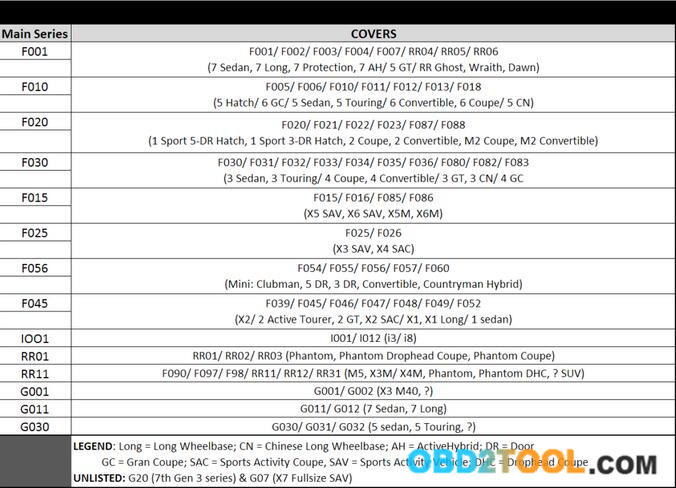
Alternative Resources: Burger Tuning & BMW Archives
Prerequisites:
1.Windows 7-10 Computerwith .NET Framework 4.5.2 (or greater) due to new features added.
* Alternative: Mac with Windows Virtualization (eg, Parallels, VMFusion, Oracle Virtualbox) or Apple Bootcamp
ALL VM Setups: Network Adapter configuration should be set to Bridged Network mode.
* E-Sys= Main Coding Software
* PSdZData Lite(~2.5 GB) = ECU Data Files. Works for VO & FDL Coding.
PSdZData_Full (> 80 GB): Contains additional ECU Firmware files ONLYneeded for flash programming (ie updating) ECU’s. Request here.
* E-Sys Launcher= Provides License (ie Activation), FDL-Coding mapping, Cheat Codes (Section 7), & other optimization.
* Connection Interface= ENET Cable (OBDII to RJ45 Ethernet) or BMW ICOM A2
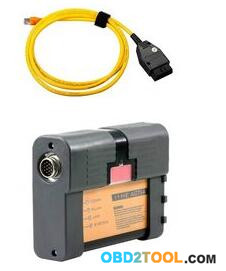
2.Software Installation:NOTE: Links neverchange. Latest versions always found below.E-Sys – Install Instructions – v.15.pdf(Guide courtesy of member Shawnsheridan)E-sys 3.31.0
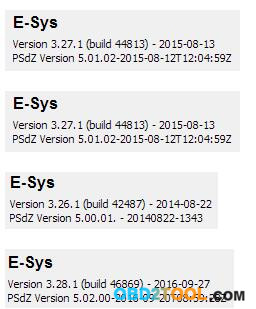
* E-Sys 3.27.1– need to use for External Transmitter to clear errors
* E-sys 3.28.1– May result in runtime errors when you try to “Edit FDL” in Expert Mode > Coding
You will not be able to inject CAFD or flash program Launcher Pro 3.x
* See pdf instructions on acquiring activation for use
* Launcher Premium 2.8.x(w/ Built in Token Generator) – Alternative free solution Latest PSdZData_Lite (~2.5 GB) WORKS FOR ALL FDL CODING & VO CODING
* Use this guideto determine your I-Step.
* You only need onelite version for coding that is equal to or greater than your I-Step.
NOTE: If you get “Not Found [C012]” error when “Read Coding Data,” it is time to update.
* Do NOT merge. DELETE old PSdZData folder & REPLACE w/ new PSdZData folder.
* ISTA-P Version & I-Level Overview
* Certain E-sys installation require a minimum Psdzdata:
TokenMaster’s NCD / CAFD Tool 0.5.2 (Optional)
* One other useful tool. You can read more about it here.
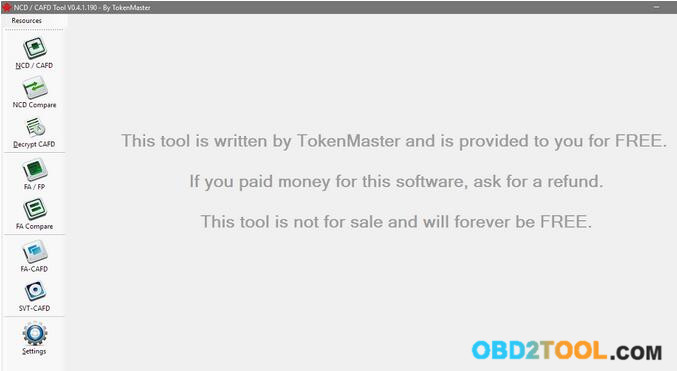
By Resource:
NCD / CAFD: Read *.ncd files offline and easily search for function, viewing current settings as well as other options
NCD Compare: Load *.ncd files using Folder icons or drag & drop and then far right button initiates compare. Popup showing Left vs right values which you can highlight and copy if you choose. It also highlights *.ncd trees differences in red & you can scroll up and down.
Decrypt CAFD: not just for CAFD’s. It also works for other Psdzdata files (eg FAFP).
FA / FP: viewer; tool includes mapping (eg 430 Inter Exter mirror anti dazzle). You can search loaded FA or entire FAFP (ie available options). FP viewer allows you to view options by Vehicle Profile (FP) without loading FA (Vehicle Order).
FA Compare: like #2, but comparing FA’s.
FA-CAFD: You load individual ECU’s *.ncd and can see how FA additions will affect (ie “what-if).
SVT-CAFD: You load entire saved SVT file and see how FA changes will affect (ie “what-if).
Source: http://www.bimmerfest.com/forums/
Saturday, December 30, 2017
How to solve the problem that BMW Icom A2 A3 host can’t be connected?
Aftre the BMW ICOM
host is connected to the car via a 16PIN connector, and the other side
is connected to the computer via a network cable. Your BMW ICOM lan and
system lights will light up. As follows:
But at this moment,the host can’t be found in the computer.As follows:

When meeting the problem,please update your BMW ICOM firmware as the following method:
1.Please connect BMW ICOM to the computer vith network cable and power on the BMW ICOM with a 12V power adapter.
2.Open the website address http://169.254.92.38:60080/by IE browser, username:root password:NZY11502.
3.Click the “update firmware”,it will show ICOM firmware version information.
4.Choose the file ICOM-BootImage-01-11-01.bin,set image type to SYSTEM,click “Send the file”.
5.When shows “Write the image file to the flash?”,click “Yes”,then ICOM light turns red.
6.When shows “The SYSTEM IMAGE update was successfull”,click “Update Firmware”.
7.Choose the file ICOM-ApplicationImage-01-15-01.bin,set image type to APPLICATION.Click “Send the file”.It will takes a few minutes because of a little large file.
8.When shows “Write the image file to the flash?”,click “Yes”,then the ICOM light turns red for the second time.
9.It is all normal,click “reboot”.
After finishing these steps,please connect again,the ICOM host will be found in the computer,as follows:


But at this moment,the host can’t be found in the computer.As follows:

When meeting the problem,please update your BMW ICOM firmware as the following method:
1.Please connect BMW ICOM to the computer vith network cable and power on the BMW ICOM with a 12V power adapter.
2.Open the website address http://169.254.92.38:60080/by IE browser, username:root password:NZY11502.
3.Click the “update firmware”,it will show ICOM firmware version information.
4.Choose the file ICOM-BootImage-01-11-01.bin,set image type to SYSTEM,click “Send the file”.
5.When shows “Write the image file to the flash?”,click “Yes”,then ICOM light turns red.
6.When shows “The SYSTEM IMAGE update was successfull”,click “Update Firmware”.
7.Choose the file ICOM-ApplicationImage-01-15-01.bin,set image type to APPLICATION.Click “Send the file”.It will takes a few minutes because of a little large file.
8.When shows “Write the image file to the flash?”,click “Yes”,then the ICOM light turns red for the second time.
9.It is all normal,click “reboot”.
After finishing these steps,please connect again,the ICOM host will be found in the computer,as follows:

Saturday, November 11, 2017
BMW ICOM ISTA-D 4.07.13 Download Free: No Issues!
Free download BMW ICOM ISTA-D 4.07.13 Standalone with ISTA data, for BMW diagnostics, coding, programming.
ISTA-D 4.07.13 Standalone download free:
https://mega.nz/#F!LNAWyI6a!fFLns3nUa-snYcu49Jxfjg
unknown security!!
Without SQLiteDBs, FASTA & HW check disabled.
License & regfiles included.
BMW_ISPI_ISTA-APP_4.07.13.20911 & ISTA-DATA_4.07.12 download:
https://mega.nz/#F!FlYAFK7L!qlgv72WeROL2OwFR2gP77w
unknown security!!
BMW_ISPI_ISTA-META_4.07.13.xml
BMW_ISPI_ISTA-APP_4.07.13.20911.msi
BMW_ISPI_ISTA-DATA_GLOBAL_4.07.12.istapackage
BMW_ISPI_ISTA-DATA_en-GB_4.07.12.istapackage
BMW_ISPI_ISTA-DATA_de-DE_4.07.12.istapackage
BMW_ISPI_ICOM-FW_03-15-02.msi
BMW_ISPI_ICOM-Next-FW_03-15-00.msi

ISTA-D 4.05.32 ISTA-P 3.61.5 Windows 7 download:
Tested & Safe to use! Works great!!


BMW ISTA-D 4.07.13 Review:
16gb ram, Core I5, 1tb disk (win7 64 bit)
Ista-d has always been running like a charm
i have also check the new ista
all is running and no problems with delete mistakes
i5 4GB RAM
Standalone version would be great!
There is 2 firmware for ICOM A1-A3, for ICOM NEXT not.
Updated. No issues.

BMW ICOM ISTA-D 4.07.13 FAQs:
Q: I tried it out, and it works fine. But after deleting some error codes, it froze, but after I restarted the program, the codes were erased, is there any specific reason why that happened?
A: If you are using a INPA k+Dcan interface, you might need a Voltage Control tool in order to properly close the operation.
If not, you might have some issues with your local installation and/or software environment and/or prerequisites needed for ISTA D.
Q: my question was: is fw-03-15-02 an officially update for icom? Or is here something modded, like “03-15-00-unprotected” or so? Because there is only one file different to 03-15-00. In the past there was always two different files.
A: Official.
Q: Does anyone have License for ISPI Admin Client 5.1.6.181?
A: Check here:
https://mega.nz/#!NNZEhSAZ!EL142xuK8Hnaq_QFXuXbVleGt5Is-QO4mMUQELXUaMc
New Firmware for Icom Next
https://mega.nz/#!vopC3IAI!MfacbUE8DR-q192YpyahvlrThH5FFLsjqpzHSJFT-Bk
For people who want to use the web interface instead.
Q: I just wanna ask about the difference between the ISTA\D or P , ISTA+ and ISPI_ISTA ?? because I have a BMW E60 535XI 2008 and I wanna choose the best option for my car to diagnose or program , and also can I use that program with a K-DCAN OBD II cable which is the same I use for coding or I need to use another one ?
A: ISTA/D is for diagnostics of all BMW’s, Mini, and RR. It can only program Fxx/Ixx/Gxx-series BMW.
For E-series, you can use K+DCAN USB cable with ISTA+ for diagnostics, but you need BMW ICOM A+B+C and ISTA-P or Winkfp for programming.
Q: can’t I for examle update my ECU with sp-daten files using K+DCAN cable using Winkfp ? since it can be done using the same method but with another adapter like “iCarly’ ? I mean why acn’t I program using K+DCAN cable with ISTA P since ICOM is more expensive
A: Carly is a bluetooth device. K+DCAN cable will not work for two reasons; it cannot communicate over “most” interface (multimedia ECU’s) and would potentially take days to program with higher rate of likely failure. An BMW ICOM A2 emulator is less expensive than replacing an ECU.
Q: Now can you please guide me on what and where to buy a good quality of ICOM as I read that ICOM A+B+C from Obd2tool.com is good but I really don’t know how much does it cost and from where to buy it since I saw some on AliExpress but I don’t trust Chinese quality.
A:
ICOM A: main interface
ICOM B: adapter for programming multimedia in E series
ICOM C: adapter for old BMW with round 20 pin diagnostic plug
ICOM D: adapter for motorcycles
You can purchase directly from dealerships; though not sure they are still selling A2’s. If you read the ISTA-P release notes, you will see that next does not always work for E-series. Or, have a try ICOM here:
Q: I’m trying to update SDP but from all files only German language was updated.
I’m doing that all the time but now I have problem and I can solve myself.
What I’m doing wrong?
A: It does not look like anything is updated. You must have xml’s and istapackage for it to work.
Q: I have now installed and changed old ISTA with new 4.07 but now ISTA says that data are incompatible?
A: It is normal, you only update databases, you have not updated ISTA APP
Current ISTA version should be the same as thread title after you apply Reg fix included with standalone.
just install new ISTA and solved
ISTA-D 4.07.13 Standalone download free:
https://mega.nz/#F!LNAWyI6a!fFLns3nUa-snYcu49Jxfjg
unknown security!!
Without SQLiteDBs, FASTA & HW check disabled.
License & regfiles included.
BMW_ISPI_ISTA-APP_4.07.13.20911 & ISTA-DATA_4.07.12 download:
https://mega.nz/#F!FlYAFK7L!qlgv72WeROL2OwFR2gP77w
unknown security!!
BMW_ISPI_ISTA-META_4.07.13.xml
BMW_ISPI_ISTA-APP_4.07.13.20911.msi
BMW_ISPI_ISTA-DATA_GLOBAL_4.07.12.istapackage
BMW_ISPI_ISTA-DATA_en-GB_4.07.12.istapackage
BMW_ISPI_ISTA-DATA_de-DE_4.07.12.istapackage
BMW_ISPI_ICOM-FW_03-15-02.msi
BMW_ISPI_ICOM-Next-FW_03-15-00.msi
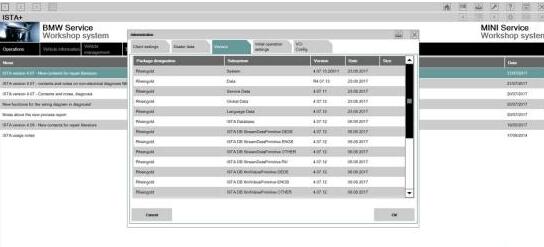
ISTA-D 4.05.32 ISTA-P 3.61.5 Windows 7 download:
Tested & Safe to use! Works great!!
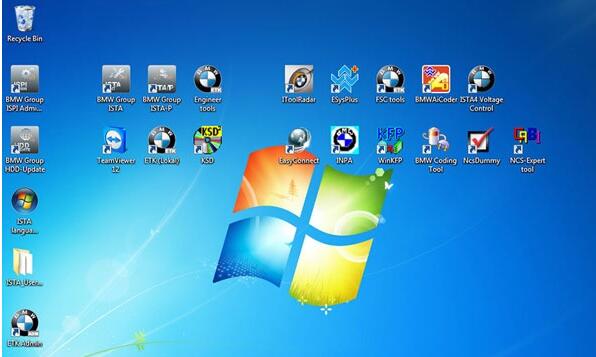
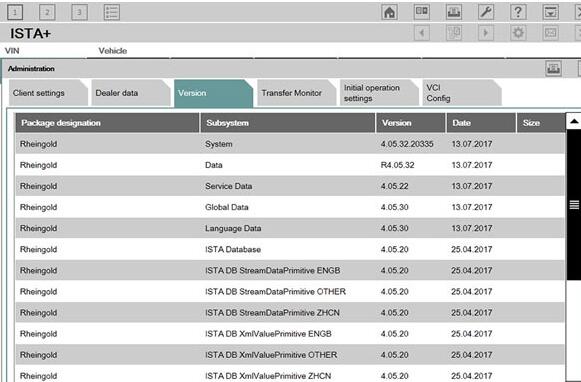
BMW ISTA-D 4.07.13 Review:
16gb ram, Core I5, 1tb disk (win7 64 bit)
Ista-d has always been running like a charm
i have also check the new ista
all is running and no problems with delete mistakes
i5 4GB RAM
Standalone version would be great!
There is 2 firmware for ICOM A1-A3, for ICOM NEXT not.
Updated. No issues.
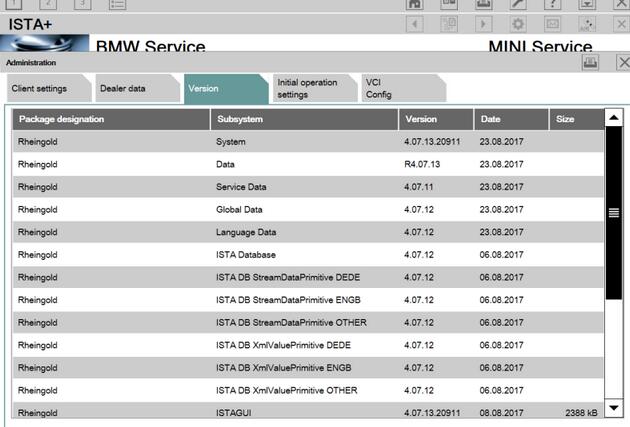
BMW ICOM ISTA-D 4.07.13 FAQs:
Q: I tried it out, and it works fine. But after deleting some error codes, it froze, but after I restarted the program, the codes were erased, is there any specific reason why that happened?
A: If you are using a INPA k+Dcan interface, you might need a Voltage Control tool in order to properly close the operation.
If not, you might have some issues with your local installation and/or software environment and/or prerequisites needed for ISTA D.
Q: my question was: is fw-03-15-02 an officially update for icom? Or is here something modded, like “03-15-00-unprotected” or so? Because there is only one file different to 03-15-00. In the past there was always two different files.
A: Official.
Q: Does anyone have License for ISPI Admin Client 5.1.6.181?
A: Check here:
https://mega.nz/#!NNZEhSAZ!EL142xuK8Hnaq_QFXuXbVleGt5Is-QO4mMUQELXUaMc
New Firmware for Icom Next
https://mega.nz/#!vopC3IAI!MfacbUE8DR-q192YpyahvlrThH5FFLsjqpzHSJFT-Bk
For people who want to use the web interface instead.
Q: I just wanna ask about the difference between the ISTA\D or P , ISTA+ and ISPI_ISTA ?? because I have a BMW E60 535XI 2008 and I wanna choose the best option for my car to diagnose or program , and also can I use that program with a K-DCAN OBD II cable which is the same I use for coding or I need to use another one ?
A: ISTA/D is for diagnostics of all BMW’s, Mini, and RR. It can only program Fxx/Ixx/Gxx-series BMW.
For E-series, you can use K+DCAN USB cable with ISTA+ for diagnostics, but you need BMW ICOM A+B+C and ISTA-P or Winkfp for programming.
Q: can’t I for examle update my ECU with sp-daten files using K+DCAN cable using Winkfp ? since it can be done using the same method but with another adapter like “iCarly’ ? I mean why acn’t I program using K+DCAN cable with ISTA P since ICOM is more expensive
A: Carly is a bluetooth device. K+DCAN cable will not work for two reasons; it cannot communicate over “most” interface (multimedia ECU’s) and would potentially take days to program with higher rate of likely failure. An BMW ICOM A2 emulator is less expensive than replacing an ECU.
Q: Now can you please guide me on what and where to buy a good quality of ICOM as I read that ICOM A+B+C from Obd2tool.com is good but I really don’t know how much does it cost and from where to buy it since I saw some on AliExpress but I don’t trust Chinese quality.
A:
ICOM A: main interface
ICOM B: adapter for programming multimedia in E series
ICOM C: adapter for old BMW with round 20 pin diagnostic plug
ICOM D: adapter for motorcycles
You can purchase directly from dealerships; though not sure they are still selling A2’s. If you read the ISTA-P release notes, you will see that next does not always work for E-series. Or, have a try ICOM here:
Q: I’m trying to update SDP but from all files only German language was updated.
I’m doing that all the time but now I have problem and I can solve myself.
What I’m doing wrong?
A: It does not look like anything is updated. You must have xml’s and istapackage for it to work.
Q: I have now installed and changed old ISTA with new 4.07 but now ISTA says that data are incompatible?
A: It is normal, you only update databases, you have not updated ISTA APP
Current ISTA version should be the same as thread title after you apply Reg fix included with standalone.
just install new ISTA and solved
Solved BMW ISTA error IFH-0010, Vehicle could not be identified
This blog list 3 kinds of bmw diagnostic scanner ISTA errors and solutions you may need.
ISTA NCS error IFH-0010+ solution
ISTA error”MSVCP120.dll is missing”+ solution
ISTA error “The vehicle could not be identified”+ solution
Note: All error solutions here are suitable for BMW ICOM A2 and BMW ICOM Next!
ISTA error IFH-0010: DATATRANSMISSION TO CONTROLUNIT DISTURBED

ISTA error: A communication fault occurred during activation
Incorrect state: ERROR ECU CONDITIONS NOT CORRECT OR REQUEST SEQUENCE ERROR

Solution: Try setting COM port latency to 1 in Advanced Settings for the port. You should change it to 1 to have the least lag/disturbances between data transfer.
BMW ISTA System error “MSVCP120.dll is missing”
The program can’t start because MSVCP120.dll is missing from your computer.

Solution: Reinstall VC++ Redistributables and try again. If you’re running x64, you will need both x86 and x64 bit versions installed.
Feedback: I got rid of this .dll error by installing an older version of VC++.
BMW ISTA error “The vehicle could not be identified. Please check the access to the vehicle and check whether the testing-analysis-diagnosis has been activated.”
Solution 1: I changed my com port to port 1 and it worked. It’s worth a shot, easy to change back if it doesn’t work.
Solution 2: Uncheck the Ethernet box and BMW ICOM A2+B+C ISTA-D worked.
Feedback: I changed COM9 to COM1. Its working!
ISTA NCS error IFH-0010+ solution
ISTA error”MSVCP120.dll is missing”+ solution
ISTA error “The vehicle could not be identified”+ solution
Note: All error solutions here are suitable for BMW ICOM A2 and BMW ICOM Next!
ISTA error IFH-0010: DATATRANSMISSION TO CONTROLUNIT DISTURBED
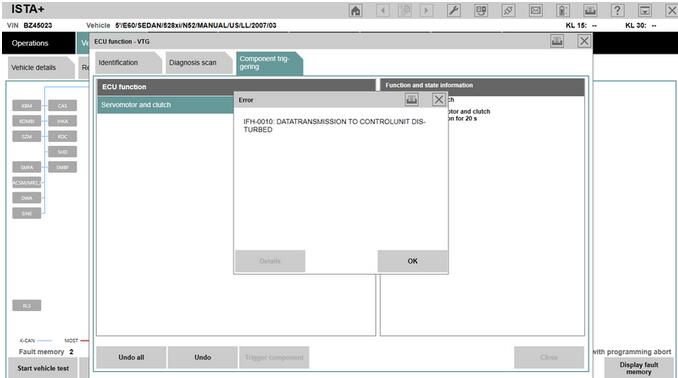
ISTA error: A communication fault occurred during activation
Incorrect state: ERROR ECU CONDITIONS NOT CORRECT OR REQUEST SEQUENCE ERROR
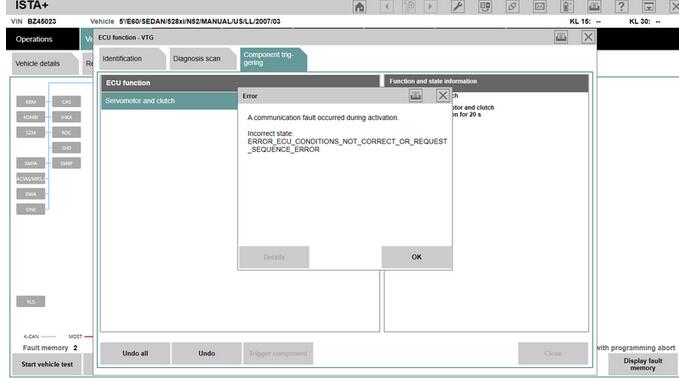
Solution: Try setting COM port latency to 1 in Advanced Settings for the port. You should change it to 1 to have the least lag/disturbances between data transfer.
BMW ISTA System error “MSVCP120.dll is missing”
The program can’t start because MSVCP120.dll is missing from your computer.
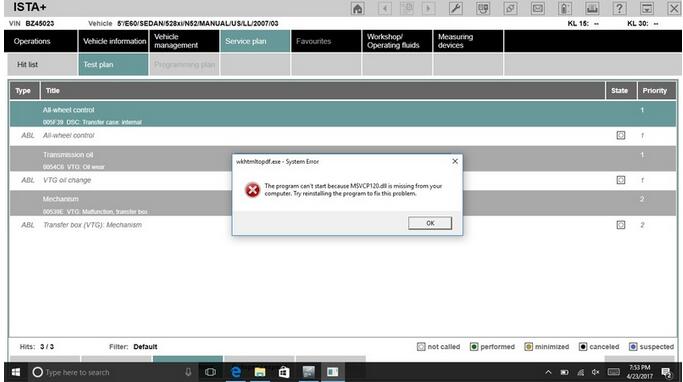
Solution: Reinstall VC++ Redistributables and try again. If you’re running x64, you will need both x86 and x64 bit versions installed.
Feedback: I got rid of this .dll error by installing an older version of VC++.
BMW ISTA error “The vehicle could not be identified. Please check the access to the vehicle and check whether the testing-analysis-diagnosis has been activated.”
Solution 1: I changed my com port to port 1 and it worked. It’s worth a shot, easy to change back if it doesn’t work.
Solution 2: Uncheck the Ethernet box and BMW ICOM A2+B+C ISTA-D worked.
Feedback: I changed COM9 to COM1. Its working!
How to setup BMW ISTA/P Loader for ICOM A2 ENET cable K+DCAN adapter
The text here, as a user manual of BMW ISTA/P Loader / ICOM
Emulator, is aimed to help those puzzled with ISTA/P Loader setup for ICOM A2, ENET cable, K+DCAN USB interface.
Note: all info here not original, shared by a forum member
So try at your own risk!
Main content:
Part 1 – Compatible device
Part 2 – Latest ISTA/P Loader update information
Part 3 – How to install ISTA/P Loader v4.x
Part 4 – How to use ISTA/P loader with ICOM A2, K+DCAN cable, ENET cable
Part 5 – How to shut down ISTA/P

Part 1 – Compatible device:
ISTA/P Loader compatible with ICOM A2 (OEM or clone), K+DCAN USB and ENET


Part 2 – Latest ISTA/P Loader update information:
NEWEST – ISTA/P Loader V4.8 update info:
Free download BMW ISTA-P Loader V4.8.7 to get all new info yourself
……
ISTA/P Loader V4.2 update info:
Custom resolution option added
Improved detection of bmw scan tool ISTA-P install location.
Improved compatibility with windows 10
Code improvements & minor bug fixes.
ISTA/P Loader V4.1 update info:
Code improvements/bug fixes. Main improvement – ISTA/P update fix (installing updates no longer fail/rollback after using loader). Note: if you have used old loader a clean install of ISTA/P will be needed (or restore backed up files). Any updates after that should install ok.
ISTA/P Loader V4 update info:
IBAC activation code generator added (also accessible from the notification icon menu).
ISTA/P user manual integrated.
Some code improvements.
Part 3 – How to install ISTA/P Loader v4.x:
Windows XP
Framework 2 – install using dotnetfx.exe
Framework 4 – install 4.0 using dotNetFx40_Full_x86_x64.exe (higher versions are not supported by XP)
Windows 7
Framework 2 – Built into the OS
Framework 4 – Install 4.52
Windows 8
Framework 2 – Built into the OS BUT needs enabling:
Framework 4 – Update to 4.52
Windows 10
Framework 2 – Built into the OS BUT needs enabling:
Framework 4 – Built into the OS
Step-by-step ISTA-P instructions
1. Disable your anti virus & firewall & run the network configuration tool “NetworkTool.exe”
note: may take a few seconds for tool to appear & up to 30 seconds to complete.
Then check in network connections that the USB network connection has appeared.

2. Install .net framework 2 & 4 (do not skip this step– loader will crash if these are not installed).
3. Install Java runtime (do not skip this step– loader will crash if this is not installed).
4. Install patched Ediabas 7.3.
5. Set up your Ethernet adaptor as shown in screenshot below (applies to ENET only. If you only intend using K+DCAN then you can skip this step).

Copy loader to desktop.7. Start the loader and choose your required settings and enter some dealerdata.note: ensure ISTA/P is installed on your system. If no ISTA/P installation is found, the loader will not start up.
Part 4 – How to use ISTA/P loader with ICOM A2, K+DCAN cable, ENET cable
How to use with ICOM A2
1. Disable firewall & turn off WIFI.
2. Connect ICOM to car and PC.
3. Click BMW, Mini, or Rolls Royce brand. ISTA/P will now launch.
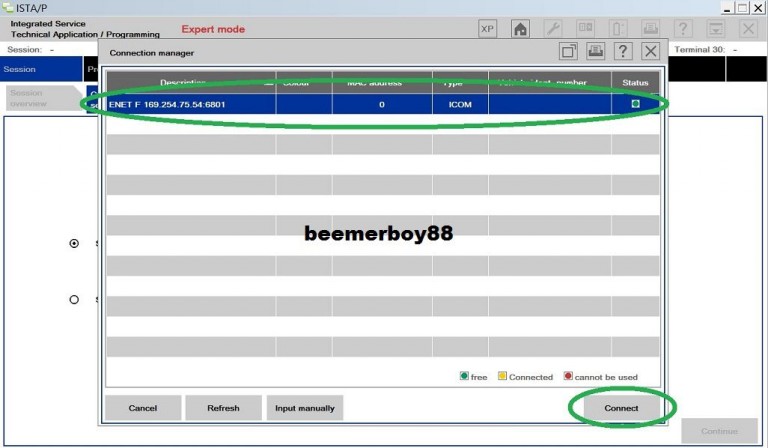
4. Select your ICOM in connection manager.
How to use with K+DCAN USB cable
First install your k+dcan cable and set up com port etc. (default port number for patched ediabas is com9).
1. Disable your anti virus, firewall & turn off WIFI.
2. Plug in K+DCAN cable and connect cable to car.
3. Start the loader
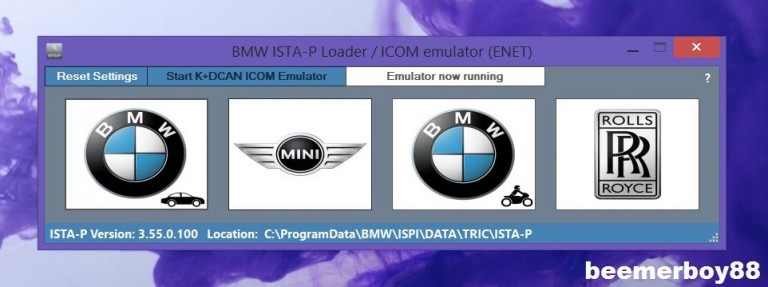
4. Click the “start K+DCAN ICOM emulator button” once. Then wait for emulator running notifications to appear.

Click BMW, Mini, or Rolls Royce brand. ISTA/P will now launch.6. Select K+DCAN in connection manager.

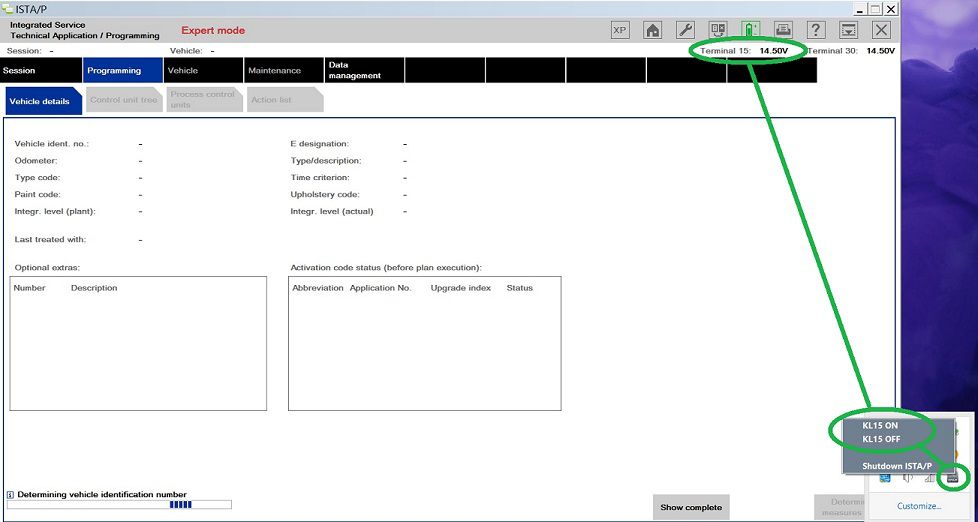
Note: when ISTA/P asks for ignition ON/OFF during programming use the KL15 controls located in the notification area of the taskbar (right click on ISTA/P notification icon). Default setting is “ON”. Obviously actual car ignition will need to be turned ON/OFF also.

How to use with ENET cable (BMW F-series)
1. Ensure your Ethernet adaptor is set up as shown in the screenshot below.

2. Disable anti virus, firewall & turn off WIFI.
3. Connect ENET cable to car and PC. Turn on ignition and wait for a minute or two.
4. Start the loader.
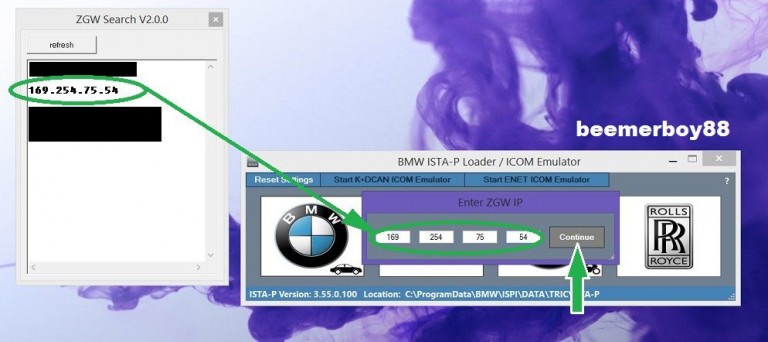
5. Click the “start ENET ICOM emulator button” once. ZGW search will now open.
6. Enter your cars ZGW IP and click “continue”. Then wait for emulator running notifications to appear.


Click BMW, Mini, or Rolls Royce brand. ISTA/P will now launch.8. Select ENET in connection manager.

Note: when ISTA/P asks for ignition ON/OFF during programming use the KL15 controls located in the notification area of the taskbar (right click on ISTA/P notification icon). Default setting is “ON”. Obviously actual car ignition will need to be turned ON/OFF also.

Part 5 – How to shut down ISTA/P
Ensure session has ended and cleared from the session overview list. Then close down the Car Scanner ISTA/P window. The loader will then shutdown everything safely. Alternatively use the shutdown button on the ISTA/P notification icon.
Note: all info here not original, shared by a forum member
So try at your own risk!
Main content:
Part 1 – Compatible device
Part 2 – Latest ISTA/P Loader update information
Part 3 – How to install ISTA/P Loader v4.x
Part 4 – How to use ISTA/P loader with ICOM A2, K+DCAN cable, ENET cable
Part 5 – How to shut down ISTA/P
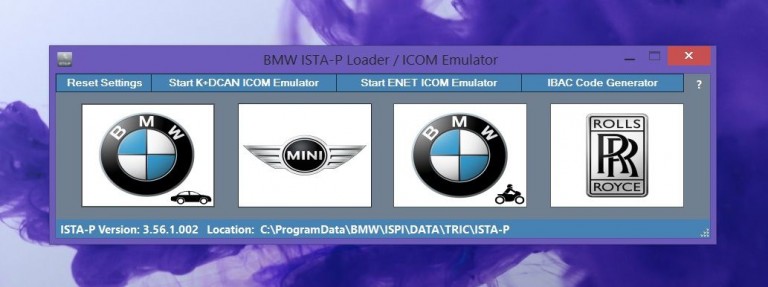
Part 1 – Compatible device:
ISTA/P Loader compatible with ICOM A2 (OEM or clone), K+DCAN USB and ENET
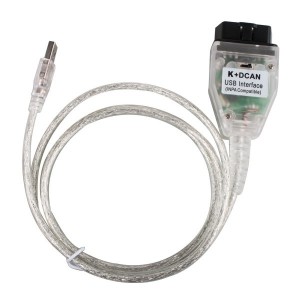
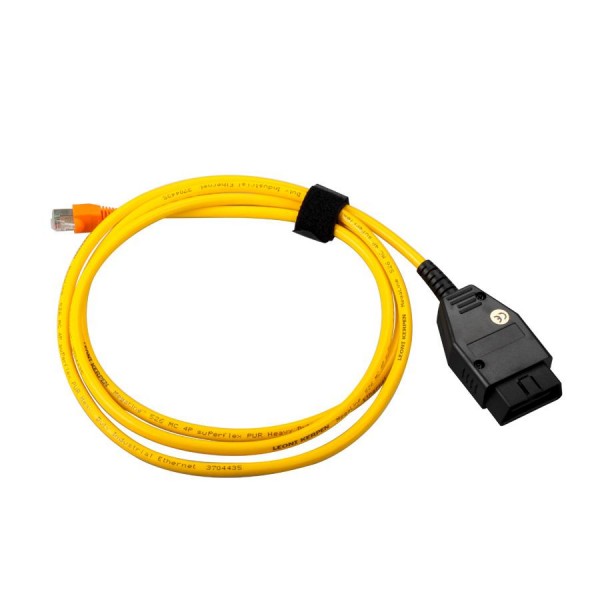
Part 2 – Latest ISTA/P Loader update information:
NEWEST – ISTA/P Loader V4.8 update info:
Free download BMW ISTA-P Loader V4.8.7 to get all new info yourself
……
ISTA/P Loader V4.2 update info:
Custom resolution option added
Improved detection of bmw scan tool ISTA-P install location.
Improved compatibility with windows 10
Code improvements & minor bug fixes.
ISTA/P Loader V4.1 update info:
Code improvements/bug fixes. Main improvement – ISTA/P update fix (installing updates no longer fail/rollback after using loader). Note: if you have used old loader a clean install of ISTA/P will be needed (or restore backed up files). Any updates after that should install ok.
ISTA/P Loader V4 update info:
IBAC activation code generator added (also accessible from the notification icon menu).
ISTA/P user manual integrated.
Some code improvements.
Part 3 – How to install ISTA/P Loader v4.x:
Windows XP
Framework 2 – install using dotnetfx.exe
Framework 4 – install 4.0 using dotNetFx40_Full_x86_x64.exe (higher versions are not supported by XP)
Windows 7
Framework 2 – Built into the OS
Framework 4 – Install 4.52
Windows 8
Framework 2 – Built into the OS BUT needs enabling:
Framework 4 – Update to 4.52
Windows 10
Framework 2 – Built into the OS BUT needs enabling:
Framework 4 – Built into the OS
Step-by-step ISTA-P instructions
1. Disable your anti virus & firewall & run the network configuration tool “NetworkTool.exe”
note: may take a few seconds for tool to appear & up to 30 seconds to complete.
Then check in network connections that the USB network connection has appeared.
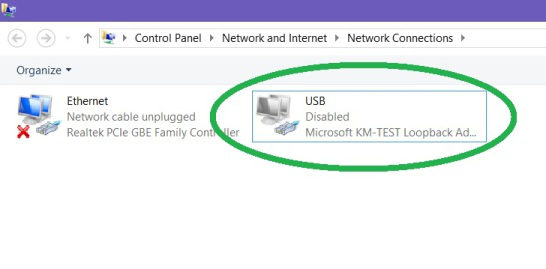
2. Install .net framework 2 & 4 (do not skip this step– loader will crash if these are not installed).
3. Install Java runtime (do not skip this step– loader will crash if this is not installed).
4. Install patched Ediabas 7.3.
5. Set up your Ethernet adaptor as shown in screenshot below (applies to ENET only. If you only intend using K+DCAN then you can skip this step).
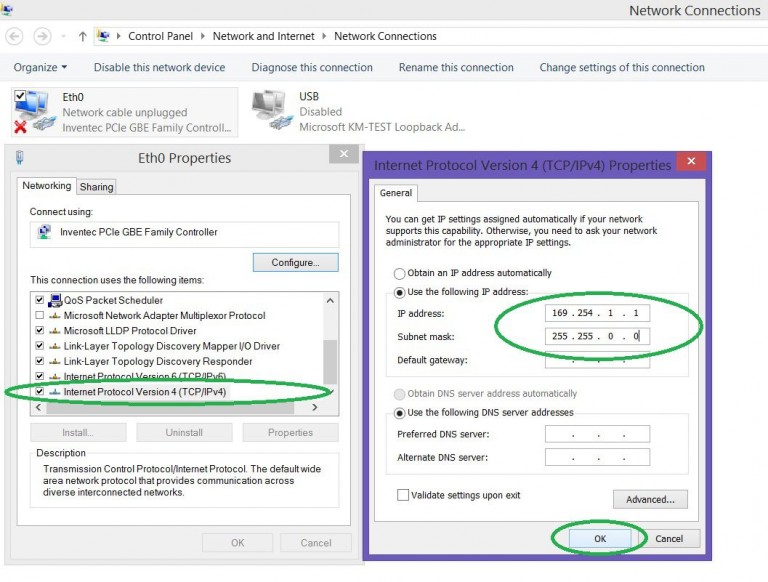
Copy loader to desktop.7. Start the loader and choose your required settings and enter some dealerdata.note: ensure ISTA/P is installed on your system. If no ISTA/P installation is found, the loader will not start up.
Part 4 – How to use ISTA/P loader with ICOM A2, K+DCAN cable, ENET cable
How to use with ICOM A2
1. Disable firewall & turn off WIFI.
2. Connect ICOM to car and PC.
3. Click BMW, Mini, or Rolls Royce brand. ISTA/P will now launch.
4. Select your ICOM in connection manager.
How to use with K+DCAN USB cable
First install your k+dcan cable and set up com port etc. (default port number for patched ediabas is com9).
1. Disable your anti virus, firewall & turn off WIFI.
2. Plug in K+DCAN cable and connect cable to car.
3. Start the loader
4. Click the “start K+DCAN ICOM emulator button” once. Then wait for emulator running notifications to appear.
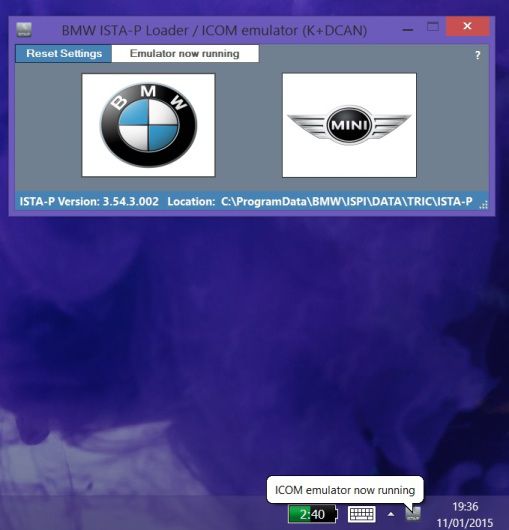
Click BMW, Mini, or Rolls Royce brand. ISTA/P will now launch.6. Select K+DCAN in connection manager.
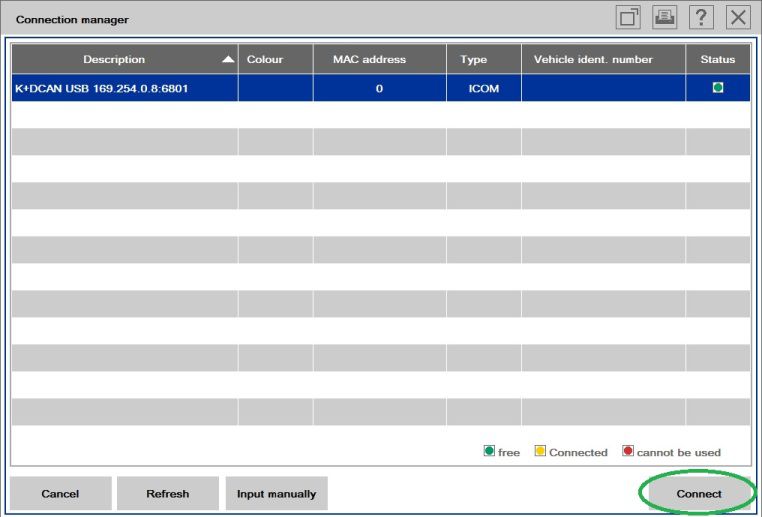
Note: when ISTA/P asks for ignition ON/OFF during programming use the KL15 controls located in the notification area of the taskbar (right click on ISTA/P notification icon). Default setting is “ON”. Obviously actual car ignition will need to be turned ON/OFF also.
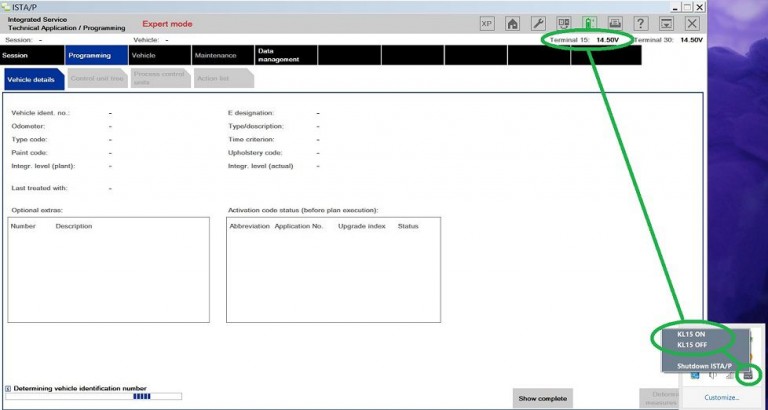
How to use with ENET cable (BMW F-series)
1. Ensure your Ethernet adaptor is set up as shown in the screenshot below.
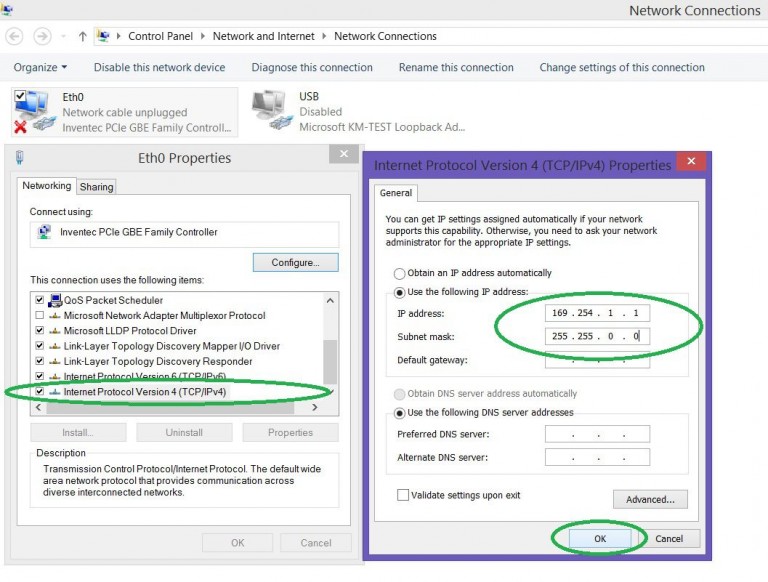
2. Disable anti virus, firewall & turn off WIFI.
3. Connect ENET cable to car and PC. Turn on ignition and wait for a minute or two.
4. Start the loader.
5. Click the “start ENET ICOM emulator button” once. ZGW search will now open.
6. Enter your cars ZGW IP and click “continue”. Then wait for emulator running notifications to appear.
Click BMW, Mini, or Rolls Royce brand. ISTA/P will now launch.8. Select ENET in connection manager.
Note: when ISTA/P asks for ignition ON/OFF during programming use the KL15 controls located in the notification area of the taskbar (right click on ISTA/P notification icon). Default setting is “ON”. Obviously actual car ignition will need to be turned ON/OFF also.
Part 5 – How to shut down ISTA/P
Ensure session has ended and cleared from the session overview list. Then close down the Car Scanner ISTA/P window. The loader will then shutdown everything safely. Alternatively use the shutdown button on the ISTA/P notification icon.
(Solved) ISTA-P folder not exist, improper PC shutdown
I have solved an ISTA-P problem that happen in case of improper shutdown of windows 7 32bit, ISTA–P version 3.61.5.000.
With help of users > darckreign1984 and AutoExe3219 I was able to discover following. 8 hours of labor.
If you see a screen, that BMW ICOM ISTA-P folder does not exist anymore, just check if there is a folder named Dataprocurement in following two directories :

C:\ProgramData\BMW\ISPI\data\TRIC\ISTA-P\BMW
C:\ProgramData\BMW\ISPI\data\TRIC\ISTA-P\Taurus
If there is no such directories, you must copy them from another location in the PC. The location is :
C:\Users\Administrator\AppData\Roaming\BMW Group\BMW ISTA-P Loader V6.1F\6.1.1.0\dataprocurement
There ate the two separate directories that simply have to be copied to the directories listed above. Then just start the loader and fill up the form with a data that you want. Then, from the loader page choose BMW cars and you are good to go.

Remember. Never try to shut down the PC before the loader is completelu shut down.
Make a backup of the critical locations to be able to make a restore in case of such accident.
Maybe this thread could be a sticky Auto Scanner Tool.
With help of users > darckreign1984 and AutoExe3219 I was able to discover following. 8 hours of labor.
If you see a screen, that BMW ICOM ISTA-P folder does not exist anymore, just check if there is a folder named Dataprocurement in following two directories :
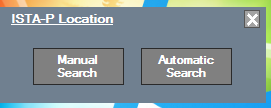
C:\ProgramData\BMW\ISPI\data\TRIC\ISTA-P\BMW
C:\ProgramData\BMW\ISPI\data\TRIC\ISTA-P\Taurus
If there is no such directories, you must copy them from another location in the PC. The location is :
C:\Users\Administrator\AppData\Roaming\BMW Group\BMW ISTA-P Loader V6.1F\6.1.1.0\dataprocurement
There ate the two separate directories that simply have to be copied to the directories listed above. Then just start the loader and fill up the form with a data that you want. Then, from the loader page choose BMW cars and you are good to go.
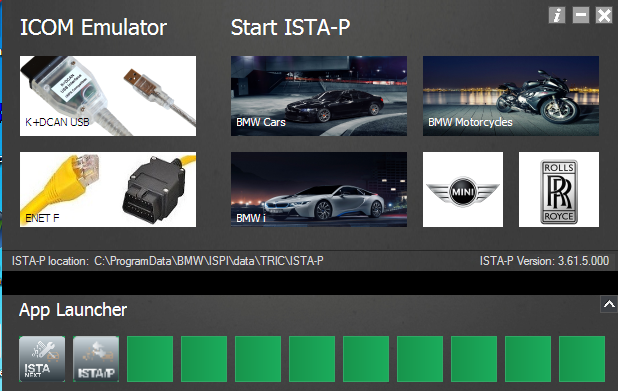
Remember. Never try to shut down the PC before the loader is completelu shut down.
Make a backup of the critical locations to be able to make a restore in case of such accident.
Maybe this thread could be a sticky Auto Scanner Tool.
Why do i need BMW ICOM A2 icom B icom C icom D?
The passage here explains the reasons for BMW Diagnostic Tool
icom a (a2, a3), icom b, icom c and icom d for BMW diagnosis, coding
and programming. And also, you will know what you should need for use in
different repairing situations.
ICOM A (A2, A3) – OBD diagnostic supporting MOST, D-CAN and K-CAN protocols

ICOM A is a basic component. Physically, on one hand, it supplies the interface that connects with car OBD II diagnosing interface; on the other hand, it can supply the interface that is self-adaptable intergraded into garage. As protocol converter, it is responsible for testing and data exchange in different controlling units, as well as signal processing through a high effective computer core. Electrical power pressure is supplied by vehicle interface. The lowest power pressure of Electrical operation of ICOM A is fixed to 8V. Only it exceeds the lowest value, can a stable function be guaranteed.
ICOM A vs ICOM A2 vs ICOM A3
Modified BMW ICOM A2 for vehicles with OBD access receives a significantly more powerful processor and more storage capacity. And robust aluminium case will help to avoid damage when using in harsh environments. It works better in cooling, runs faster and works more stable, not easier broken than older ICOM A.
ICOM A3 can program all units for all BMW series expect media system, and work more stable and has stronger compatibility than ICOM A2, A1.
ICOM B – diagnosis via MOST bus, and possess link to A-interface through USB connection

ICOM B for vehicles with optical MOST access will be equipped with a soft cover made of rubber instead of the former plastic cap, to protect the MOST connector
ICOM B is the external MOST interface of ICOM A, and it connect with ICOM A by a usual USB or that within supplying. Power is supplied by USB through ICOM A from OBD2TOOL.
Only when the power supplied to ICOM A lower to 8V, can electrical running of ICOM B be ready to connect with standard.
ICOM C–20-pin cable for previous types

ICOM C for old series with a diagnostics socket will be additionally equipped with an approx. 20 cm long cable, which facilitates the connection of the ICOM A2 and makes storage in the engine compartment easier.
ICOM C in an intelligent interface converter, which makes OBD II compatible with BMW round plug. As a lengthened auxiliary module, it makes ICOM A connects with non-OBD II vehicle module. Power is supplied by round plug through KL30.
The lowest pressure of ICOM C electrical running regulated to 8v. Electrical pressure on KL30 is conveyed to OBD II through internal equipment, and then to ICOM A. Only when vehicle battery voltage ICOM C exceeds to the lowest limitation, can it guarantee the stable interactivity of the two equipments.
ICOM A2, ICOM B, ICOM C connection:

ICOM A B C and BMW E & F-series

Save a lot for E and F series:
BMW E series: K+DCAN USB cable
BMW F series: ENET cable
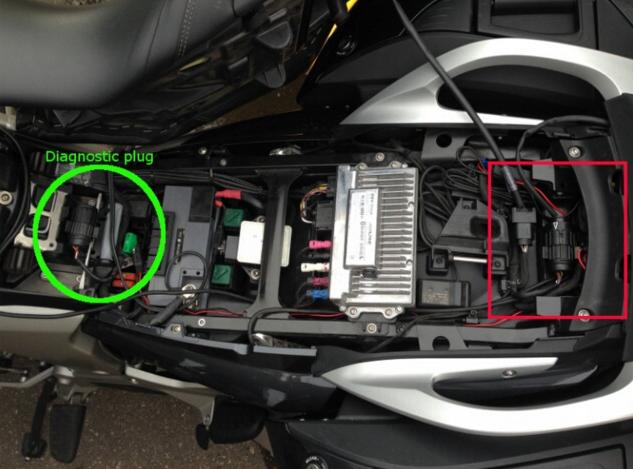
ICOM D – for BMW motorcycles motobikes diagnostics

ICOM D is a 10-pin to 16-pin diagnostic cable for BMW motorcycles motobikes diagnostic and programming together with ICOM A2
It is the TOP 1 in the BMW motor diagnostics list, with the most powerful & stable function and the best reputation.
ICOM D connector location:

ICOM A (A2, A3) – OBD diagnostic supporting MOST, D-CAN and K-CAN protocols
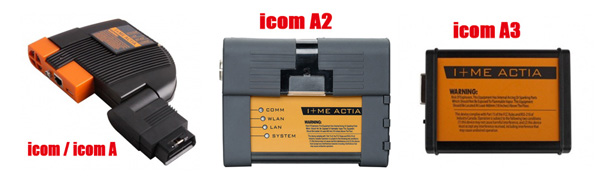
ICOM A is a basic component. Physically, on one hand, it supplies the interface that connects with car OBD II diagnosing interface; on the other hand, it can supply the interface that is self-adaptable intergraded into garage. As protocol converter, it is responsible for testing and data exchange in different controlling units, as well as signal processing through a high effective computer core. Electrical power pressure is supplied by vehicle interface. The lowest power pressure of Electrical operation of ICOM A is fixed to 8V. Only it exceeds the lowest value, can a stable function be guaranteed.
ICOM A vs ICOM A2 vs ICOM A3
Modified BMW ICOM A2 for vehicles with OBD access receives a significantly more powerful processor and more storage capacity. And robust aluminium case will help to avoid damage when using in harsh environments. It works better in cooling, runs faster and works more stable, not easier broken than older ICOM A.
ICOM A3 can program all units for all BMW series expect media system, and work more stable and has stronger compatibility than ICOM A2, A1.
ICOM B – diagnosis via MOST bus, and possess link to A-interface through USB connection
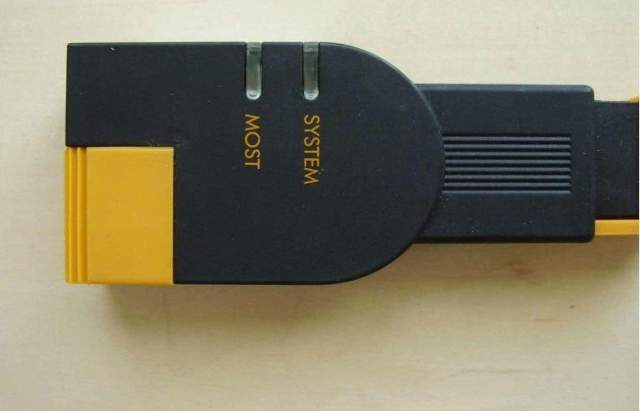
ICOM B for vehicles with optical MOST access will be equipped with a soft cover made of rubber instead of the former plastic cap, to protect the MOST connector
ICOM B is the external MOST interface of ICOM A, and it connect with ICOM A by a usual USB or that within supplying. Power is supplied by USB through ICOM A from OBD2TOOL.
Only when the power supplied to ICOM A lower to 8V, can electrical running of ICOM B be ready to connect with standard.
ICOM C–20-pin cable for previous types
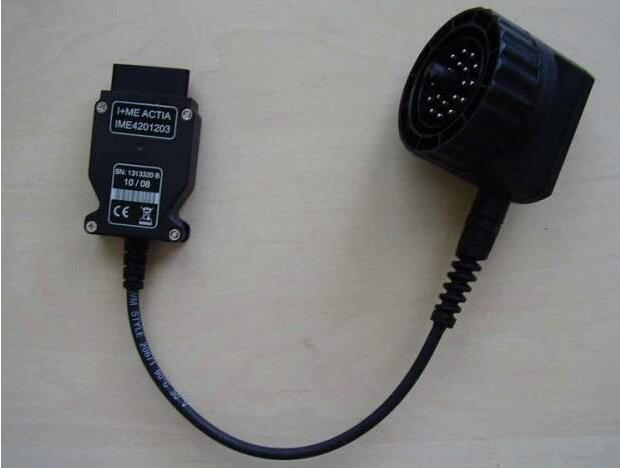
ICOM C for old series with a diagnostics socket will be additionally equipped with an approx. 20 cm long cable, which facilitates the connection of the ICOM A2 and makes storage in the engine compartment easier.
ICOM C in an intelligent interface converter, which makes OBD II compatible with BMW round plug. As a lengthened auxiliary module, it makes ICOM A connects with non-OBD II vehicle module. Power is supplied by round plug through KL30.
The lowest pressure of ICOM C electrical running regulated to 8v. Electrical pressure on KL30 is conveyed to OBD II through internal equipment, and then to ICOM A. Only when vehicle battery voltage ICOM C exceeds to the lowest limitation, can it guarantee the stable interactivity of the two equipments.
ICOM A2, ICOM B, ICOM C connection:
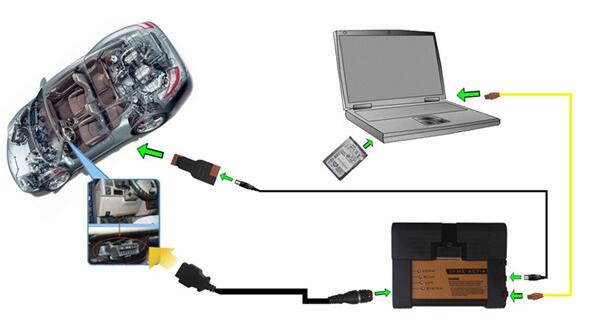
ICOM A B C and BMW E & F-series
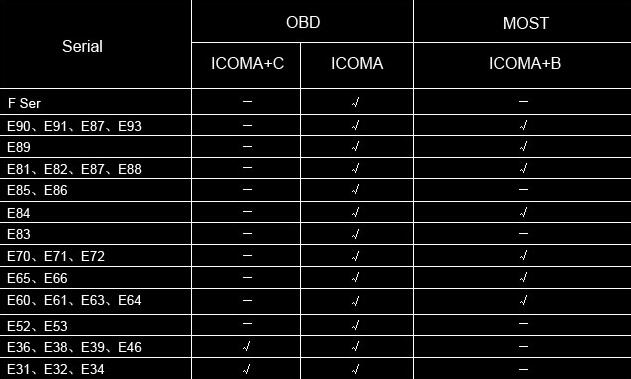
Save a lot for E and F series:
BMW E series: K+DCAN USB cable
BMW F series: ENET cable
ICOM D – for BMW motorcycles motobikes diagnostics
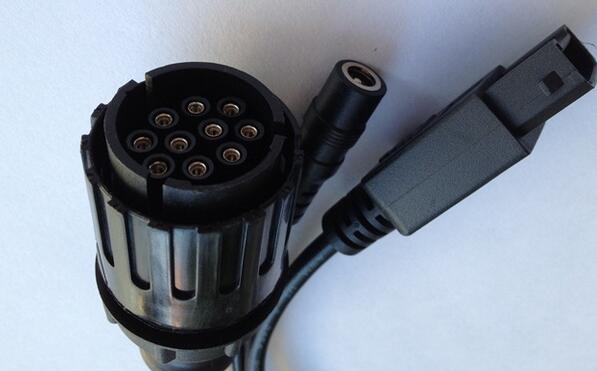
ICOM D is a 10-pin to 16-pin diagnostic cable for BMW motorcycles motobikes diagnostic and programming together with ICOM A2
It is the TOP 1 in the BMW motor diagnostics list, with the most powerful & stable function and the best reputation.
ICOM D connector location:
Thursday, October 26, 2017
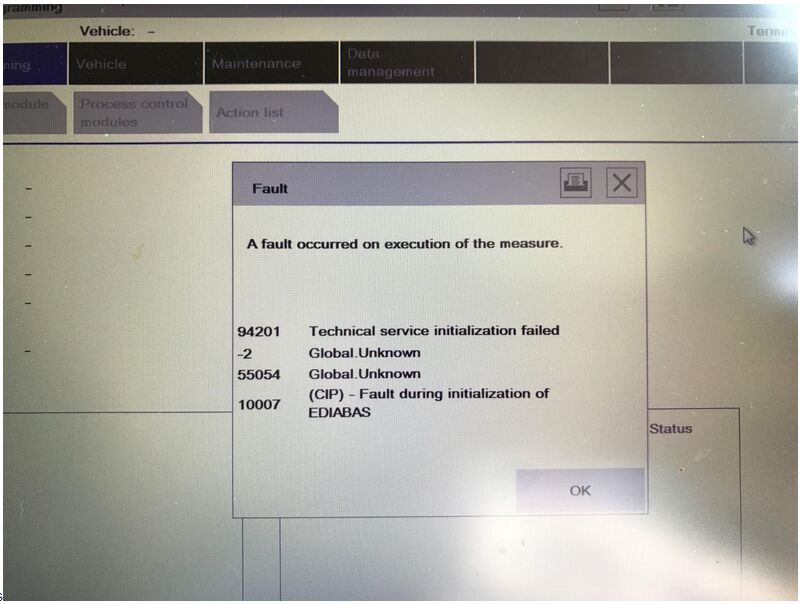
How to solve ISTA-P 3.60.2.001 error 94201 63031 63014
10 steps to solve ISTA-P 3.60.2.001 error 94201 63031 /63014 after boot.

1.End the dialogue.
2.Disconnect ICOM device from the BMW.
3.unplug the car battery for 10 minutes.
4.Plug the car battery again, boot the new ISTA/P dialogue.
5.Turn on the ignition.
6.Connect the ICOM device to the BMW.
7.Choose “ICOM” in the ISTA/P connection manager.
8.Boot the programming dialogue.
If the problem is not solved, please do by following below steps.
1.End the dialogue.
2.To confirm the repair shop has no the activated ISTA/P dialogue.
3.Reboot the programming device (PC, ISID or ISSS)
4.Use other ICOM BMW to restart new programming dialogue. Connect ICOM to the vehicle with the ignition is on.
If the problem is not solved, please firstly follow the
[=>00044444EN] description to collect Log file, then contact the tech support.
Thanks to Susan who are working at www.obd2tool.com,one user bought from her one ISTA-D 4.04.12 ISTA-P 3.60.2.001 and come across the above error, with her help, the problem is solved finally.
Attach ISTA-P 3.60.2.001 picture:
ista-p-error-2
1.End the dialogue.
2.Disconnect ICOM device from the BMW.
3.unplug the car battery for 10 minutes.
4.Plug the car battery again, boot the new ISTA/P dialogue.
5.Turn on the ignition.
6.Connect the ICOM device to the BMW.
7.Choose “ICOM” in the ISTA/P connection manager.
8.Boot the programming dialogue.
If the problem is not solved, please do by following below steps.
1.End the dialogue.
2.To confirm the repair shop has no the activated ISTA/P dialogue.
3.Reboot the programming device (PC, ISID or ISSS)
4.Use other ICOM BMW to restart new programming dialogue. Connect ICOM to the vehicle with the ignition is on.
If the problem is not solved, please firstly follow the
[=>00044444EN] description to collect Log file, then contact the tech support.
Thanks to Susan who are working at www.obd2tool.com,one user bought from her one ISTA-D 4.04.12 ISTA-P 3.60.2.001 and come across the above error, with her help, the problem is solved finally.
Attach ISTA-P 3.60.2.001 picture:
ista-p-error-2
BMW E-sys ENET vs Carly for BMW
Which better for BMW F series coding: BMW E-sys ENET or Carly for BMW?

Look here:
Carly: not for coding; E sys: coding success
I have been using Carly on my F30 for over a year, but not for coding, as that’s still not supported on Android. Carly can read and clear diagnostic codes and a host of other things that E-Sys isn’t meant to do. I recommend going to their website and checking on its capabilities there. From what they’ve told me, their F-chassis coding will probably be limited to the KOMBI module (dashboard items), but it may expand to include HU-ENTRY/CIC/NBT/NBT2 and FEM_BODY in the future.
It’s a simple connect (via their BT adapter), read coding data, select features to activate or deactivate (or change values), then push back into the module. Same as E-Sys but with a much more simplified interface. It allows you to save the module coding data as a backup, just like E-Sys. It worked great for coding on E-chassis cars, so I’m hoping it will be the same for F-Chassis, although they’ve had quite a bit of time to get things working and so far, coding with Android still isn’t fully tested yet. I’ve since used E-Sys for coding my F30 and the wife’s F23.
BMW E-Sys works better than Carly app in Fxx coding
I used Carly for my wife’s previous E88 128 convertible and it worked great – no having to do one item at a time, etc. Not quite sure what the problem is with the F-cars, because the principle is the same – read coding data, modify, write coding data. Apparently the new “network” and whatever read/write protocol that implies is far different than the BMW Engineer Software of the E-series cars.
By comparison, E-Sys has improved vastly over the past year or two and coding both my F30 and the wife’s new F23 was relatively easy, particularly since you can save the coding data, disconnect, take the computer inside to do the modifications on a copy of the saved data, then reconnect and push the data back using the modified file. No more sitting in the car searching for the feature to be coded while the engine’s idling.
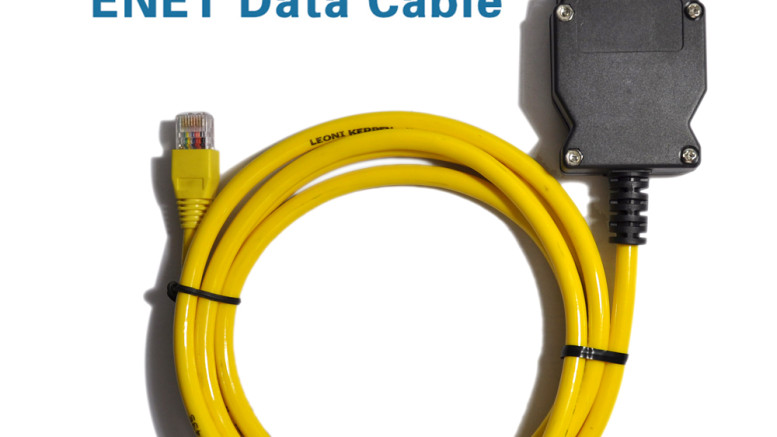
Carly adapter– Bluetooth; E sys ENET cable– Ethernet to OBD
Actually, the Carly adapter is Bluetooth. E-Sys looks for a connection via the ethernet port on your laptop. It won’t recognize BT at all – at least, I’ve not been able to make it do so. If your laptop doesn’t have an ethernet/RJ45 connector, you’ll need to find a device that does. Pretty sure that you can’t use a USB-to-ethernet adapter, either.
Coding the speedo correction affects the analog (gauge) speedometer; it appears that the digital readout, which gets added to the “list” of things you can display in the center of the cluster, then gives the same reading as the analog. I can guarantee that it does fix the approximately 3 MPH slow reading (actual speed 67, speedo reading 70). All speedos are going to be somewhat innacurate unless they’re calibrated and “certified”, such as the ones in Law Enforcement cars. Even your GPS will give you a 1-2 MPH difference from the “corrected” reading once you’ve coded it, but the GPS is generally reading too slow as well.
Look here:
Carly: not for coding; E sys: coding success
I have been using Carly on my F30 for over a year, but not for coding, as that’s still not supported on Android. Carly can read and clear diagnostic codes and a host of other things that E-Sys isn’t meant to do. I recommend going to their website and checking on its capabilities there. From what they’ve told me, their F-chassis coding will probably be limited to the KOMBI module (dashboard items), but it may expand to include HU-ENTRY/CIC/NBT/NBT2 and FEM_BODY in the future.
It’s a simple connect (via their BT adapter), read coding data, select features to activate or deactivate (or change values), then push back into the module. Same as E-Sys but with a much more simplified interface. It allows you to save the module coding data as a backup, just like E-Sys. It worked great for coding on E-chassis cars, so I’m hoping it will be the same for F-Chassis, although they’ve had quite a bit of time to get things working and so far, coding with Android still isn’t fully tested yet. I’ve since used E-Sys for coding my F30 and the wife’s F23.
BMW E-Sys works better than Carly app in Fxx coding
I used Carly for my wife’s previous E88 128 convertible and it worked great – no having to do one item at a time, etc. Not quite sure what the problem is with the F-cars, because the principle is the same – read coding data, modify, write coding data. Apparently the new “network” and whatever read/write protocol that implies is far different than the BMW Engineer Software of the E-series cars.
By comparison, E-Sys has improved vastly over the past year or two and coding both my F30 and the wife’s new F23 was relatively easy, particularly since you can save the coding data, disconnect, take the computer inside to do the modifications on a copy of the saved data, then reconnect and push the data back using the modified file. No more sitting in the car searching for the feature to be coded while the engine’s idling.
Carly adapter– Bluetooth; E sys ENET cable– Ethernet to OBD
Actually, the Carly adapter is Bluetooth. E-Sys looks for a connection via the ethernet port on your laptop. It won’t recognize BT at all – at least, I’ve not been able to make it do so. If your laptop doesn’t have an ethernet/RJ45 connector, you’ll need to find a device that does. Pretty sure that you can’t use a USB-to-ethernet adapter, either.
Coding the speedo correction affects the analog (gauge) speedometer; it appears that the digital readout, which gets added to the “list” of things you can display in the center of the cluster, then gives the same reading as the analog. I can guarantee that it does fix the approximately 3 MPH slow reading (actual speed 67, speedo reading 70). All speedos are going to be somewhat innacurate unless they’re calibrated and “certified”, such as the ones in Law Enforcement cars. Even your GPS will give you a 1-2 MPH difference from the “corrected” reading once you’ve coded it, but the GPS is generally reading too slow as well.
(09.2017) ISTA-D 4.06 ISTA-P 3.62 download: 100% tested with BMW ICOM, K+DCAN, ENET
TOPICS:BMW ICOM A2BMW ICOM NEXTBMW INPAENET cable

Posted By: OBD2TOOL October 27, 2017
09.2017 BMW ISTA software free download: tested 100% & works perfect
http://www.obd2tool.com/search-BMW+ICOM.html

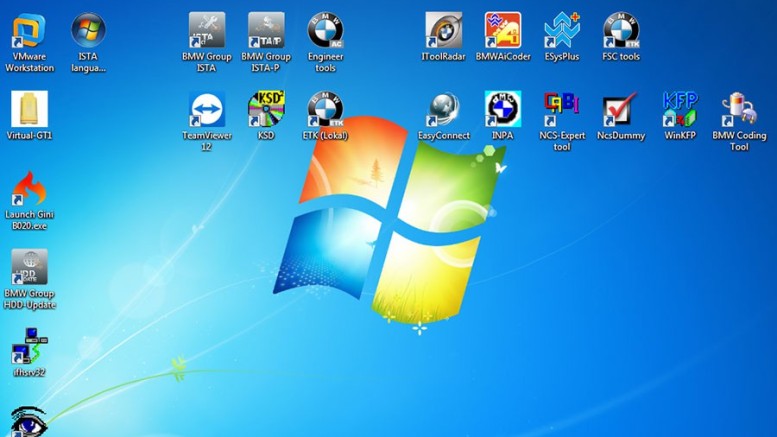
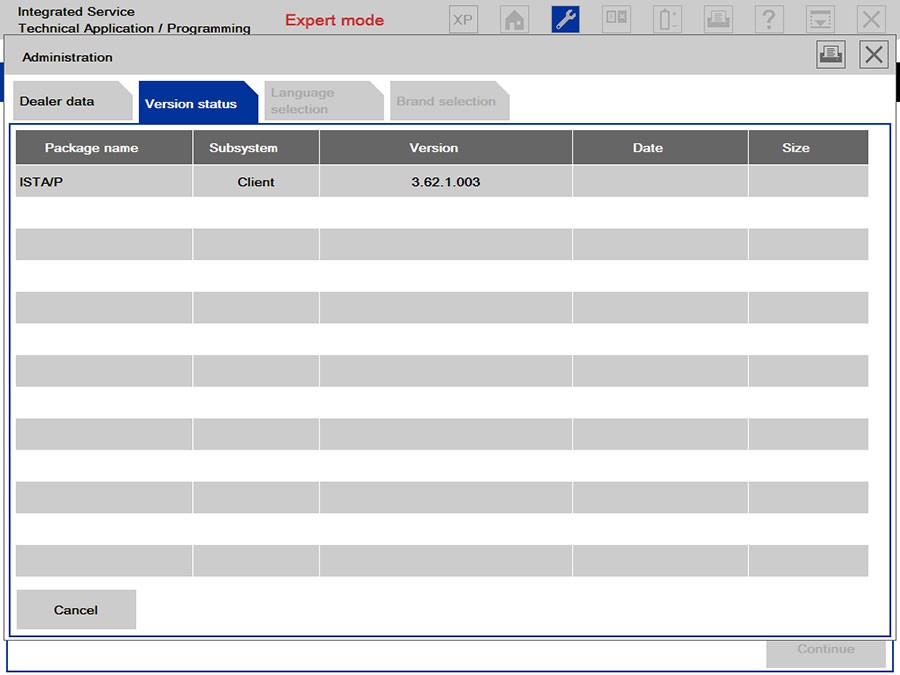
ISTA-D 4.06.31 ISTA-P 3.62.1.003
ISTA-D 4.06.31
ISTA-P 3.62.1.003
VIN: 2017.06.12
Not connected 9000 days remaining
BMW ETK: 2017.08
BMW KSD: 08.2017Multilanguage
BMW FSC Navigation Code Generator
BMWAiCoder for BMW Coding
INPA,
NCS EXPERT,
WinKFP,
E-Sys 3.27.1, e-sys plus 3.27.1
Tool32 61.5
BMW FSC code generator
Dr.gini B020 diagnostic software
ALL TESTED WITH BMW ICOM, BMW ICOM Next, ENET, PASSTHRU or K+DCAN: works great!!


So, which a BMW Diagnostic Tool cable you need: K+DCAN or ENET or ICOM A2/ ICOM Next?

In summary,
It depends on your purpose (diagnostic or coding or programming) and model (Exx or Fxx or others).
For Coding, you need different Tools, NCS Expert / SP-Daten for E-Series and E-Sys / PSdZData for F-Series.
All Diagnosis and Coding can be done with cheap DCAN Cable for E-Series and cheap ENET Cable for F-Series.
For Programming (Flashing ECU’s with new Firmware), then you need ISTA/P for for both E-Series and F-Series cars, or you can use WinKFP for E-Series and E-Sys for F-Series. For E-Series Programming, you will need an ICOM, but for F-Series Programming, you can use ENET Cable.
Again, 2017.9 BMW ICOM software above tested good with +DCAN or ENET or ICOM A2/ ICOM Next here. You can use it for diagnostic and programming with relief.
THE IMPORTANT NOTE: All links haven’t tested by professionals. YOURSELF BUT NO ONE should take responsibility of what you’ll try. Someone has installed it successfully, but not reported if it’s working or not.


BMW ISTA 4.06.22 Standalone ISTA+ Update Info
Ultimate Ediabas/ISTA+ voltage control
Hardware check disabled -can use the program on the slower laptops.
ISTA contains all the functions required for programming vehicles of the F, G and I series and for Motorrad models with vehicle electrical system 2020 (BN2020).
Language: ENG, GER, FR, RU, OTHER
With Technical Information (TIS) and Wiring Diagram (WDS).
Ediabas and all necessary tools included.
Included components (32-Bit & 64-Bit)
Included : ISTA User Manual EN,DE, IT,PL,RU,TR,CZ,ES,FR,JP,KR,NL,SE
NET Framework 4.6 + Updates
Java Runtime Environment 8
DirectX 9.0c Extra files
General runtime files
Microsoft Visual C++ Runtimes (v2005 – v2015)
Microsoft Visual J# 2.0 SE
Microsoft Silverlight 5
Adobe Flash Player (Opera, FireFox, Internet Explorer)
Shockwave Player 12 (Internet Explorer Plugin
EDIABAS
Suitable for BMW Motorcycle
BMW ISPI ICOM-FW 03-15-00
BMW ISPI ICOM-Next-FW 03-15-00
BMW ISTA 4.06.22 Operating system
Windows 7 (32-bit or 64-bit)
Windows 8 (32-bit or 64-bit)
Windows 8.1 (32-bit or 64-bit)
Windows 10 (32-bit or 64-bit)
BMW ISTA 4.06.22 Hardware requirements
Processor (CPU): Intel Pentium 2.0 GHz, Core Duo 2.0 GHz or better
Memory (RAM): 3 GB or more
Hard drive (HDD): 22 GB free space on disk
Have fun!
http://forobd2tool.com/blog/2017/10/25/09-2017-ista-d-4-06-ista-p-3-62-download-100-tested-with-bmw-icom-kdcan-enet/
Posted By: OBD2TOOL October 27, 2017
09.2017 BMW ISTA software free download: tested 100% & works perfect
http://www.obd2tool.com/search-BMW+ICOM.html
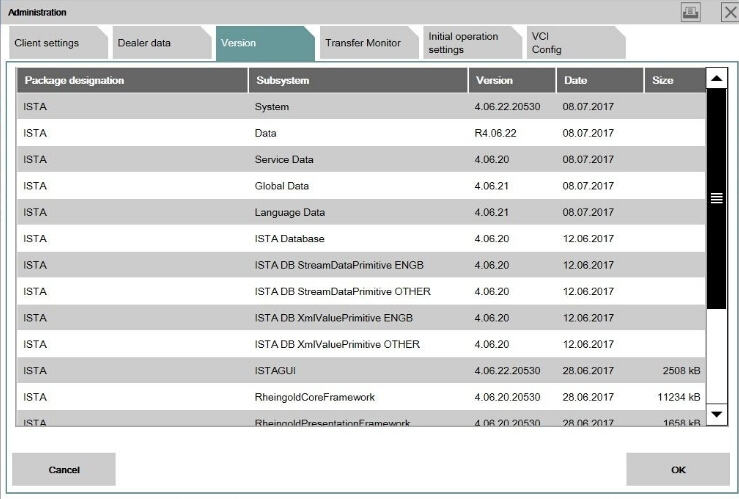
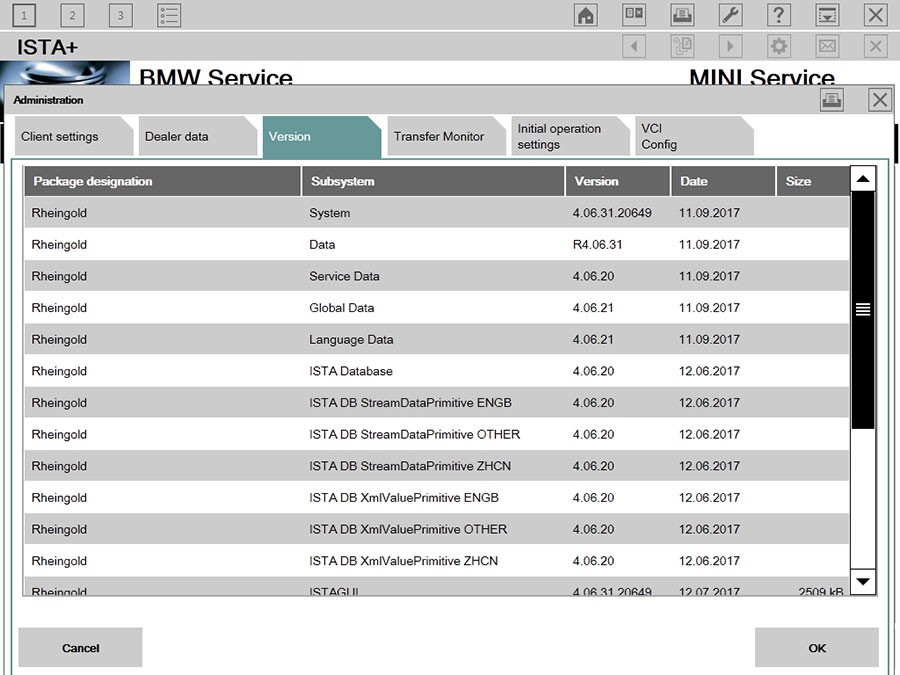
ISTA-D 4.06.31 ISTA-P 3.62.1.003
ISTA-D 4.06.31
ISTA-P 3.62.1.003
VIN: 2017.06.12
Not connected 9000 days remaining
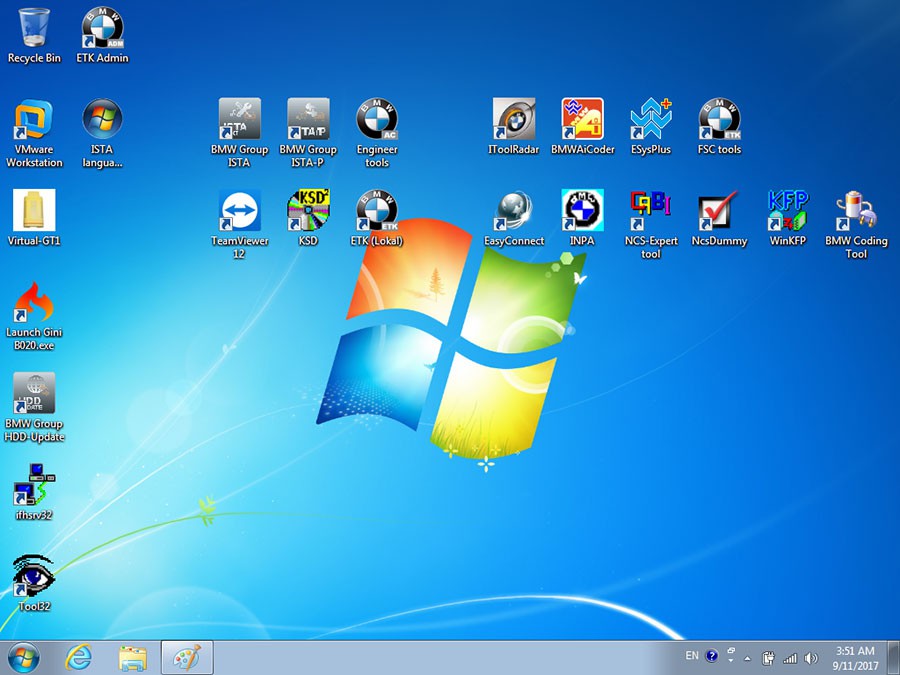
BMW ETK: 2017.08
BMW KSD: 08.2017Multilanguage
BMW FSC Navigation Code Generator
BMWAiCoder for BMW Coding
INPA,
NCS EXPERT,
WinKFP,
E-Sys 3.27.1, e-sys plus 3.27.1
Tool32 61.5
BMW FSC code generator
Dr.gini B020 diagnostic software
ALL TESTED WITH BMW ICOM, BMW ICOM Next, ENET, PASSTHRU or K+DCAN: works great!!
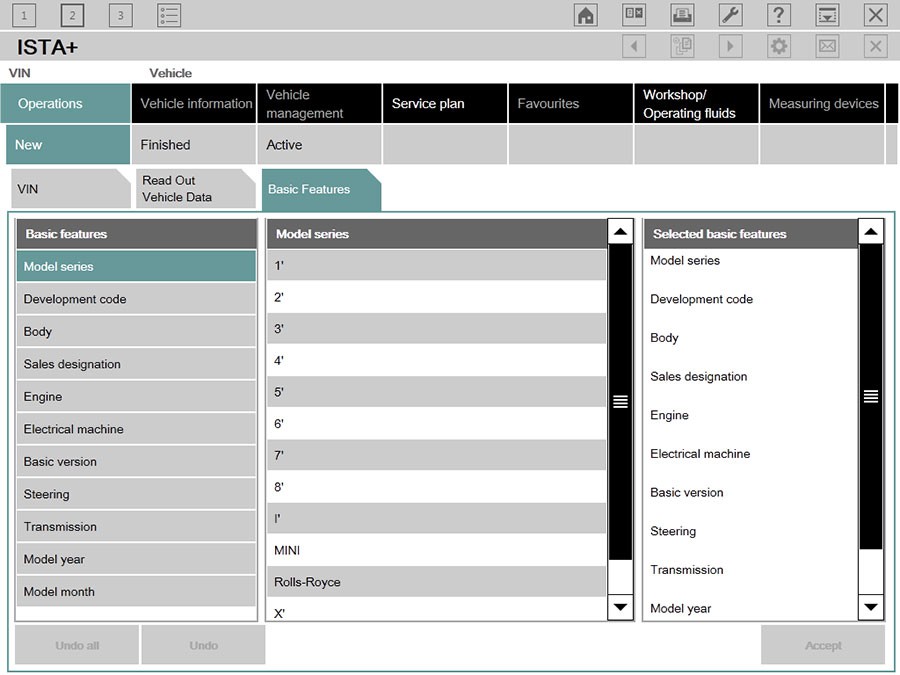
So, which a BMW Diagnostic Tool cable you need: K+DCAN or ENET or ICOM A2/ ICOM Next?
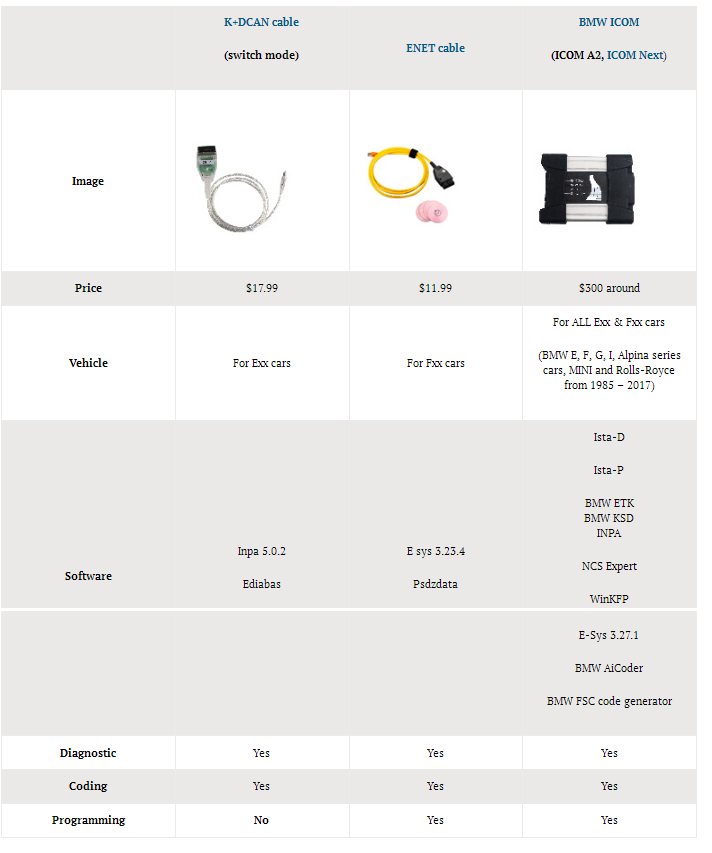
In summary,
It depends on your purpose (diagnostic or coding or programming) and model (Exx or Fxx or others).
For Coding, you need different Tools, NCS Expert / SP-Daten for E-Series and E-Sys / PSdZData for F-Series.
All Diagnosis and Coding can be done with cheap DCAN Cable for E-Series and cheap ENET Cable for F-Series.
For Programming (Flashing ECU’s with new Firmware), then you need ISTA/P for for both E-Series and F-Series cars, or you can use WinKFP for E-Series and E-Sys for F-Series. For E-Series Programming, you will need an ICOM, but for F-Series Programming, you can use ENET Cable.
Again, 2017.9 BMW ICOM software above tested good with +DCAN or ENET or ICOM A2/ ICOM Next here. You can use it for diagnostic and programming with relief.
THE IMPORTANT NOTE: All links haven’t tested by professionals. YOURSELF BUT NO ONE should take responsibility of what you’ll try. Someone has installed it successfully, but not reported if it’s working or not.
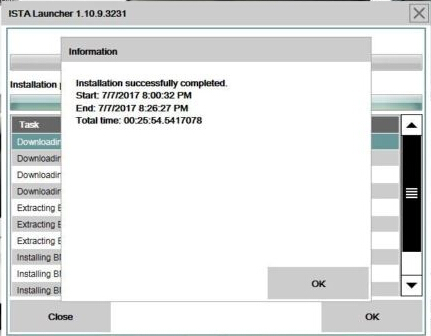
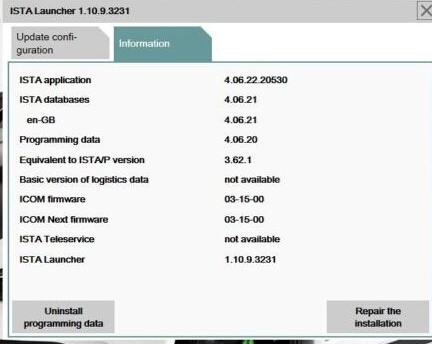
BMW ISTA 4.06.22 Standalone ISTA+ Update Info
Ultimate Ediabas/ISTA+ voltage control
Hardware check disabled -can use the program on the slower laptops.
ISTA contains all the functions required for programming vehicles of the F, G and I series and for Motorrad models with vehicle electrical system 2020 (BN2020).
Language: ENG, GER, FR, RU, OTHER
With Technical Information (TIS) and Wiring Diagram (WDS).
Ediabas and all necessary tools included.
Included components (32-Bit & 64-Bit)
Included : ISTA User Manual EN,DE, IT,PL,RU,TR,CZ,ES,FR,JP,KR,NL,SE
NET Framework 4.6 + Updates
Java Runtime Environment 8
DirectX 9.0c Extra files
General runtime files
Microsoft Visual C++ Runtimes (v2005 – v2015)
Microsoft Visual J# 2.0 SE
Microsoft Silverlight 5
Adobe Flash Player (Opera, FireFox, Internet Explorer)
Shockwave Player 12 (Internet Explorer Plugin
EDIABAS
Suitable for BMW Motorcycle
BMW ISPI ICOM-FW 03-15-00
BMW ISPI ICOM-Next-FW 03-15-00
BMW ISTA 4.06.22 Operating system
Windows 7 (32-bit or 64-bit)
Windows 8 (32-bit or 64-bit)
Windows 8.1 (32-bit or 64-bit)
Windows 10 (32-bit or 64-bit)
BMW ISTA 4.06.22 Hardware requirements
Processor (CPU): Intel Pentium 2.0 GHz, Core Duo 2.0 GHz or better
Memory (RAM): 3 GB or more
Hard drive (HDD): 22 GB free space on disk
Have fun!
http://forobd2tool.com/blog/2017/10/25/09-2017-ista-d-4-06-ista-p-3-62-download-100-tested-with-bmw-icom-kdcan-enet/
Subscribe to:
Posts (Atom)
-
Symptom: BMW diagnostic mux ICOM A2 System LED stays red and flashes/blink always. No problem exists after self-test and f...
-
Steps to re-adapt BMW engine with BMW ISTA-D or ISTA+ software : (Rheingold is the old name of ISTA/D. After version 4, it was called ISTA...
-
I have read that BMW will stop support F and G series from Ista P. Is there somewhere a good tutorial how to install the new ISTA+ with al...


