Showing posts with label New BMW ICOM. Show all posts

Wednesday, November 10, 2021

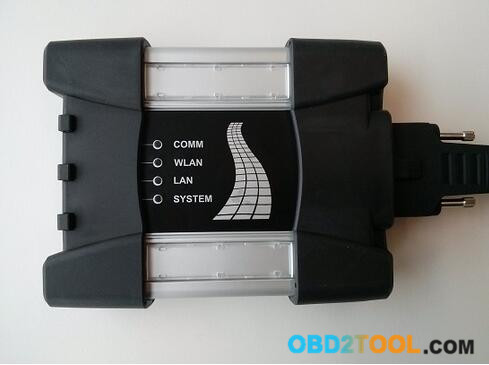
How to Fix BMW ICOM NEXT not work

Do update Emergency Firmware on BMW ICOM Next for fix troubles when it not find IP address or all LEDs show Red Color
ICOM NEXT Error:

I have one BMW ICOM Next bought from China have been use 2 years great ,but sundenly it stop work .It will not connection any Vehicles and Programmer says Etherenet can’t find IP address . the ICOM NEXT mux all LEDS going Red and the System LED blinking Red-Yellow .
BMW ICOM NEXT not work Soultion :

1.Go to check BMW ICOM programmer Directory :C\ProgramData\BMW\ISP\data\TRIC\ICOMNEXT\ICOM-Image-XX-YY-ZZ( Show hidden files if you not find it ),if there have more than one ICOM-Image-XX-YY-ZZ file ,then choose the most recent one for last updates .

2.Copy the file ICOM_Next_app_yyyyyy.tar.gz and ICOM_Next_rootfs_xxxxxx.tar.gz to Your USB Disk ROOT Directory(Important) .

3.Disconnect ICOM NEXT Mux from Power adapter or Vehicle,And pull the USB Disk to ICOM’S USB port

4.Press the Reset Button and keep Hold,another Hand held the OBDII Cable with vehicles diagnotic socket(Start Engineer for supply power ),the whole LEDS will glow red.
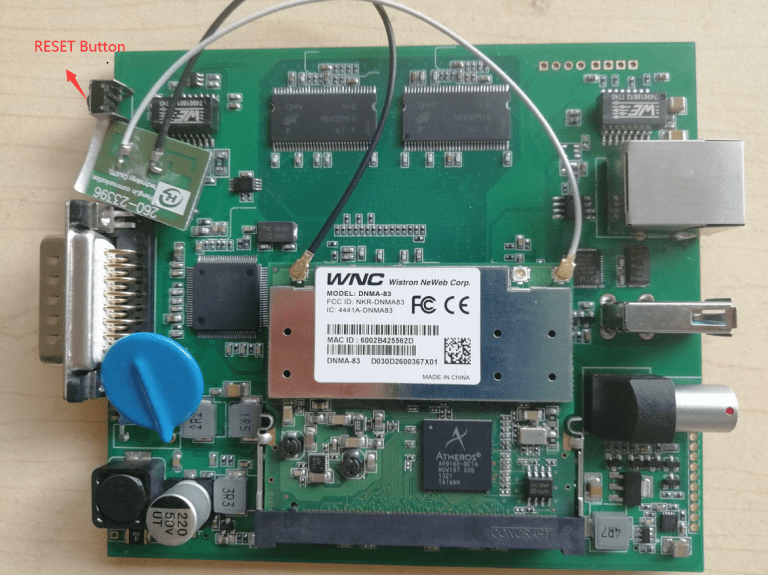
How-to-Fix-BMW-ICOM-NEXT-not-work

5.Now release the reset button ,Press again 3 times within 4 seconds. After there will be going do firmware update

6.Wait several minutes until all LEDS stop glowing(Do not disconnect ICOM mux as long as any LED glows red)

7.The emergency firmware update is finised !now you can pull out USB Disk and try Connect LAN Cable to vehicle for Test .all setting will need be reconfigured since it have been lost .

If you want to know more about bmw diagnositc tools, please click bmw trouble repair.

Wednesday, February 28, 2018

What is used for BMW G30 ECU flash

22-1
Purpose: Need to flash a BWM G series G30

Puzzle: Is the ICOM Next mandatory or is the up to date ICOM 1st generation BMW ICOM Next from 2012 ok?
Can I flash NBT EVO with old ICOM?

Advice & Options:

1.

ENET cable would probably be better for you.

2.

I flashed NBT EVOs with old ICOM without problems.

3.

Flashed all Cars with Icom Next and Online Aos with DHCP over Router. Since that i have Never any Problems with NBT or other. Flash E/F/G with this Setup.

Note that Online Aos is the online version of the BMW software for Diagnostic, Programming any many other things.

4.

To answer your question
1st : you doesn’t need iCOM NEXT to flash the G series…but It actually Lot better & save up your times because iCOM NEXT has build in Gigabit connection.
2nd : old iCOM working find. It just take a lot longer.

5.

Icom best any type , router I noticed w my setup I use desktop w 2 lan port and on a few f cars it actually faster then oem it programs up to 8 module same time w gigabit switch , and handle data lots faster than etnet cable and for certain modules the router is a must will crash hu high in kombi in a few others

6.

Any icom will work , but to be safe with f,g,i series vehicles , use a dedicated router as kafas huh and a few other modules will crash if you do not use a router it handles the switches for Ethernet as those modules use more than 1 path way , in short it uses all 4 two pair wires and without router not good , this has worked for me for some time now good luck. note my router does not connect to wan

Conclusion:

ICOM Next is the best option for G series, working better and faster than old BMW Diagnostic Tool BMW ICOM cables. It handles multiprogramming and coding quite nicely. Gets the job done much faster if flashing the complete vehicle. Also, another benefit to Next will be compatibility for future cars.

Thursday, October 26, 2017

How to choose a BMW ICOM cable

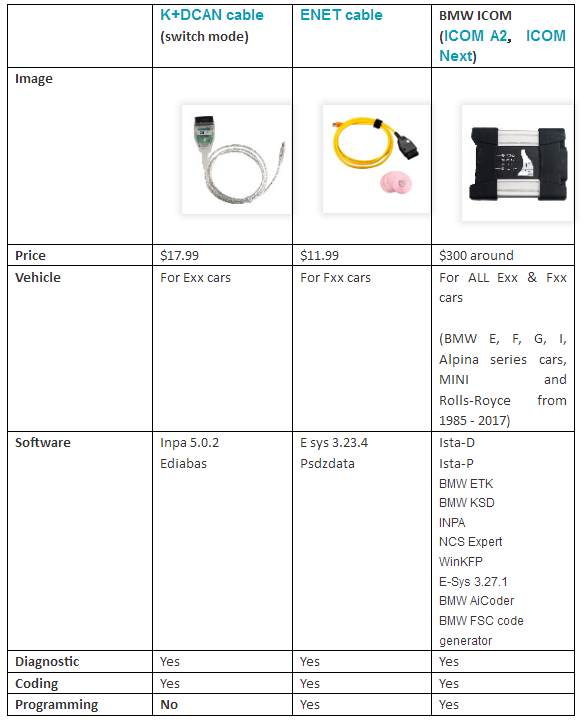
which a BMW ICOM cable you need: K+DCAN or ENET or BMW ICOM A2/ ICOM Next?
bmw icom cable-1
In summary,
It depends on your purpose (diagnostic or coding or programming) and model (Exx or Fxx or others).
For Coding, you need different Tools, NCS Expert / SP-Daten for E-Series and E-Sys / PSdZData for F-Series.
All Diagnosis and Coding can be done with cheap DCAN Cable for E-Series and cheap ENET Cable for F-Series.
For Programming (Flashing ECU’s with new Firmware), then you need ISTA/P for for both E-Series and F-Series cars, or you can use WinKFP for E-Series and E-Sys for F-Series. For E-Series Programming, you will need an BMW ICOM, but for F-Series Programming, you can use ENET Cable.
For Exx- Series:
Interface = K+DCAN Cable (OBDII to USB) or ICOM
ECU Data Files = SP-Daten
NCS Expert = Coding Software
WinKFP = Programming (Flashing) Software
EDIABAS = Low-Level ECU Communication Software used by NCS Expert & WinKFP
For Fxx- / Ixx- / Gxx-Series, Mini, & Rolls-Royce:
Interface = ENET Cable (OBDII to RJ45 Ethernet) or ICOM
ECU Data Files = PSdZData
E-Sys = Coding Software
E-Sys = Programming (Flashing) Software
About: BMW ICOM
ICOM A (also ICOM A2, ICOM A3, ICOM Next A): main interface
ICOM B: adapter for programming multimedia in E series
ICOM C: adapter for old BMW with round 20 pin diagnostic plug
ICOM D: adapter for motorcycles
ISTA+ (AKA Rheingold or ISTA-D)
DIAGNOSTICS for All Vehicles
PROGRAMMING for F/I/G/RR & MINI, but requires an ICOM
ISTA-P
PROGRAMMING traditionally for all chassis, but is being phased out by August 2017, except for legacy E-series.
Replacement ECU's must be NEW
YOU HAVE TO KNOW before you buy ICOM A2 or ICOM A3 or ICOM Next:
ICOM NEXT vs the old ICOM
-> much faster in BMW F and G series ..
-> supports gigabit Ethernet too to be future proof, there currently is not gigabit Ethernet protocol defined yet for autos. Also it has USB3.0 instead of USB2.0 and a better wifi card.
ICOM NEXT A vs ICOM A2
-> more stable during programming
-> be necessary for the future Gbit cars
-> faster start-up times and high throughput
-> through high-performance,low-power ARM SoC
-> improved handling
-> more flexible OBD cable
-> lighted button for logs

ICOM A vs ICOM A2 vs ICOM A3
Modified ICOM A2 for vehicles with OBD access receives a significantly more powerful processor and more storage capacity. And robust aluminium case will help to avoid damage when using in harsh environments. It works better in cooling, runs faster and works more stable, not easier broken than older BMW ICOM A+B+C.
ICOM A3 can program all units for all BMW series expect media system, and work more stable and has stronger compatibility than ICOM A2, A1.

Sunday, September 24, 2017

(Fixed) BMW ICOM A3 program ok but fail to diagnose

Question:
BMW ICOM A3 Program ok but diagnose with no luck, device fail to connect. How to do?
bmw icom diagnosis
Possible reason:
The hardware version is too low to do diagnostic job.
Solution:
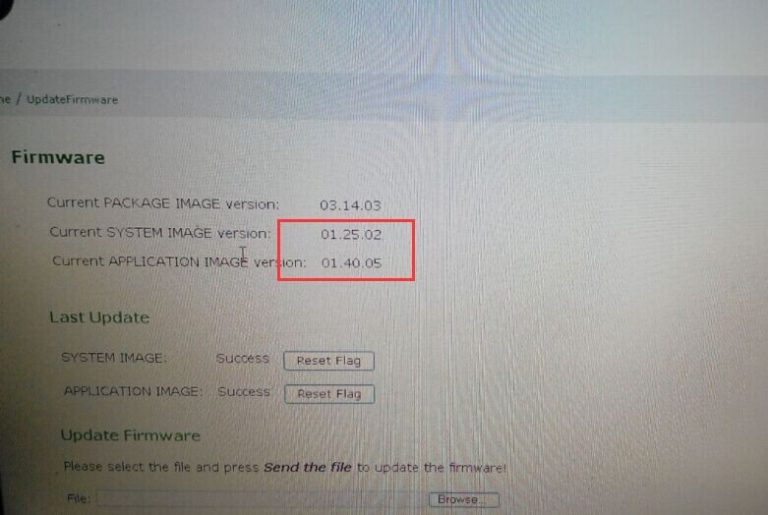
Update firmware to the newest version, e.g fw 1.40.05/01.25.02
35-1
To get BMW Diagnostic Tool ICOM, ICOM A1 and common ICOM A2 run with the newest ISTA-D Rheingold ISTA-P, user is required to update firmware to the newest version
Firmware current system Image version: 01.25.02
Firmware current application Image version: 01.40.05
What ICOM hardware APPLICATION 1.40.05 and SYSTEM version 01.25.02 is compatible with?
Take www.worldobd2.com for example, all of following available ICOM is tested working fine with APPLICATION 1.40.05 and SYSTEM version 01.25.02:
Perfect version ICOM A: item NO SP168-BA and SP168-BO
Step – by –step procedure:
1.Please use internet cable to connect ICOM (including all available ICOM) with computer, and plug 12V power adapter to super ICOM A2 to supply power or connect ICOM to BMW vehicle for power.
2.Unzip perfect ICOM A1 A2 fw 1.40.05 upgrade files.
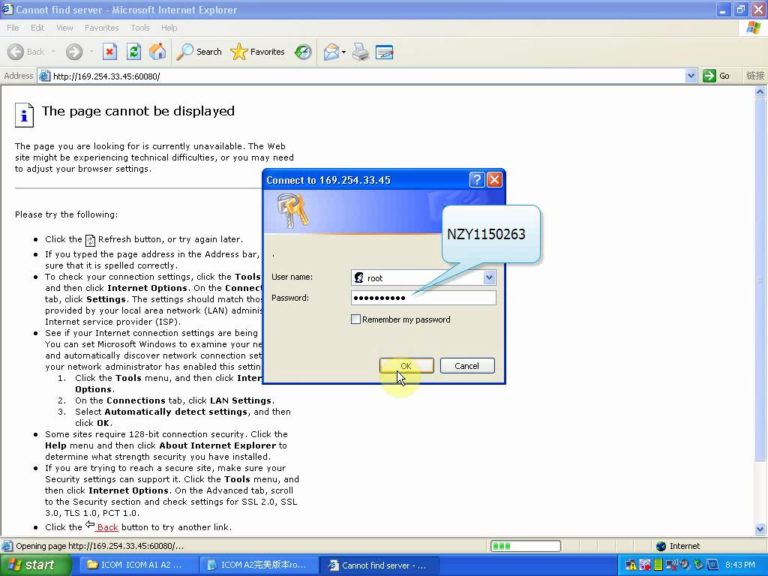
1) Perfect version ICOM A: Open IE Internet Explorer, enter address http://169.254.33.45:60080/, log in with username/password: root/NZY1150263
2) Common version ICOM A2 A1: browse http://169.254.92.38:60080/ and username/password: root/NZY11502.
Following picture is perfect version ICOM A fw 1.40.0/ 01.25.02 login inform.
35-2
For the following operation procedure, both common BMW ICOM Next and super version ICOM are the same.
3)Click “Update Firmware”, you will see ICOM firmware version information.
35-3
4)Click “Browse” to select file “ICOM-BootImage-01-25-02.bin”, set image type as “SYSTEM”, click “Send the file”.
5)When you get message “Write the image file to the flash?” click “Yes”, then ICOM indicator light will turn red.
6)When you get message “The SYSTEM IMAGE update was successful”, click “Update Firmware”.
35-4
7)Choose ” ICOM-ApplicationImage-01-40-05.bin”, set image type as “APPLICATION”, click “Send the file”, it will cost several minutes please be patient to upload.
8)When you get message “Write the image file to the flash?” click “Yes”, then the OBD-II scan tool ICOM indicator light will turn red for the second times.
When it finish upgrading, click “reboot”.
9)Click “Home” – “Update Firmware”, you will find ICOM A2 firmware update to the newest version:
Current SYSTEM IMAGE version: 01.25.02
Current APPLICATION IMAGE version: 1.40.05
Additional Note:
Please be sure your computer is to obtain IP address automatically.