Monday, December 20, 2021

How to upgrade BMW ICOM Next A firmware step by step

How to upgrade BMW ICOM Next A firmware step by step

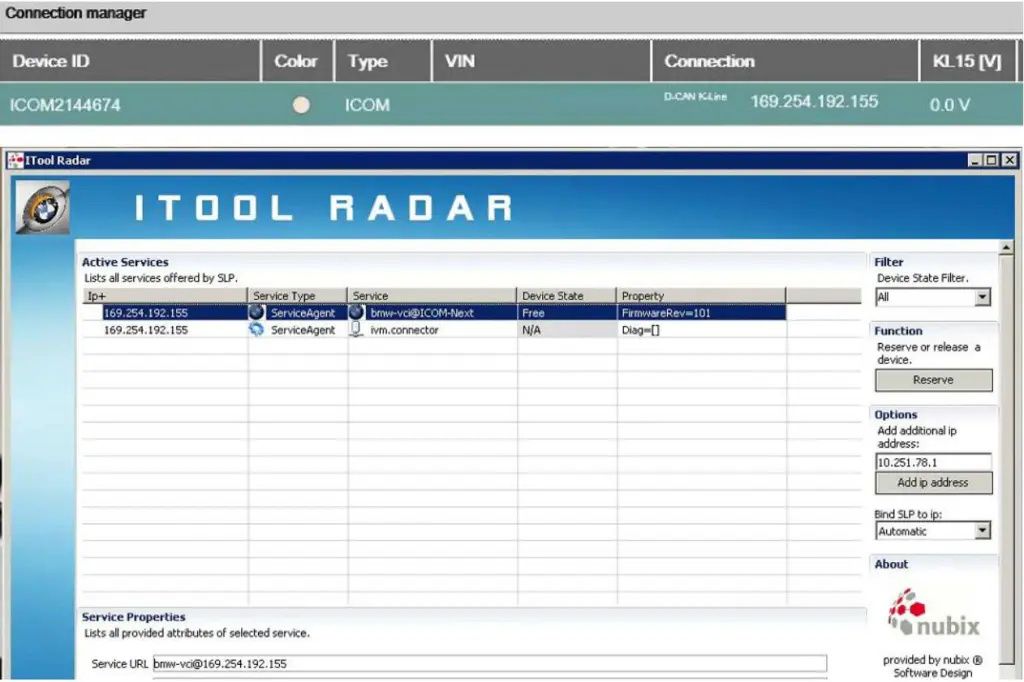
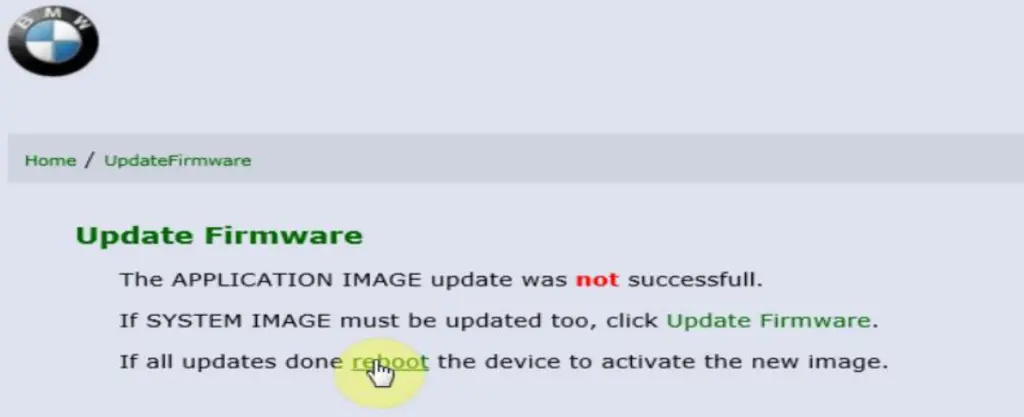
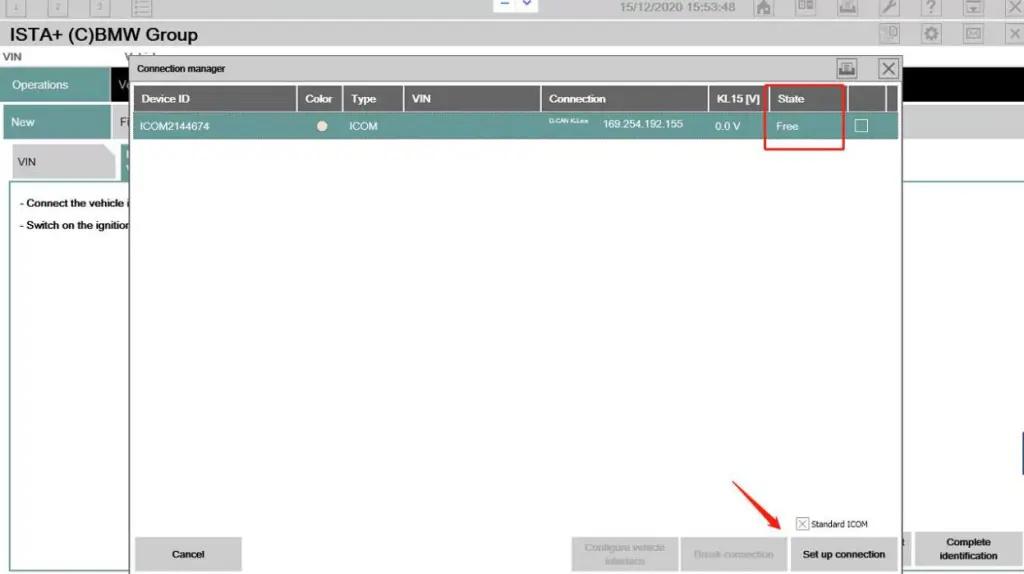
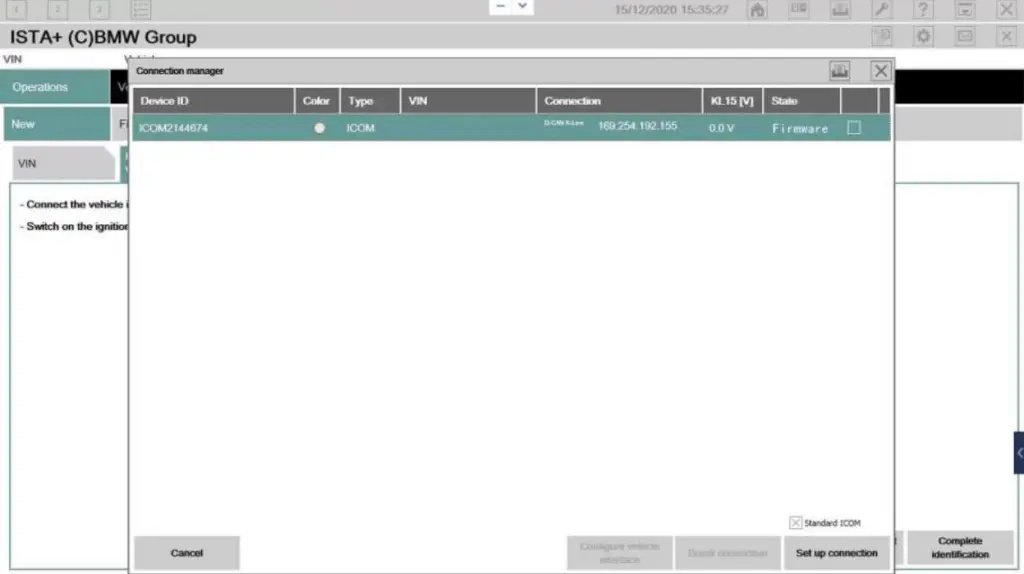
1. When you update the BMW ISTA diagnostic software and connect to a BMW car, the connection manager displays the firmware, indicating that your ICOM needs to be upgraded. I will show you how to upgrade the ICOM firmware through the WEB page;

How-to-upgrade-BMW-ICOM-Next-A-firmware-step-by-step-1     1

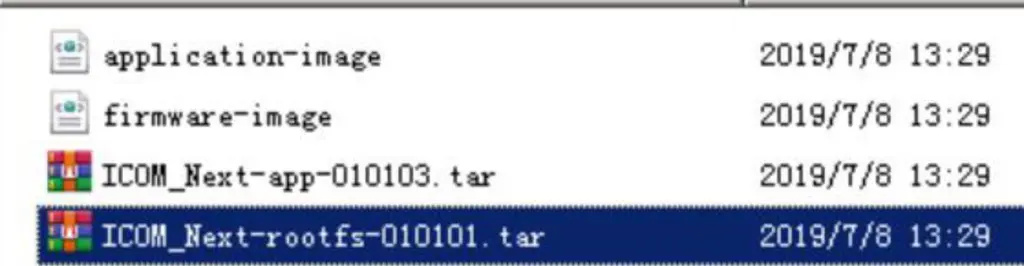
2. ICOM NEXT Firmware file

How-to-upgrade-BMW-ICOM-Next-A-firmware-step-by-step-2

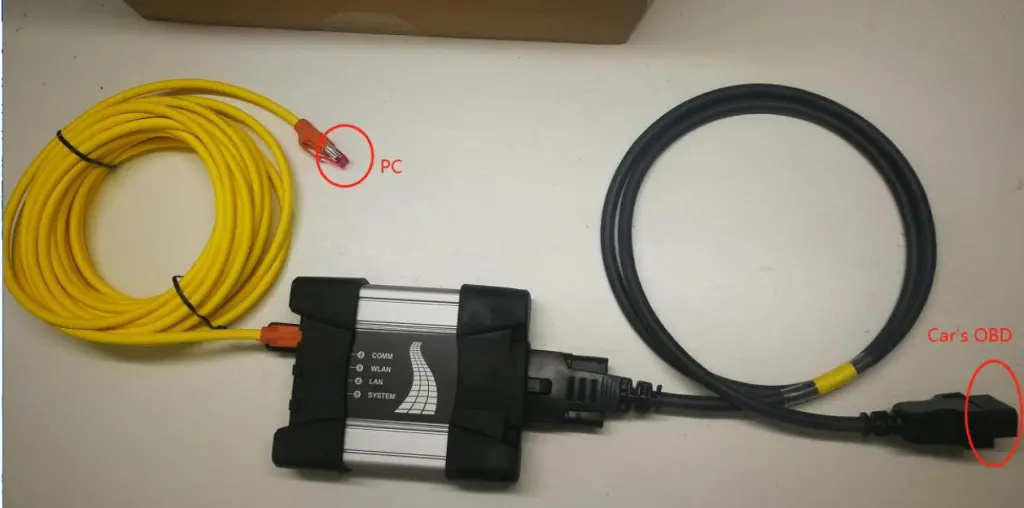
3. ICOM NEXT connect car;

How-to-upgrade-BMW-ICOM-Next-A-firmware-step-by-step-3

4. ICOM NEXT IP;

How-to-upgrade-BMW-ICOM-Next-A-firmware-step-by-step-4

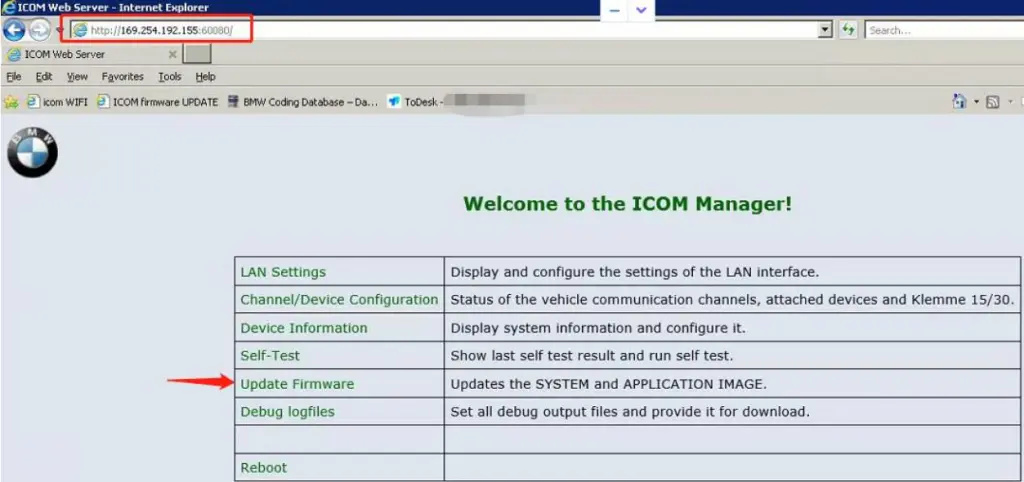
5.WEB Login:http//169.254.X.X:60080,user:admin,password:NZY1150263;

How-to-upgrade-BMW-ICOM-Next-A-firmware-step-by-step-5

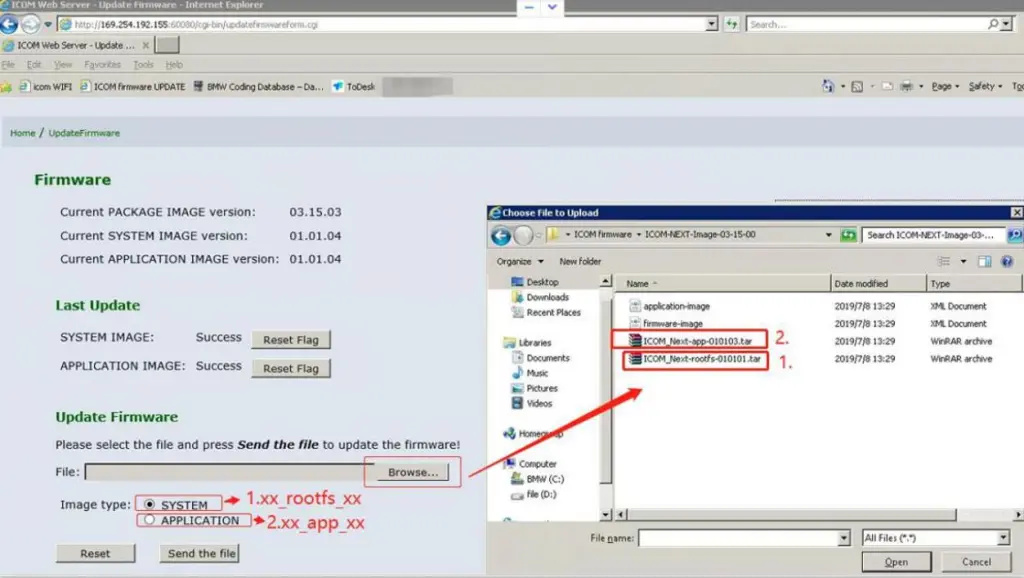
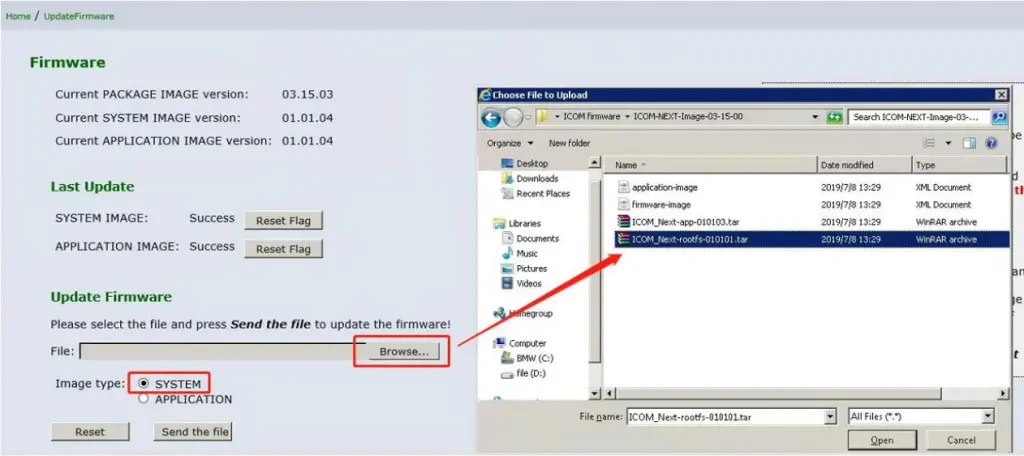
6.Select firmware file;

How-to-upgrade-BMW-ICOM-Next-A-firmware-step-by-step-6
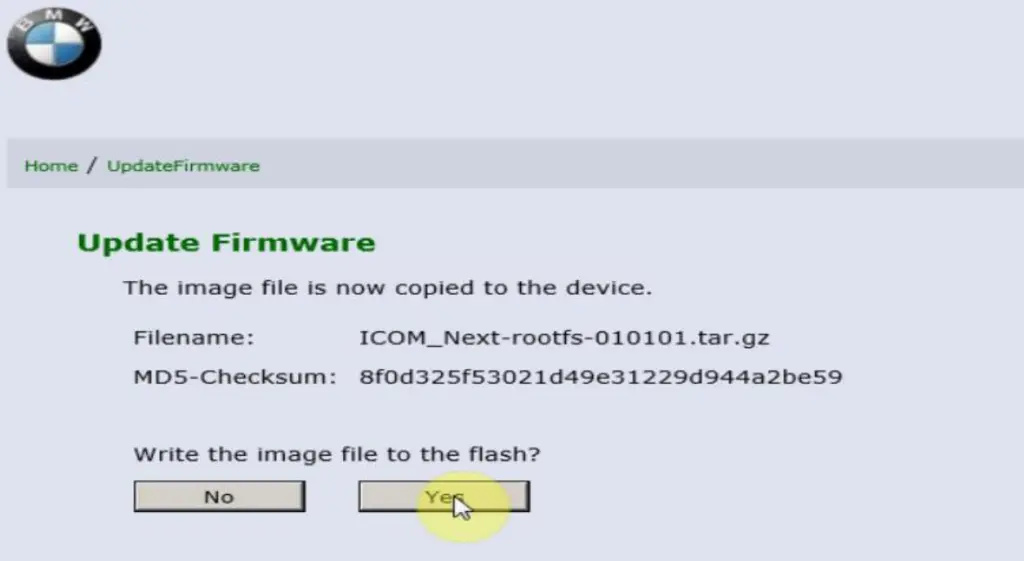
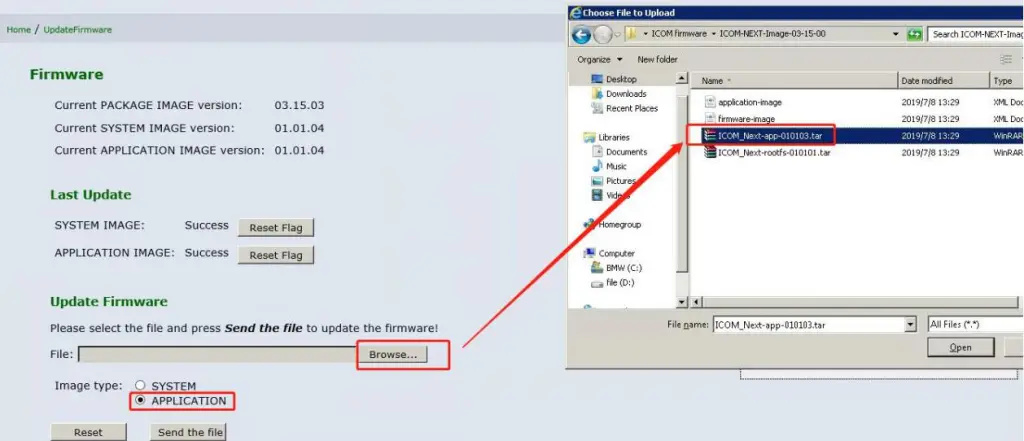
How-to-upgrade-BMW-ICOM-Next-A-firmware-step-by-step-7How-to-upgrade-BMW-ICOM-Next-A-firmware-step-by-step-8
How-to-upgrade-BMW-ICOM-Next-A-firmware-step-by-step-9
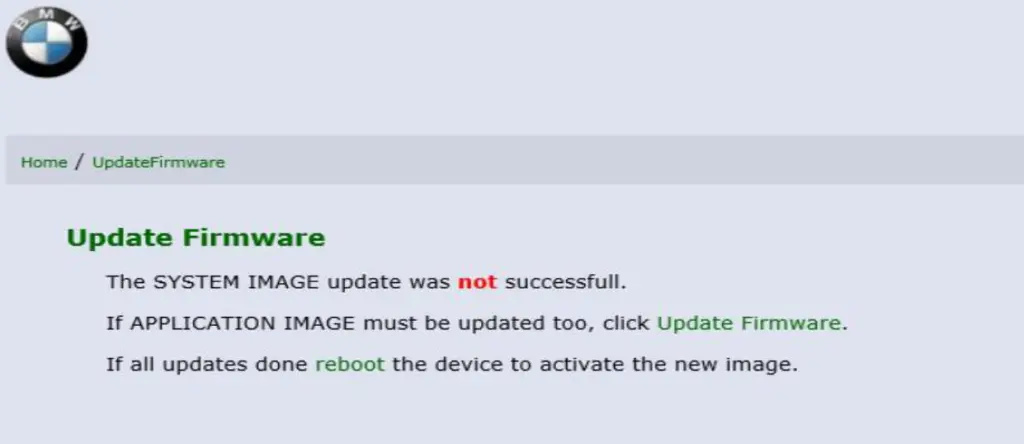
How-to-upgrade-BMW-ICOM-Next-A-firmware-step-by-step-10

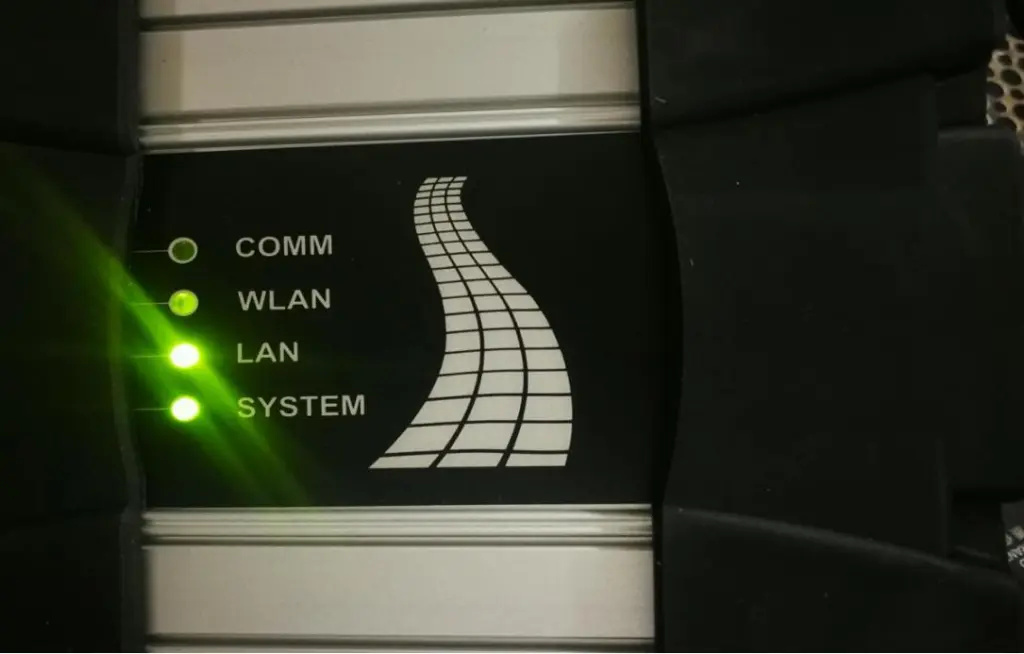
7. After the firmware file is sent, click XX to upgrade. At this time, the ICOM NEXT LED will display red. After the upgrade is completed, the ICOM NEXT will automatically restart. After five minutes, the ICOM NEXT indicator will be green and the upgrade is complete.

How-to-upgrade-BMW-ICOM-Next-A-firmware-step-by-step-11
How-to-upgrade-BMW-ICOM-Next-A-firmware-step-by-step-12
How-to-upgrade-BMW-ICOM-Next-A-firmware-step-by-step-13

8. State is free, connect BMW car.

Tuesday, December 7, 2021

How to program and code your BMW with ISTA / P

ISTA / P stands for Integrated Service Technical Application / Programming. It is a dealer-level diagnostic software that has replaced the older version of the SSS Progman programming software. ISTA / P BMW is primarily used to process all coded, programmed and approval-dependent control units in BMW vehicles.

A video guide created by BMW Doctor shows a walkthrough on how to properly use ISTA/P to program and code your BMW vehicle. Check it out on the video below:

With a K + DCAN or ENET cable, you can diagnose, calibrate, read out and erase most of your BMW vehicle modules, register and encode and program memory errors. ISTA / P should be used with an ICOM interface. To cover all of your vehicle modules, you need ICOM A, ICOM B and ICOM C for BMW vehicles that were produced before June 2001.

When programming with ISTA/P, you need to observe the following precautions:
• Always follow the instructions and requests given in ISTA/P.
• Leave your vehicle’s ignition switched on.
• Do not cut or interrupt the connection between your vehicle, the workshop network, and the vehicle interface.
• After any action initiated in the luggage compartment, always close the the boot lid to prevent overheating the luggage compartment lighting.
• You should not perform any other activity in your vehicle while programing aside from what is instructed by ISTA/P.

If you wish some assistance in your BMW coding and programming, you can request for remote coding assistance for a flat fee here: BMW Trouble Repair.

Thursday, December 2, 2021

BMW ICOM Diagnostic & Programming Tool 2021.09 BMW Coding FAQs

There have many customer have doubts that BMW ICOM coding their BMW 1, 2, 3, 4, 5, 6, 7, X, I, or BMW Mini is safe by BMW NCS Expert or E-sys or Smart Bimmer Tool ? We’d like to say that coding is safer than changing spark plugs or replacing brake pads on your vehicle.

Lets check some common FAQs as bellowing :
1.Will coding features on my car void my cars warranty?
Because of the nature of coding mentioned above, coding will not void the warranty of your car if under the factory warranty. This is because we do not alter the vehicle to do something it was not originally designed to do. All features enabled/disabled during the coding process are technically already present on your vehicle, coding just flips the switch to enable or disable it. Rest assured, a simple coding would be all it takes to revert the changes back to stock.

2.How long will it take to code my BMW?
A typical 4-5 feature coding takes about 10-20 minutes by teamviewer remote or VPN, and a simple one module code with two features takes about 5 minutes. After the coding process, we verify if the changes were accepted and the requested feature functionality is present.

3.Will coding features on my car void my cars warranty?
Because of the nature of coding mentioned above, coding will not void the warranty of your car if the factory warranty. This is because we do not alter the vehicle to do something it was not originally designed to do. All features enabled/disabled during the coding process are technically already present on your vehicle, coding just flips the switch to enable or disable it. Rest assured, a simple coding would be all it takes to revert the changes back to stock.

4.Will the Coding on my BMW is completely reversible?
Coding is done by using BMW factory software and a laptop which connects to your car’s OBD2 service port. Your car’s configuration files for the specific module to code are downloaded to the laptop and a backup is made. After storing a backup of your car’s configuration files, we alter the configuration file to enable or disable your desired feature. We then upload the modified configuration file back to the car and the coding is complete after testing for functionality. Because a backup is made for your specific car, if at any point the customer decides to revert back to the stock configuration, all it takes is a simple re-upload and the change is reverted.

5.What does a typical coding session look like?
Coding your BMW begins with requesting a quote for your specific vehicle and feature request. This does two things; it gives you a firm price for the features you want and allows us to verify your vehicle’s ability to receive the desired coding. If we find the feature request is incompatible with your vehicle’s year and model, we’ll let you know, saving you time and money. After receiving your quote, a time, date, and location to meet are scheduled whereupon coding services are rendered.

In a normal situation, you will be asked to verify which features are desired. The coder will then connect the coding laptop and OBD2 interface cable to the car’s service port located in the driver-side footwell. It will typically take anywhere from 10-30 minutes to do a code of about 3-5 features on a car. The whole time the coding tech is working, the customer is welcome to ask questions and observe the entire process. If by SmartBimmer tool, everything will be done automatically with a smooth internet connection plus a BMW Enet cable 5-10mins job done.

6.What happens if I take my car to the dealership for service and they update my BMW software?
If you take your car to the dealership or independent mechanic and for whatever reason, they update any module’s software to a newer version, you will lose all your customized codes and will need to code your vehicle again.

7.What if I want to undo any coded option?
If for whatever reason you choose to have any changes we code your car reversed for free within 48hours. And with the SmartBimmer tool you can choose to reverse by input the same feature code to run 2nd time will be restored back to the factory status.

8.Will you flash the Alpina B3, SMG, DME to Euro, or update x module’s software?
Most likely yes. We will update any vehicle module software except the iDrive module (updating it can require 4+ hours). We currently offer the E46 M3 CSL DME engine + E46 M3 CSL transmission flash for the E46 M3 with SMG II, N54 PPK, and N55 PPK, and Alpina B3 transmission flash, among others.

9.What is the difference between coding my E series BMW’s and the new F/G series BMW’s?
BMW’s new F and G series models use a new type of connection and software to code the vehicle. Instead of a typical K-line, or D-Can OBD2 Cable interface, the BMW F-series and G-series models use a TCP/IP network-based OBD2 interface, called an E-SYS / Enet cable. These two cables and associated software applications are not interchangeable between the BMW E, F, and G series. Nevertheless, if you have no ideas about either K DCAN cable or Enet cable and E-sys coding software, you could simply use the SmartBimmer tool as easy as ABC to go.

10.Will Coding on my BMW alter the software of the Vehicle?
Coding your BMW does not alter the software of the Vehicle:
It’s important to note that coding your vehicle does not make any alterations to the module’s software. We like to use the analogy of a light switch explaining coding to the customer. By changing the settings in the BMW modules configuration file to either aktiv or nicht-aktiv, we essentially flip a switch to either turn the feature on or off. Nothing but the “switch” is modified.

Most fear from coding comes from the belief that we are uploading new software to the modules, and if a glitch happens during that firmware upload, the module would then corrupt and be rendered defective. This would definitely be true if we were uploading or upgrading software, however, because we are only changing the configuration file which the software reads and uses to control itself, there is no danger. This is still true even if the vehicle’s battery dies, the laptop crashes or the cable has a connection error. In the event any of those things occur, one just needs to write a blank file back to the module and reset it back to defaults!
Safe and easy
Wednesday, December 1, 2021

BMW ICOM Diagnostic & Programming Tool 2021.09 BMW Coding FAQs

There have many customer have doubts that BMW ICOM coding their BMW 1, 2, 3, 4, 5, 6, 7, X, I, or BMW Mini is safe by BMW NCS Expert or E-sys or Smart Bimmer Tool ? We’d like to say that coding is safer than changing spark plugs or replacing brake pads on your vehicle.

Lets check some common FAQs as bellowing :
1.Will coding features on my car void my cars warranty?
Because of the nature of coding mentioned above, coding will not void the warranty of your car if under the factory warranty. This is because we do not alter the vehicle to do something it was not originally designed to do. All features enabled/disabled during the coding process are technically already present on your vehicle, coding just flips the switch to enable or disable it. Rest assured, a simple coding would be all it takes to revert the changes back to stock.

2.How long will it take to code my BMW?
A typical 4-5 feature coding takes about 10-20 minutes by teamviewer remote or VPN, and a simple one module code with two features takes about 5 minutes. After the coding process, we verify if the changes were accepted and the requested feature functionality is present.

3.Will coding features on my car void my cars warranty?
Because of the nature of coding mentioned above, coding will not void the warranty of your car if the factory warranty. This is because we do not alter the vehicle to do something it was not originally designed to do. All features enabled/disabled during the coding process are technically already present on your vehicle, coding just flips the switch to enable or disable it. Rest assured, a simple coding would be all it takes to revert the changes back to stock.

4.Will the Coding on my BMW is completely reversible?
Coding is done by using BMW factory software and a laptop which connects to your car’s OBD2 service port. Your car’s configuration files for the specific module to code are downloaded to the laptop and a backup is made. After storing a backup of your car’s configuration files, we alter the configuration file to enable or disable your desired feature. We then upload the modified configuration file back to the car and the coding is complete after testing for functionality. Because a backup is made for your specific car, if at any point the customer decides to revert back to the stock configuration, all it takes is a simple re-upload and the change is reverted.

5.What does a typical coding session look like?
Coding your BMW begins with requesting a quote for your specific vehicle and feature request. This does two things; it gives you a firm price for the features you want and allows us to verify your vehicle’s ability to receive the desired coding. If we find the feature request is incompatible with your vehicle’s year and model, we’ll let you know, saving you time and money. After receiving your quote, a time, date, and location to meet are scheduled whereupon coding services are rendered.

In a normal situation, you will be asked to verify which features are desired. The coder will then connect the coding laptop and OBD2 interface cable to the car’s service port located in the driver-side footwell. It will typically take anywhere from 10-30 minutes to do a code of about 3-5 features on a car. The whole time the coding tech is working, the customer is welcome to ask questions and observe the entire process. If by SmartBimmer tool, everything will be done automatically with a smooth internet connection plus a BMW Enet cable 5-10mins job done.

6.What happens if I take my car to the dealership for service and they update my BMW software?
If you take your car to the dealership or independent mechanic and for whatever reason, they update any module’s software to a newer version, you will lose all your customized codes and will need to code your vehicle again.

7.What if I want to undo any coded option?
If for whatever reason you choose to have any changes we code your car reversed for free within 48hours. And with the SmartBimmer tool you can choose to reverse by input the same feature code to run 2nd time will be restored back to the factory status.

8.Will you flash the Alpina B3, SMG, DME to Euro, or update x module’s software?
Most likely yes. We will update any vehicle module software except the iDrive module (updating it can require 4+ hours). We currently offer the E46 M3 CSL DME engine + E46 M3 CSL transmission flash for the E46 M3 with SMG II, N54 PPK, and N55 PPK, and Alpina B3 transmission flash, among others.

9.What is the difference between coding my E series BMW’s and the new F/G series BMW’s?
BMW’s new F and G series models use a new type of connection and software to code the vehicle. Instead of a typical K-line, or D-Can OBD2 Cable interface, the BMW F-series and G-series models use a TCP/IP network-based OBD2 interface, called an E-SYS / Enet cable. These two cables and associated software applications are not interchangeable between the BMW E, F, and G series. Nevertheless, if you have no ideas about either K DCAN cable or Enet cable and E-sys coding software, you could simply use the SmartBimmer tool as easy as ABC to go.

10.Will Coding on my BMW alter the software of the Vehicle?
Coding your BMW does not alter the software of the Vehicle:
It’s important to note that coding your vehicle does not make any alterations to the module’s software. We like to use the analogy of a light switch explaining coding to the customer. By changing the settings in the BMW modules configuration file to either aktiv or nicht-aktiv, we essentially flip a switch to either turn the feature on or off. Nothing but the “switch” is modified.

Most fear from coding comes from the belief that we are uploading new software to the modules, and if a glitch happens during that firmware upload, the module would then corrupt and be rendered defective. This would definitely be true if we were uploading or upgrading software, however, because we are only changing the configuration file which the software reads and uses to control itself, there is no danger. This is still true even if the vehicle’s battery dies, the laptop crashes or the cable has a connection error. In the event any of those things occur, one just needs to write a blank file back to the module and reset it back to defaults!
Safe and easy
Sunday, November 28, 2021

How to do BMW engine re-adaptation using ISTA D or ISTA+

Steps to re-adapt BMW engine with BMW ISTA-D or ISTA+ software:

(Rheingold is the old name of ISTA/D. After version 4, it was called ISTA+ and also has the ability to program F and G cars without ISTA/P. ISTA/P is legacy now for E series cars.)

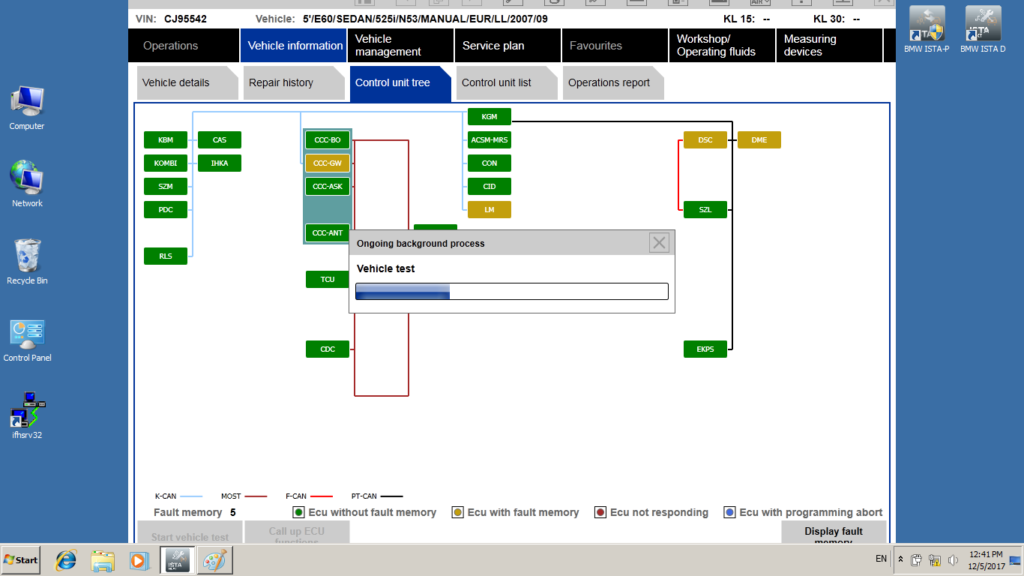
1.  Start new session in ISTA D/ ISTA+, perform the identification of vehicle and a test:

How-to-do-BMW-engine-re-adaptation-using-ISTA-D-or-ISTA+-1
How-to-do-BMW-engine-re-adaptation-using-ISTA-D-or-ISTA+-2

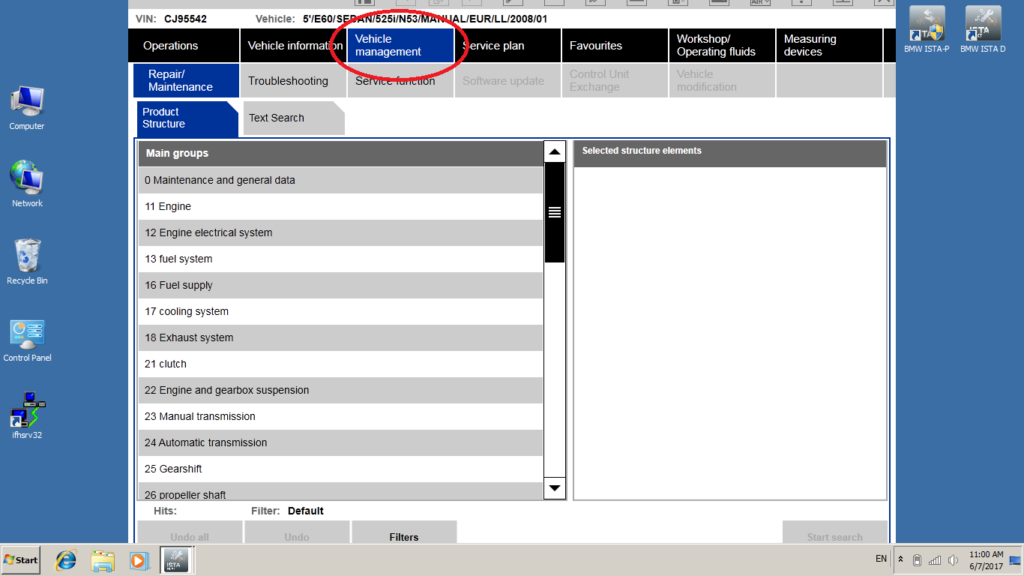
2.  open menu Vehicle management:

How-to-do-BMW-engine-re-adaptation-using-ISTA-D-or-ISTA+-3

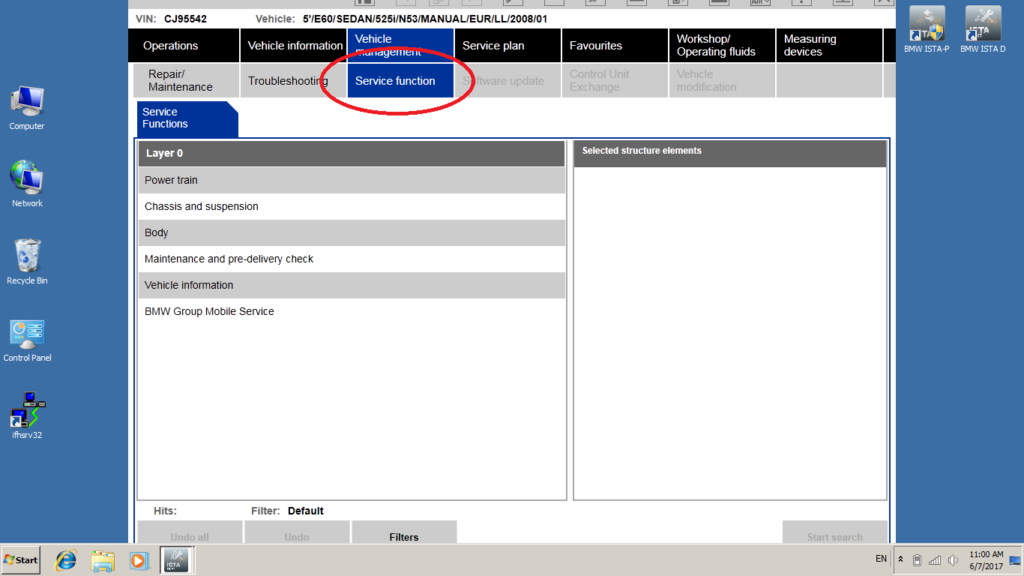
3.  open menu Service function:

How-to-do-BMW-engine-re-adaptation-using-ISTA-D-or-ISTA+-4

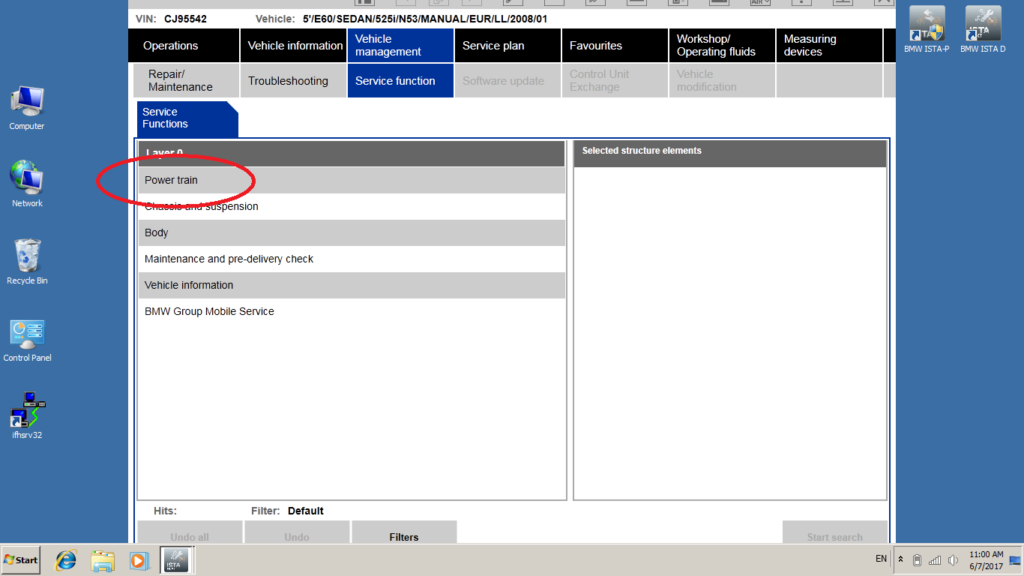
4.  open sub-menu Power train, press Start search:

How-to-do-BMW-engine-re-adaptation-using-ISTA-D-or-ISTA+-5

5.  open sub-menu Engine Electronics:

How-to-do-BMW-engine-re-adaptation-using-ISTA-D-or-ISTA+-6

6.  open sub-menu Adjustment functions:

How-to-do-BMW-engine-re-adaptation-using-ISTA-D-or-ISTA+-7

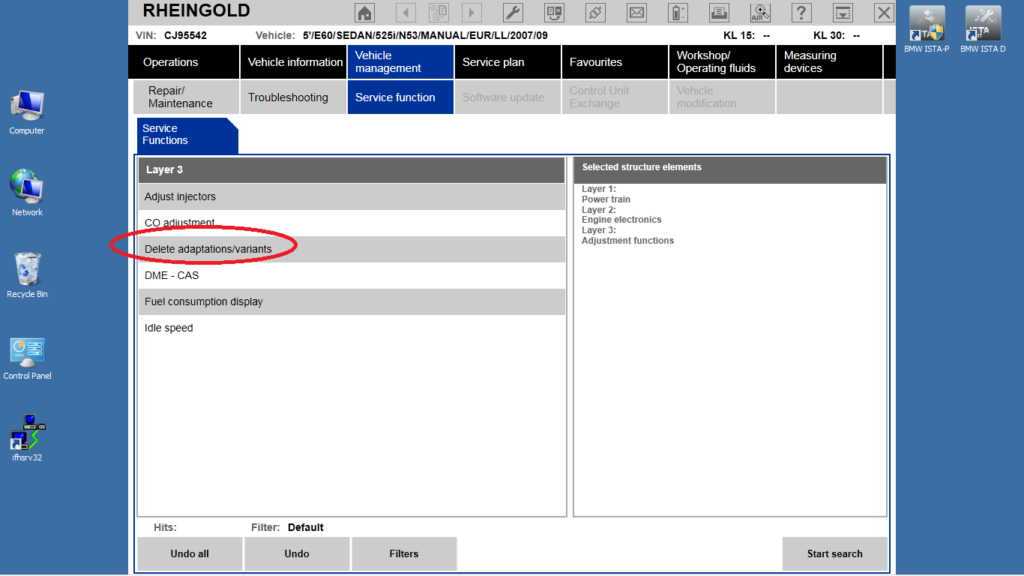
7.  Select Delete adaptations/variants

How-to-do-BMW-engine-re-adaptation-using-ISTA-D-or-ISTA+-8

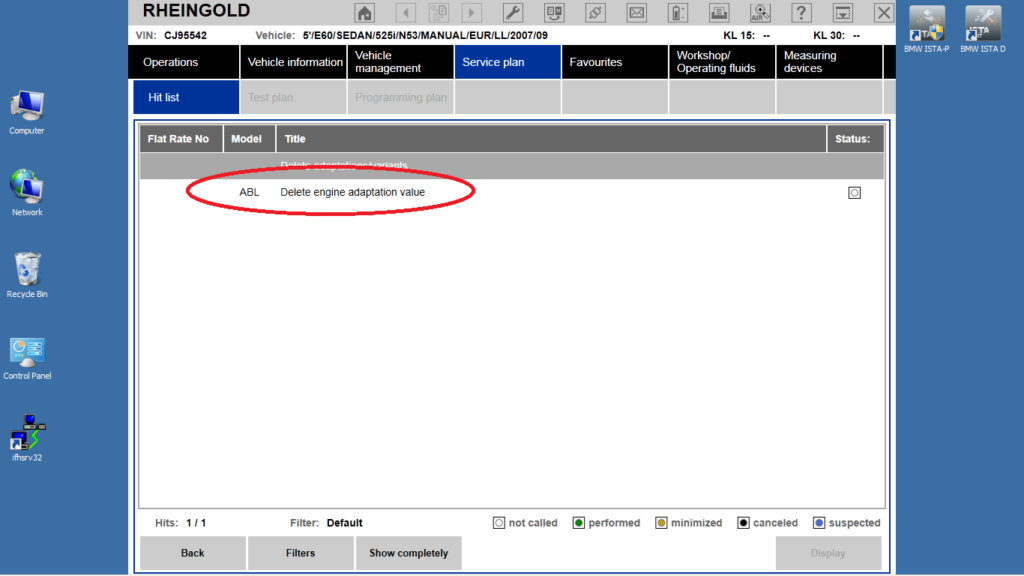
8.  Select Delete engine adaptation value, press Display

How-to-do-BMW-engine-re-adaptation-using-ISTA-D-or-ISTA+-9

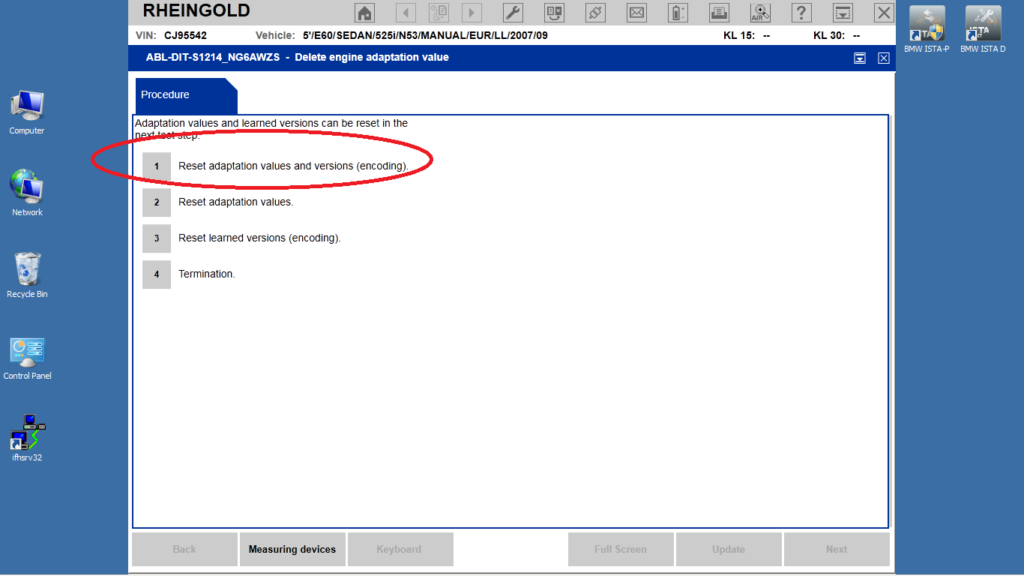
9.  Select Reset adaptation values and versions (encoding)
How-to-do-BMW-engine-re-adaptation-using-ISTA-D-or-ISTA+-10

Follow instructions on the screen.

Important!
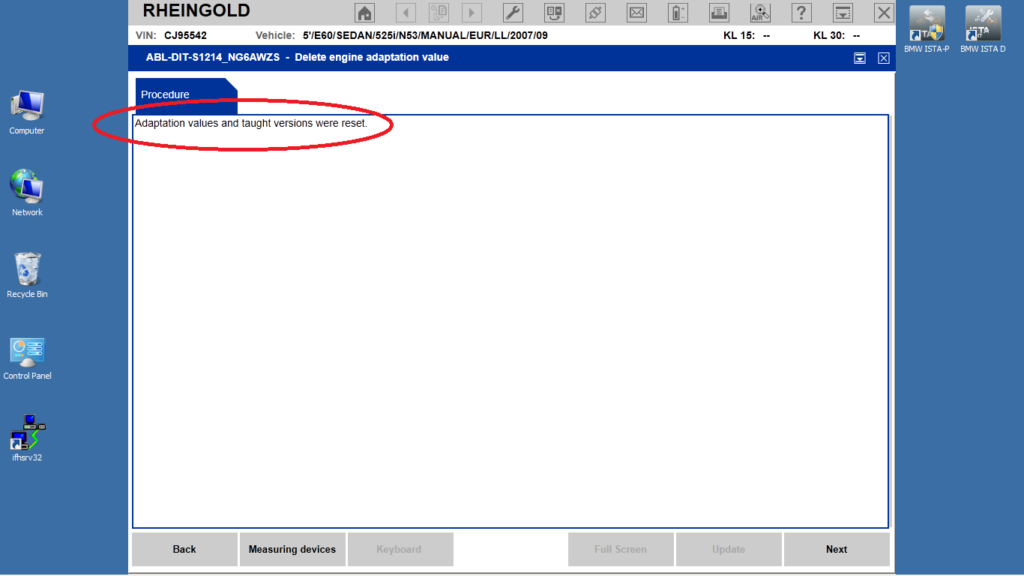
Follow the instructions very carefully! If deleting of adaptations was successful, you will see notice “Adaptation values and taught versions were reset”. If ISTA D/ ISTA+ does not displays notice “Adaptation values and taught versions were reset” after the attempt to delete the adaptations, repeat the procedure once again.

How-to-do-BMW-engine-re-adaptation-using-ISTA-D-or-ISTA+-11

10.  Adaptation of the flywheel
11.  a) turn on the engine;
Attention: the car may run unevenly! If EML (check engine) symbol appears on KOMBI and increased/incorrect idle is observed:
*   turn off the engine; turn on the ignition;
*   slowly press and release accelerator pedal for three times;
*   start the engine;
b) accelerate till 100 .. 110km/h on even road;
c) switch the 4th gear (for automatic transmission – in manual mode);
d) release the accelerator pedal, brake with the engine (don’t press brake pedal) for 7 .. 10 seconds;
Repeat points b .. d three times;
e) stop the car, switch off the ignition, takeoff the key, disconnect the diagnostics cable;
f) wait, till the lighting of start/stop button turns off.

11. Re-adaptation of the fuel mixture
12.  a) turn on the engine;
Attention: the car may run unevenly! If EML (check engine) symbol appears on KOMBI and increased/incorrect idle is observed:
*   turn off the engine; turn on the ignition;
*   slowly press and release accelerator pedal for three times;
*   start the engine;
b) allow the engine to run idle for 5 minutes;
c) perform the driving session with even speed 60 .. 90km/h; 5 .. 10min;
d) repeat points b .. c for several times;
e) stop the car, switch off the ignition, takeoff the key, disconnect the diagnostics cable;
f) wait, till the lighting of start/stop button turns off.
Recheck error message memory, clear if necessary.

12.  Next few times, when starting the cold engine:
13.  a) allow the engine to run idle at least for 5 minutes;
14.  b) drive with longer driving sessions with even RPM and torque when possible.
With this, the creating of initial adaptations can be considered as complete.

Note: when adaptations are cleared, following error messages* can appear immediately:
*   error messages relating DSC. Solution: drive 10 .. 15 min, switch off/on ignition;
*   error messages relating throttle. Solution: turn on ignition, press and release accelerator pedal for 3 times, then start engine.

During adaptation process (after old adaptations have been cleared) some error messages* can appear:
*   error messages relating fuel trim (bank and/or cylinders individually);
*   insufficient performance of CO catalytic converters;
*   Lambda probes (trim and/or signal);
*   uneven run (Stratified charge and/or Homogeneous injection).

These error messages in the exact situation do not indicate any problems with the engine performance.

After new adaptations are completed (after 5 .. 8 driving sessions for cold/warm engine, at least 200 .. 300 km), check the new adaptations and clear error message memory using INPA or ISTA D/ ISTA+, if necessary.

Troubleshooting
1.  When starting a session with ISTA D/ ISTA+, basic data of car does not appear on the computer screen, they must be entered manually. Menus relating NOx sensor and NOx converter are not accessible.
The reason: communication problems between ISTA D/ ISTA+ and the car. Typical problems with OBD / USB host or ICOM IP address and port settings. Contact interface vendors to resolve the issue. If communication between the car and ISTA D/ ISTA+ is established, the car’s basic data will be read from the car.
2.  After confirmation of deleting the adaptations (by pressing ‘Continue’ after the warning ‘Adaptation values will now be reset’), the message ‘Could NOT reset adaptation values’appears.
The reason: the condition ‘Ignition ON’ is not met, see p.3
3.  How to comply with ‘Ignition ON’? – my car does not have an ignition key, it is equipped with the Start / Stop button.
To activate ‘Ignition ON’ mode:
*   insert the key into the slot;
*   do not press any pedal (no clutch, no brake pedal);
*   press the ‘Start / Stop’ button several times while all the indicators (ABS/DTC, SRS, etc.) light up in the KOMBI.
*   After confirmation of deleting the adaptations (by pressing ‘Continue’ after the warning ‘Adaptation values will now be reset’), the message ‘Switch off Terminal 15 and terminal R’appears.

Action required:
*   switch off the ignition;
*   remove the key from the slot;
*   wait for further instructions.

Wednesday, November 24, 2021

Tactrix OpenPort Passthru for OEM Softwares

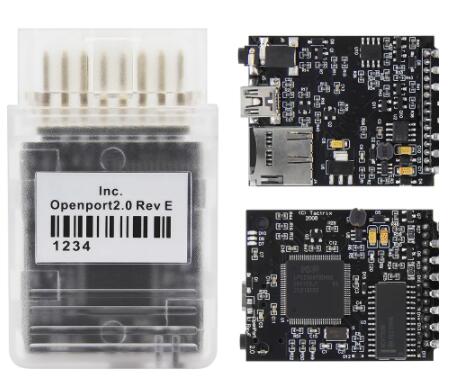
As we know Tactrix OpenPort 2.0 is one powerfully J2534 interface that compatible with many OEM Softwares as below. We advise you use the Original ones or High Quality Clone Openport adapter .

Tactrix-OpenPort-Passthru-for-OEM-Softwares-1

Audi/VW (VAG ) ODIS   K-Line not working ,CAN Line prefect
BMW  ISTA-D ISTA-P Tested
Chrysler  Not Tested
Ford/Mazda FJDS  Not Tested
GM Tis2Web (CAN vehicles only) Tested
Saturn Tis2Web Not Tested
Saab Tis2Web Not Tested
Honda HDS Tested
Jaguar/Landrover JLR SDD Tested
Mercedes Benz XENTRY/DAS Pass Thru SoftwareTested
Mitsubishi MMC Update Manager Works
Toyota TIS Techstream Works
Subaru STIS Pass Thru Programming Too Works
Nissan Nissan J2534 Tested
Porsche Pass Thru DME

1.How to setup BMW ISTA-D working with Openport 2.0 ?

1).Firstly you should have ISTA-D Programmer installed ,then run BMW Passthru drivers under Administrator
2).Choose Openport 2.0 as J2534 Device
3).Copy all fies EXCEPT EDIABAS.INI from C:\Program files(X86)\BMW AG|PassThruD to C:EDIABAS\BIN ,!!! DO NOT OVERWRITE EXISTING FILES !!!
4).Open the C:\EDIABAS\BIN\EDIABAS.INI file in notepad ,Edit configuration interface = STD:passthrud and Save it.
5).Run the BMW ISTA-D again and select menu Configuration—Interface,Select the EDIABAS.INI(You edited ones) and Apply it

Finished !Now you can test BMW Vehicles with Tactrix OPENPORT Interface through ISTA Programmer .it will not work on all models but newer models should work okay
You can download BMW ISTA-D Programmer Free from some garage forum or buy Hard disk from our store .
And here the link for download BMW Passthru Drivers

2.Xentry Passthru working with Openport 2.0 reviews:

Installed Xentry Passthru 12.2020 and Tactrix Openport 2.0 CLONE.Xentry Passthru work on new cars who are CAN line newer 2006 Year ,for older Merceds you will need C3 or SD C4 Diagnostic Kit
Succesfully diagnosed W211. All modules are available including data and DTC reset functions.SBC and old ECU ME2.8 will not read. Other modules without a problem. The newer 211 (facelift) is also no problem

Sunday, November 21, 2021

BMW ISTA+ Display Function isn’t working,How to Solve

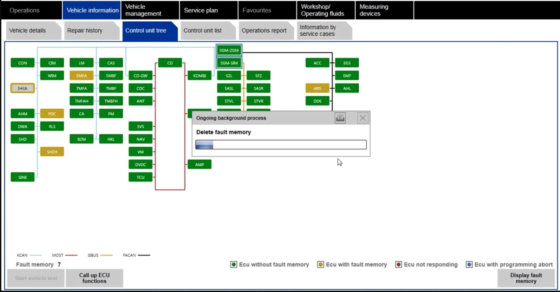
Problem: BMW ISTA + display function does not work, files were downloaded from the forum, all files were extracted and unlocked. Car can be identified and fault tree is displayed. Everything works fine, but when I create a bug test plan and hit display, the next page is blank and the program half freezes.

BMW-ISTA+-Display-Function-isn’t-working-How-to-Solve

How to fix BMW ISTA+ “Display” Function is blank?

To do a fresh installation again,

Disconnect from internet,

Stop antivirus programs, windows defender or any software that may block files,

Use 7zip to extract all files then try again.

Follow the installation guide, pay attention to windows software like .net framework 3.0,3.5,4.0,4.5, VC++ all versions starting from 2003 up to at least 2015 x86 and 64 bit, and java.

You asked for the sitting for the Ediabas folder in Rheingold folder ediabas.ini , interface, it should be set to “REMOTE” not “STD:OBD”, as I am also using a INPA K+DCAN not an ICOM. Interface = STD:OBD must be set in the C: Ediabas folder only.

I am not sure if this has something to do with the screen freezing problem but I think it is worth to say.

For flashing: INPA should work and connection to the car verified that also will start the server, close INPA and start winkfp providing you installed spdaten properly.

PS: It is always recommended to install BMW software on a fresh copy of windows.

Alright, if you bought any of INPA K+DCAN or BMW ICOM from obd2tool.com, remote assistance is available if any problem.